
Logo shown is the property of Vagaro, used for identification purposes only.
Get Vagaro Pricing & Demo
Compare plan details and see how Vagaro fits your practice.
Vagaro is a cloud-based practice management platform for clinics and practices that provide skin, injectable, and laser services. It brings scheduling, patient records, intake forms, charting tools, payments, and reporting into one system, so front-desk and clinical teams work from the same record. Share your needs and we'll help you review current plan details.
Key takeaways
Vagaro combines appointment scheduling, patient records, intake forms, charting tools, marketing, payments, and reporting in a single cloud-based platform. Its connected workflow may appeal to dermatology practices and skin-treatment clinics that want front-desk and provider tasks in one system. Buyers should confirm the charting templates, integrations, and payment options available for their location and services.
See the plan that fits your practice
Share a few details and we'll send Vagaro pricing matched to your practice needs.
Independent guidance
Software Finder is an independent software marketplace, not Vagaro, and not affiliated with or endorsed by them.
By submitting, you agree to Software Finder's Terms of Service and Privacy Policy and consent to be contacted by Software Finder and one or more matchedsoftware vendors (which may include Vagaro) about your request. You can opt out at any time.
Overview
What is Vagaro?
Vagaro is business management software for practices and clinics that provide dermatologic and skin-treatment services. It connects the patient journey from online booking and intake through scheduling, charting, reminders, marketing, and payment. Teams manage calendars, patient records, products, and invoices from the same platform, and owners can track performance across one or multiple locations.
Best for
Vagaro is best suited to dermatology practices, cosmetic dermatology clinics, and multi-specialty practices with a dermatology service line that want scheduling, patient records, intake forms, and payments in one cloud-based system. Its strength is the connection between booking, documentation, and day-to-day practice operations.
Scheduling
Book consultations, injectables, and laser sessions across providers
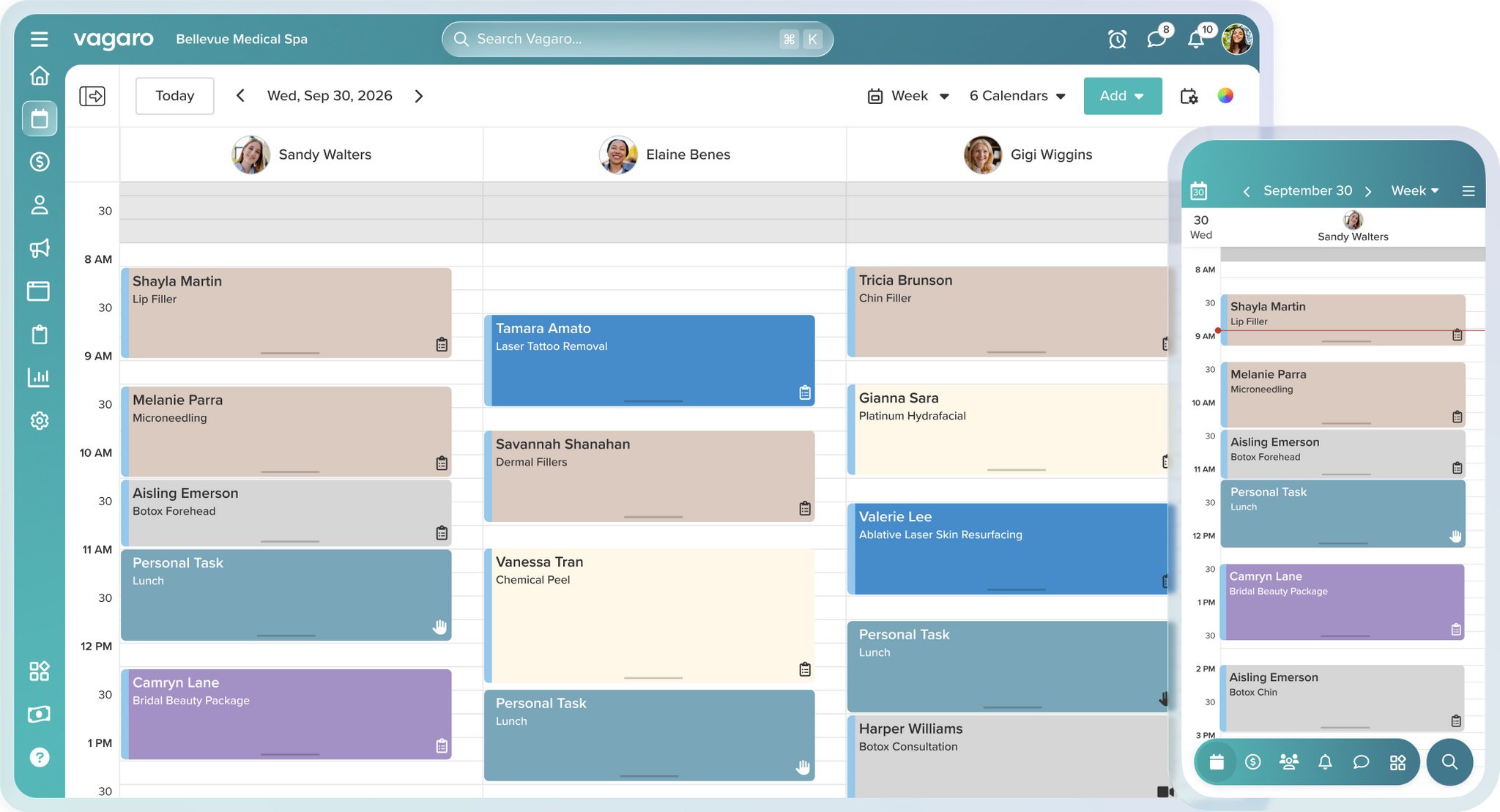
Vagaro gives dermatology practices a color-coded calendar that supports multiple providers, rooms, and locations. Front-desk teams can drag and drop appointments, hold follow-up and touch-up slots, manage waitlists, and fill last-minute cancellations from one schedule.
- Color-coded calendar with drag-and-drop editing
- Provider and room assignments across locations
- Waitlists and automated appointment reminders
Screenshots sourced from Vagaro's publicly available materials and shown for identification and review purposes. Interface shown may differ from the current release.
Intake and charting
Collect medical history before the first visit
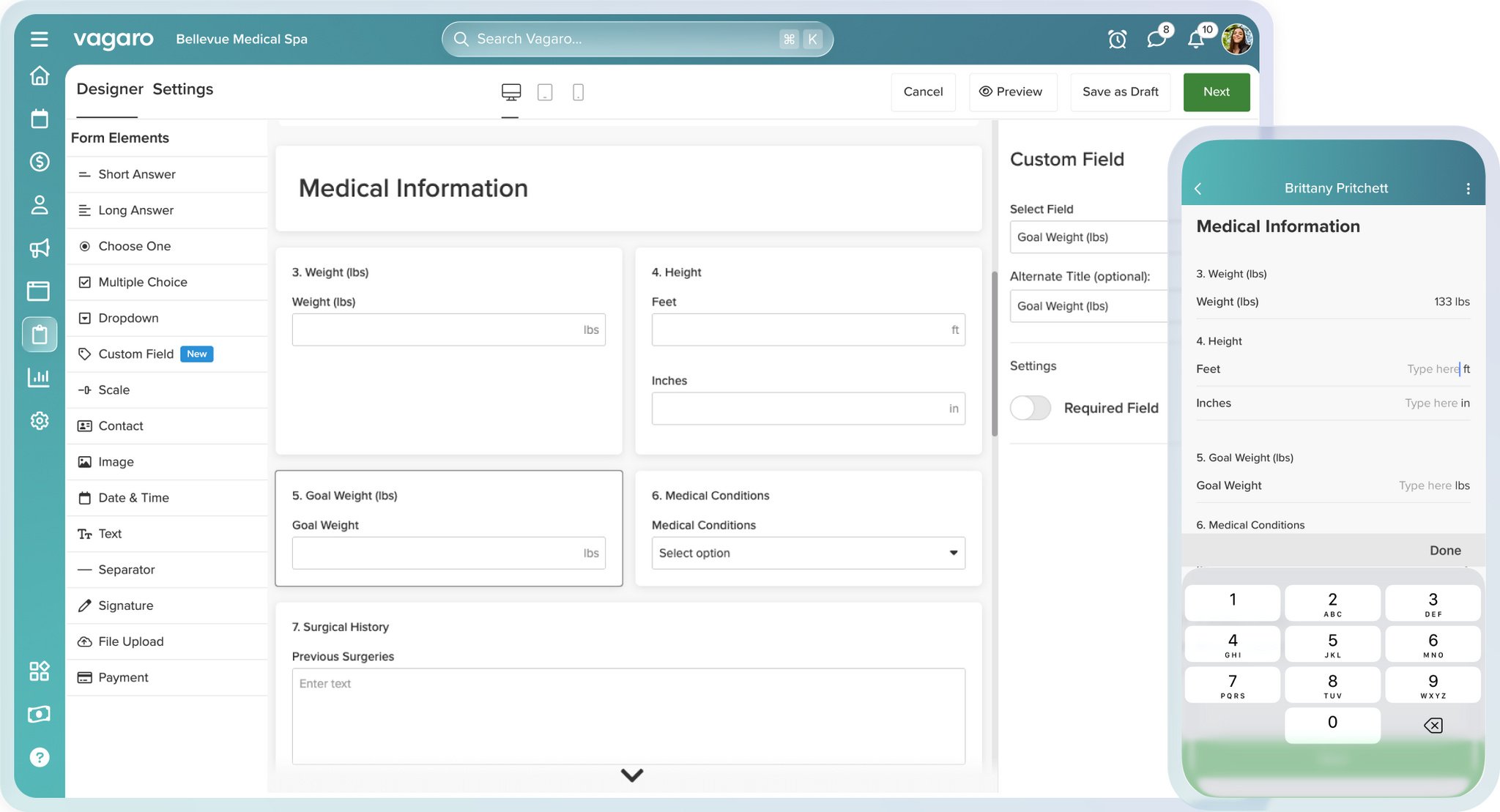
Vagaro's form builder lets a practice assemble its own intake questionnaire, with fields for medical conditions, surgical history, weight, and height, and a required-field setting on any question. Answers attach to the patient record, and SOAP-style notes with photo annotation support treatment documentation.
- Custom intake forms covering medical conditions and surgical history
- Required fields, dropdowns, signatures, and file uploads
- SOAP-style notes with photo annotation
Screenshots sourced from Vagaro's publicly available materials and shown for identification and review purposes. Interface shown may differ from the current release.
Patient records
Track treatment progress visit by visit
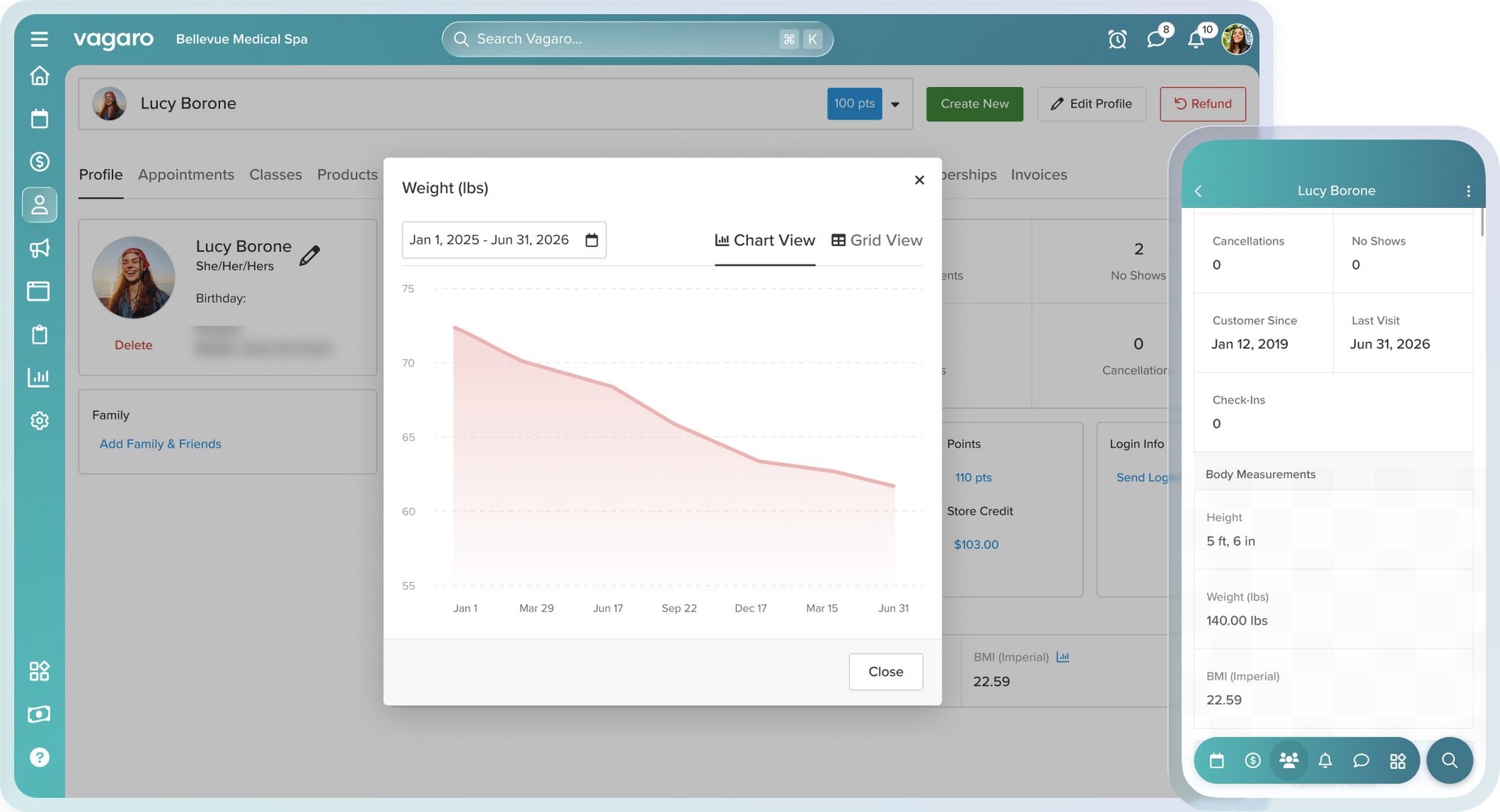
Vagaro keeps each patient record with appointment history, no-shows and cancellations, body measurements, BMI, and a charted view of tracked values over time. Products, invoices, and payments sit on the same profile, so follow-up recommendations and billing questions draw from one record.
- Patient profiles with visit history and no-show tracking
- Body measurements, BMI, and progress charts over time
- Products, invoices, and payments on the same record
Screenshots sourced from Vagaro's publicly available materials and shown for identification and review purposes. Interface shown may differ from the current release.
Pricing
How much does Vagaro cost?
Vagaro offers subscription plans, with plan details varying by selected features, number of providers, locations, and available add-ons. Current plan details should be confirmed for your specific practice.
Get PricingCore practice tools
Scheduling, patient records, intake forms, reminders, and payment workflows.
Marketing and retention
Email and text campaigns, automated reminders, and review requests.
Multi-location setup
A configuration for larger teams, several providers, or multiple locations.
Public feedback often highlights Vagaro's scheduling tools and the convenience of keeping bookings, records, and payments together. Dermatology buyers should confirm whether its charting templates and integrations fit the exact needs of their services.
Plan details are based on publicly available information and may change. Actual costs vary by agreement.
Who it's for
Who is Vagaro for?
Who it's not for
Use cases
Common ways teams use Vagaro
Managing appointments
Schedule providers and rooms, fill cancellations from waitlists, and send automated reminders.
Collecting intake details
Send a custom intake form covering medical conditions and surgical history before the visit.
Documenting treatments
Use SOAP notes and photo annotations to record treatment areas and results.
Tracking treatment progress
Review visit history, body measurements, and BMI trends from a single patient record.
Managing follow-up
Run email and text campaigns, request reviews, and promote treatment packages.
What users say
Public reviews commonly describe Vagaro as reliable for scheduling and everyday practice operations, particularly bookings and payments. Dermatology buyers with complex clinical documentation needs may need to assess whether its charting depth and integrations are sufficient.
Features
Vagaro features
Capabilities listed on the official site, summarised in our own words. Exact availability varies by plan.
Appointment scheduling
Color-coded calendars, provider and room assignments, waitlists, and recurring bookings.
Patient records
Profiles with visit history, body measurements, BMI, products, and invoices.
Intake and consent forms
Customizable forms with medical conditions, surgical history, signatures, and file uploads.
Charting tools
SOAP-style notes with photo annotation for treatment documentation.
Marketing tools
Email and text campaigns, review requests, and automated follow-ups.
Payments and reporting
Payment processing, invoices, and practice performance reporting.
Pros & cons
Vagaro pros and cons
Pros
- Connected scheduling and patient records
- Customizable intake forms with medical history fields
- Marketing and review tools included
- Mobile apps for providers and patients
- Cloud-based access across locations
Cons
- Advanced clinical needs may require add-ons or integrations
- Plan details vary by practice configuration
- Specialty-specific template fit should be confirmed
- Complex organizations may need deeper reporting options
FAQ
Common questions about Vagaro
Request a demo
Share a few details and we'll help arrange a Vagaro walkthrough for your workflow.
Software Finder is an independent software marketplace, not Vagaro, and not affiliated with or endorsed by them.
By submitting, you agree to Software Finder's Terms of Service and Privacy Policy and consent to be contacted by Software Finder and one or more matchedsoftware vendors (which may include Vagaro) about your request. You can opt out at any time.
Next step
See how Vagaro fits your dermatology workflow.
Request a guided walkthrough to review scheduling, patient records, intake forms, charting, and practice operations with the right team.
- Review appointment workflows
- See intake and charting tools
- Explore the patient booking experience
- Get independent guidance