

Logo shown is the property of TouchWorks EHR, used for identification purposes only.
Get TouchWorks EHR Pricing & Demo
Compare plans, book a live demo, and see how TouchWorks EHR fits your practice.
TouchWorks EHR from Altera Digital Health is an ambulatory electronic health record used by multi-specialty groups and larger practices, covering documentation, scheduling and reporting. Tell us about your practice and we'll return current pricing.
Key takeaways
TouchWorks EHR is Altera Digital Health's ambulatory electronic health record, used mainly by multi-specialty groups, larger practices and organisations affiliated with health systems. Public feedback commonly highlights the depth of the documentation toolset and its ability to support many specialties on one platform, while recurring criticisms mention the learning curve and the configuration effort needed to get workflows right.
See the plan that fits your practice
Share a few details and we'll send TouchWorks EHR pricing matched to your practice needs.
Independent guidance
Software Finder is an independent software marketplace, not TouchWorks EHR, and not affiliated with or endorsed by them.
By submitting, you agree to Software Finder's Terms of Service and Privacy Policy and consent to be contacted by Software Finder and one or more matchedsoftware vendors (which may include TouchWorks EHR) about your request. You can opt out at any time.
Overview
What is TouchWorks EHR?
TouchWorks EHR is an ambulatory electronic health record from Altera Digital Health, designed for medical groups that run several specialties or a higher volume of providers. It combines documentation, patient history, scheduling and reporting in one record, with specialty-specific workflows so each provider documents in a way that suits their practice. Because it is built for larger ambulatory organisations, it is often deployed alongside existing practice management and revenue systems.
Best for
TouchWorks EHR suits mid-sized to larger ambulatory groups and multi-specialty practices that need one patient record across specialties and locations, rather than a lightweight single-provider system.
Practice documentation
Documentation shaped around each provider's specialty
TouchWorks EHR gives providers documentation tools that adapt to how they work, with visit notes and history held in one longitudinal record. Providers move through the visit without leaving the record, and the next appointment opens with full context.
- Specialty-aware note templates and workflows
- Visit notes and history in one patient record
- Voice and assisted documentation options
Screenshots sourced from TouchWorks EHR's publicly available materials and shown for identification and review purposes. Interface shown may differ from the current release.
Practice workflow
Scheduling and front-office work alongside the record
Registration, scheduling and check-in run next to the patient record, so front-desk staff and providers work from the same patient information. Larger groups can coordinate provider availability across sites and specialties from one place.
- Appointment scheduling across providers and locations
- Registration, demographics and insurance capture
- Task and inbox routing between provider and admin staff
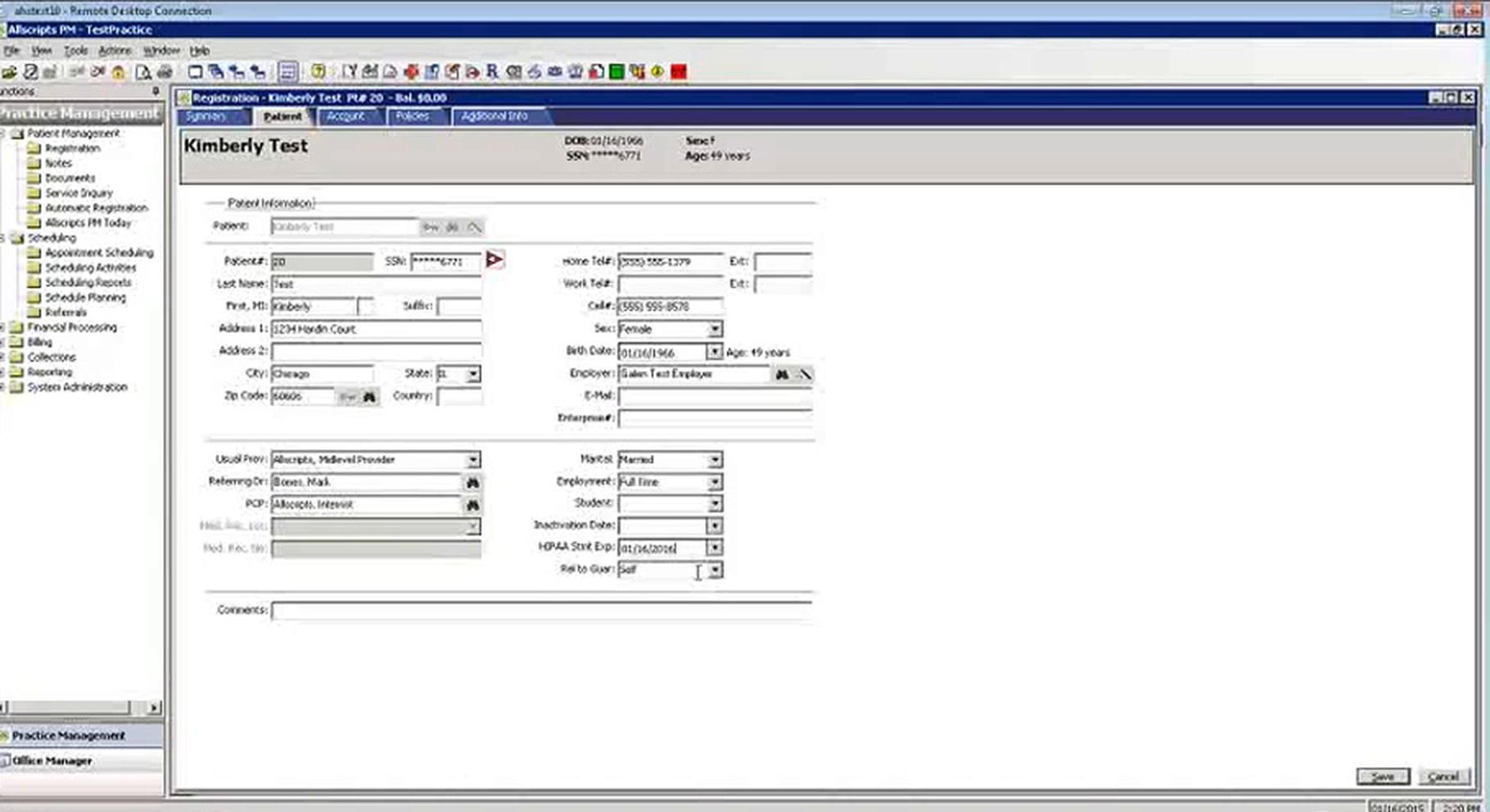
Screenshots sourced from TouchWorks EHR's publicly available materials and shown for identification and review purposes. Interface shown may differ from the current release.
Practice reporting
Keep practice reporting in the same system
Built-in reporting covers visit volume, provider productivity and quality measures for groups taking part in value-based programs.
- Visit volume and utilisation reporting
- Quality-measure tracking for value-based programs
- Provider-level and group-level reporting
Screenshots sourced from TouchWorks EHR's publicly available materials and shown for identification and review purposes. Interface shown may differ from the current release.
Pricing
How much does TouchWorks EHR cost?
TouchWorks EHR is generally quoted per provider based on the number of providers, which modules the group needs, and the scope of implementation and data migration. Training and ongoing support are typically part of the arrangement.
Get PricingCore EHR
Documentation and the longitudinal patient record.
EHR + patient engagement
The patient record with portal and patient communication.
Enterprise ambulatory
Multi-specialty deployment with reporting and population-health tooling.
Across public reviews, TouchWorks EHR is rated well for documentation depth and multi-specialty coverage. Some reviewers note the interface feels dense at first and that configuration effort is needed before workflows feel natural.
Plan details are based on publicly available third-party information and industry benchmarks. Actual costs may vary.
Who it's for
Who is TouchWorks EHR for?
Who it's not for
Use cases
Common ways teams use TouchWorks EHR
Documenting ambulatory visits
Capture the visit and its documents in one record tied to the appointment.
Running a multi-specialty group
Keep specialty-specific documentation while every provider works in one shared record.
Coordinating care across locations
Give providers at different sites the same patient history and records.
Reviewing group performance
Track visit volume, provider activity and quality measures from built-in reporting.
What users say
Aggregated from public reviews, sentiment toward TouchWorks EHR is generally positive among larger ambulatory groups. Reviewers frequently point to the depth of the documentation toolset, the ability to support many specialties on one record, and reliability at scale. Recurring criticisms include a dense interface for new users and the configuration effort required during implementation.
Features
TouchWorks EHR features
Capabilities listed on the official site, summarised in our own words. Exact availability varies by plan.
Ambulatory patient record
Documentation with visit notes and patient history in a structured longitudinal record.
Specialty workflows
Note templates and workflows that adapt to each provider's specialty.
Scheduling and front office
Registration, appointments and check-in alongside the patient record.
Assisted documentation
Voice and assisted note tooling to reduce manual entry during visits.
Patient engagement
Portal access, reminders and patient communication tied to the record.
Population health and quality measures
Track measures and patient cohorts for value-based and quality programs.
Reporting
Productivity, visit-volume and group-level reporting for leadership.
Pros & cons
TouchWorks EHR pros and cons
Pros
- Deep documentation toolset built for ambulatory groups
- Supports many specialties on one shared record
- Scales across multiple locations and providers
- Specialty-specific documentation workflows
- Population-health and quality-measure tooling
- Established vendor with enterprise experience
Cons
- Interface feels dense to new users
- Configuration effort needed before workflows feel natural
- Heavier than small single-provider practices usually need
FAQ
Common questions about TouchWorks EHR
Request a demo
Share a few details and we'll help arrange a TouchWorks EHR walkthrough for your workflow.
Software Finder is an independent software marketplace, not TouchWorks EHR, and not affiliated with or endorsed by them.
By submitting, you agree to Software Finder's Terms of Service and Privacy Policy and consent to be contacted by Software Finder and one or more matchedsoftware vendors (which may include TouchWorks EHR) about your request. You can opt out at any time.
Next step
Still comparing options? See TouchWorks EHR in action.
Software Finder helps you gather the information that actually drives a software decision, a real walkthrough of TouchWorks EHR and a clear view of how it compares to similar platforms.
- See TouchWorks EHR in a live walkthrough
- Connect with the right team
- Compare against similar platforms
- Independent guidance