

Logo shown is the property of Tebra, used for identification purposes only.
Get Tebra Pricing & Demo
Compare plans, book a live demo, and see how Tebra fits your practice.
Tebra is a cloud practice platform that brings electronic records, scheduling, intake, billing and patient engagement together for independent practices. Modules can be combined or used on their own. Tell us about your practice and we will return current plan details.
Key takeaways
Tebra is a cloud practice platform combining electronic records, scheduling, intake, billing, patient engagement and analytics for independent practices. The platform is modular, so practices can adopt the pieces they need and add others later. Across public reviews the majority of feedback is positive, with users highlighting the all-in-one nature of the suite and the patient engagement tools. Recurring criticisms centre on the learning curve during onboarding and the time needed to configure workflows for specific specialties.
See the plan that fits your practice
Share a few details and we'll send Tebra plan details matched to your practice needs.
Independent guidance
Software Finder is an independent software marketplace, not Tebra, and not affiliated with or endorsed by them.
By submitting, you agree to Software Finder's Terms of Service and Privacy Policy and consent to be contacted by Software Finder and one or more matchedsoftware vendors (which may include Tebra) about your request. You can opt out at any time.
Overview
What is Tebra?
Tebra is a cloud-based software platform for independent healthcare practices, covering electronic records, scheduling, intake, billing, reporting and patient engagement. Modules share the same data, so a practice can start with scheduling and billing and add the record system later. It is used by independent practices, multi-provider groups and billing teams that support several practices from one login. Reporting dashboards summarise appointments, collections, outstanding balances and patient engagement activity across locations.
Best for
Tebra suits independent and multi-provider outpatient practices that want records, scheduling, billing and patient engagement on one platform rather than separate tools. Its standout element, noted by reviewers, is the patient engagement layer, which combines online booking, reminders, reviews and recall campaigns in one workflow.
Practice records
Document visits with specialty-ready templates
Tebra provides a cloud practice record system with configurable templates, task lists and a shared workspace so front office and providers work from the same record. Notes, intake details and follow-up tasks stay connected to the appointment they belong to.
- Configurable templates by specialty
- Shared workspace for front office and providers
- Records connected to scheduling and billing
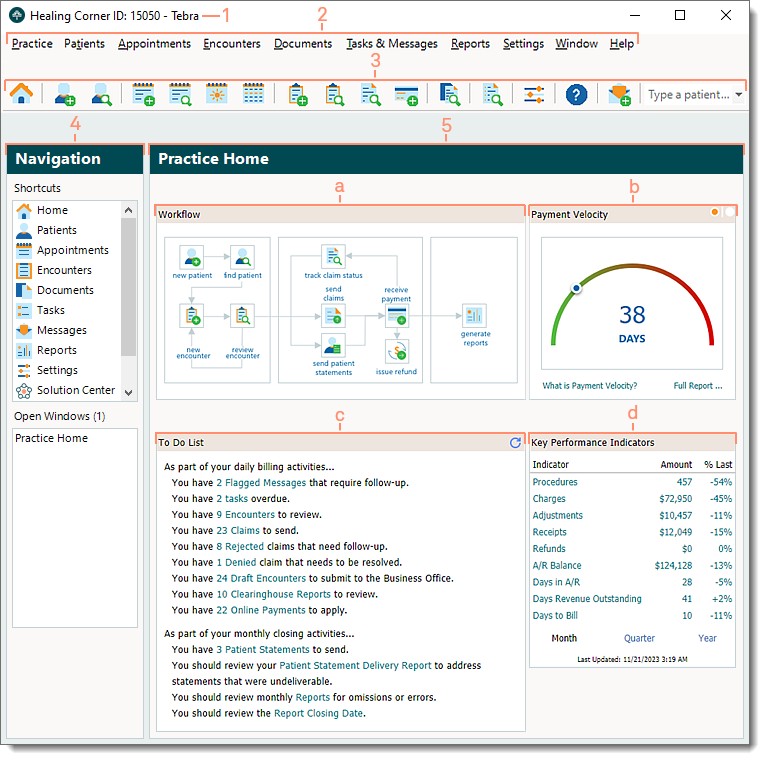
Screenshots sourced from Tebra's publicly available materials and shown for identification and review purposes. Interface shown may differ from the current release.
Scheduling
Manage appointments, resources and daily schedules
Tebra's calendar supports daily, weekly and workweek views with color-coded appointments, resource filters and status tracking. Practices can manage rooms, providers and equipment from one schedule while keeping the front desk and clinical staff aligned.
- Color-coded daily and workweek calendar views
- Resource and provider filters
- Appointment status tracking
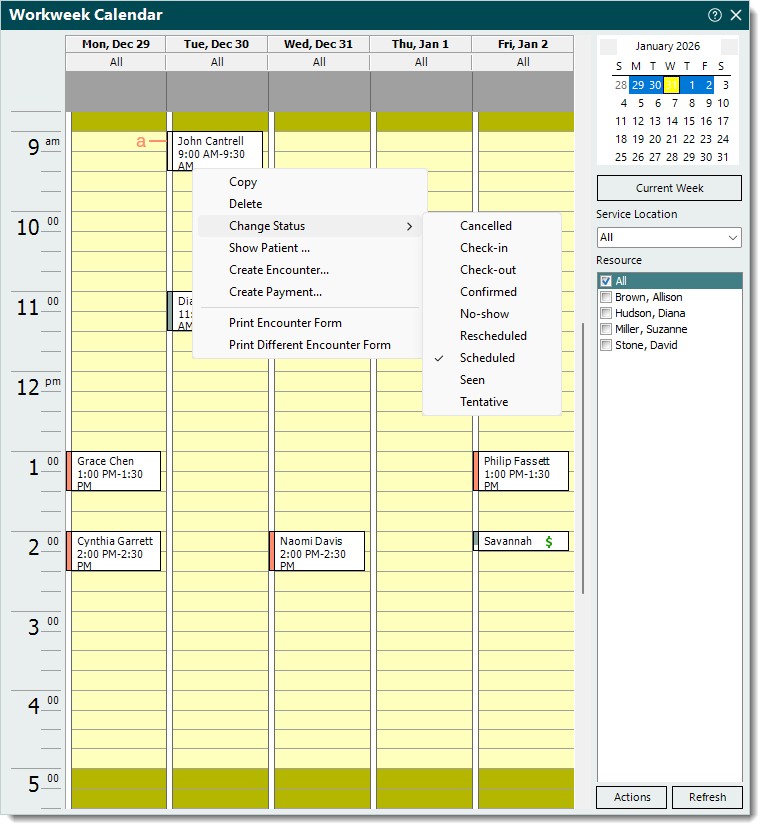
Screenshots sourced from Tebra's publicly available materials and shown for identification and review purposes. Interface shown may differ from the current release.
Billing and collections
Track claims, A/R and practice revenue
Tebra covers claim submission, denial follow-up, patient statements and financial reporting, with dashboards that summarise outstanding A/R, payer balances and collection trends. Practices can run billing in-house or work with an outsourced service on the same data.
- A/R aging and payer balance dashboards
- Claim tracking and denial follow-up
- Collections reporting by insurance and patient
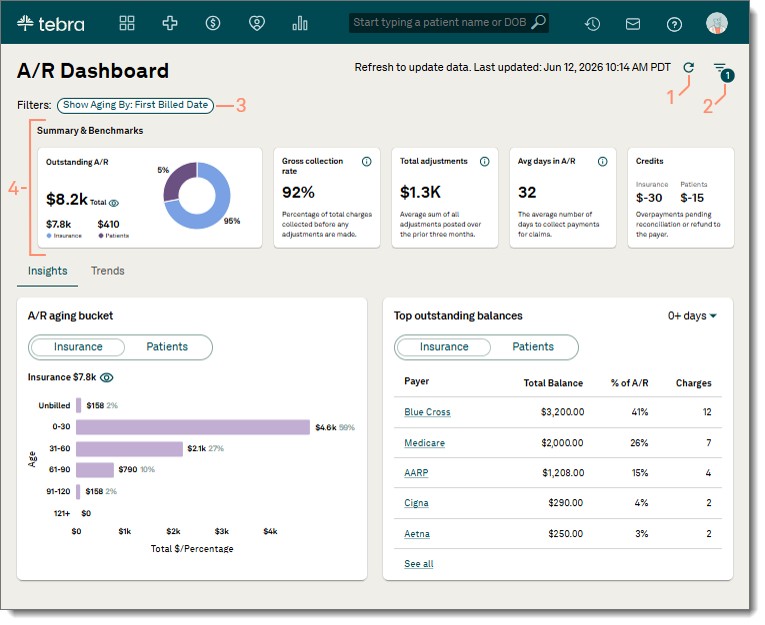
Screenshots sourced from Tebra's publicly available materials and shown for identification and review purposes. Interface shown may differ from the current release.
Pricing
How much does Tebra cost?
Tebra is offered as separate modules or as a bundled suite, and is commonly quoted per provider. Plan details vary by module mix, provider count and practice size, and are provided on request.
Get PricingPractice management only
Scheduling, eligibility verification, intake and front-office tools for practices that do not need a full record system.
Records and practice management
Documentation templates, scheduling, intake and a client portal in one connected system.
Full suite
Records, practice management, billing, patient engagement and analytics, with optional outsourced billing support.
Across public reviews, Tebra is generally described positively by office managers, billers and providers at independent practices. Users value the combined scheduling and billing workflow and the patient engagement tools. Some reviews cite a learning curve during onboarding and variable support response times.
Plan details references are based on publicly available third-party information and industry benchmarks. Actual costs may vary.
Who it's for
Who is Tebra for?
Who it's not for
Use cases
Common ways teams use Tebra
Consolidating front office and billing
Run scheduling, intake and claims from one system so the front desk and billing team share the same data.
Multi-provider and multi-location reporting
Roll up appointment volume, collections and outstanding balances across providers and locations in one view.
Reducing no-shows
Use reminders, online intake and self-service scheduling to cut down on missed appointments and paperwork at check-in.
Engaging patients between visits
Use automated recall, reviews and online booking to keep the schedule full and the patient relationship active.
What users say
Aggregated from public reviews, sentiment toward Tebra is largely positive among practice managers, billers and providers at small to mid-size outpatient practices. Users value the breadth of the suite and the patient engagement tools. Common criticisms include the time needed to learn the interface and inconsistent support response times.
Features
Tebra features
Capabilities listed on the official site, summarised in our own words. Exact availability varies by plan.
Electronic records
Configurable templates, task lists and a shared workspace connected to scheduling and billing.
Scheduling and intake
Appointment scheduling, reminders, eligibility verification and online self-service intake forms.
Billing and A/R
Electronic claim submission, denial follow-up, statements, payment tracking and A/R aging.
Patient engagement
Online booking, reminders, recalls, reviews and secure messaging for patient communication.
Reporting dashboards
Appointment, collection, balance and engagement reporting rolled up across providers and locations.
Pros & cons
Tebra pros and cons
Pros
- Records, scheduling, billing and patient engagement on one platform
- Modular, so practices can adopt in stages
- Strong patient engagement and online booking tools
- Cloud-based with online intake for clients
- Works for single and multi-location practices
Cons
- Learning curve reported during onboarding
- Support response times vary in some reviews
- Configuration takes time to match specialty workflows
- Less suited to inpatient hospital environments
FAQ
Common questions about Tebra
Request a demo
Share a few details and we'll help arrange a Tebra walkthrough for your workflow.
Software Finder is an independent software marketplace, not Tebra, and not affiliated with or endorsed by them.
By submitting, you agree to Software Finder's Terms of Service and Privacy Policy and consent to be contacted by Software Finder and one or more matchedsoftware vendors (which may include Tebra) about your request. You can opt out at any time.
Next step
Still comparing options? See Tebra in action.
Software Finder helps you gather the information that actually drives a software decision, including a real walkthrough of Tebra and a clear view of how it compares to similar platforms.
- See Tebra in a live walkthrough
- Connect with the right team
- Compare against similar platforms
- Independent guidance