

Logo shown is the property of RevolutionEHR, used for identification purposes only.
Get RevolutionEHR Pricing & Demo
Compare plans, book a live demo, and see how RevolutionEHR fits your team.
RevolutionEHR is a cloud-based EHR and practice management platform built specifically for optometry. It combines exam documentation, scheduling, patient intake, billing, payments and patient engagement in one optometry-specific system, with an AI Scribe to reduce documentation time. Tell us your needs and we'll return current pricing.
Key takeaways
RevolutionEHR is an optometry-specific EHR and practice management platform that combines exam documentation, AI Scribe, scheduling, patient intake, billing, payments and patient engagement in one cloud-based system. Across public reviews the majority of feedback is positive, with optometrists and practice managers frequently noting the optometry-specific workflows and the convenience of having all practice tools in one place. Recurring criticisms centre on the learning curve when switching from another system and the modular add-on plan details structure.
See the plan that fits your team
Share a few details and we'll send RevolutionEHR pricing matched to your clinical needs.
Independent guidance
Software Finder is an independent software marketplace, not RevolutionEHR, and not affiliated with or endorsed by them.
By submitting, you agree to Software Finder's Terms of Service and Privacy Policy and consent to be contacted by Software Finder and one or more matchedsoftware vendors (which may include RevolutionEHR) about your request. You can opt out at any time.
Overview
What is RevolutionEHR?
RevolutionEHR is a cloud-based electronic health record and practice management platform built exclusively for optometry practices. It combines optometry-specific exam documentation with AI Scribe, online scheduling and intake, billing and insurance claims, in-office and online payments, patient engagement tools and CMS quality reporting support. The aim is to give optometry practices a single platform that covers the full visit, from booking through billing, without adapting a general medical EHR.
Best for
RevolutionEHR is best for solo optometrists, multi-OD practices and optometry groups that want exam documentation, billing and front-office tools built specifically around optometry rather than general medicine. Its standout element, frequently highlighted by reviewers, is the optometry-specific clinical depth combined with a full suite of front-office and billing tools in one cloud platform.
Daily dashboard
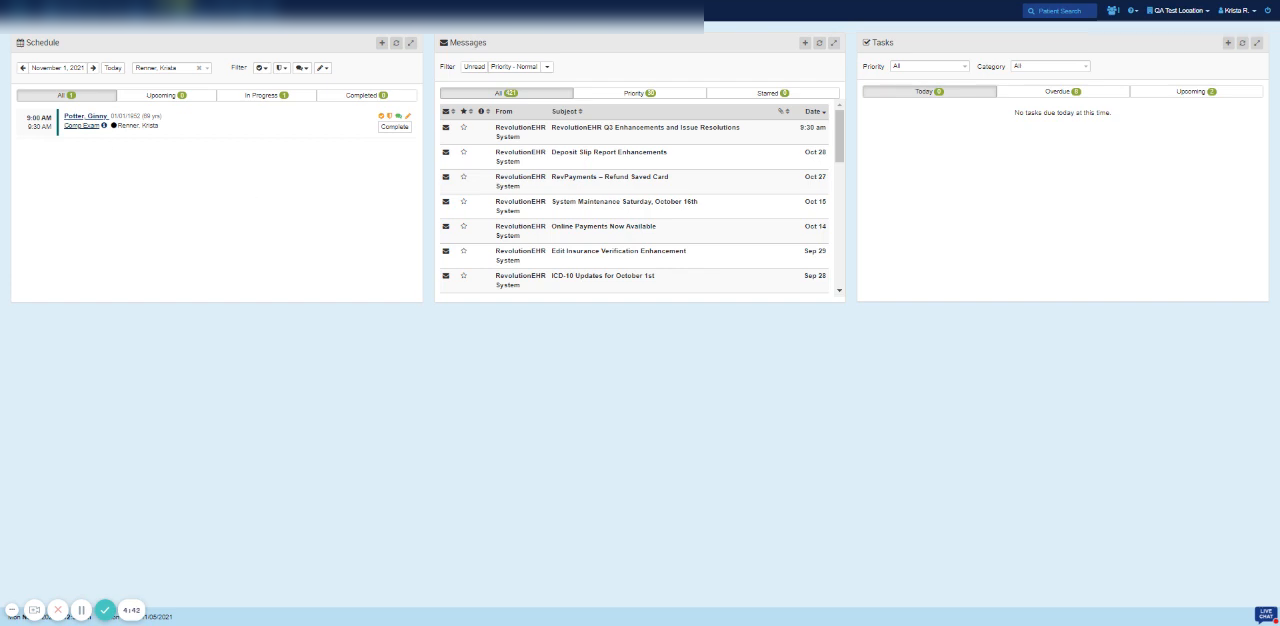
One dashboard for the schedule, messages, and tasks
RevolutionEHR opens on a configurable dashboard that puts the day's schedule, internal messages, and outstanding tasks side by side. Staff can filter by provider, priority, or status, so the whole team starts from the same view of what needs attention.
- Schedule, messages, and task panels on one screen
- Filters by provider, priority, and completion status
- Configurable layout for different roles in the practice
Screenshots sourced from RevolutionEHR's publicly available materials and shown for identification and review purposes. Interface shown may differ from the current release.
Patient intake
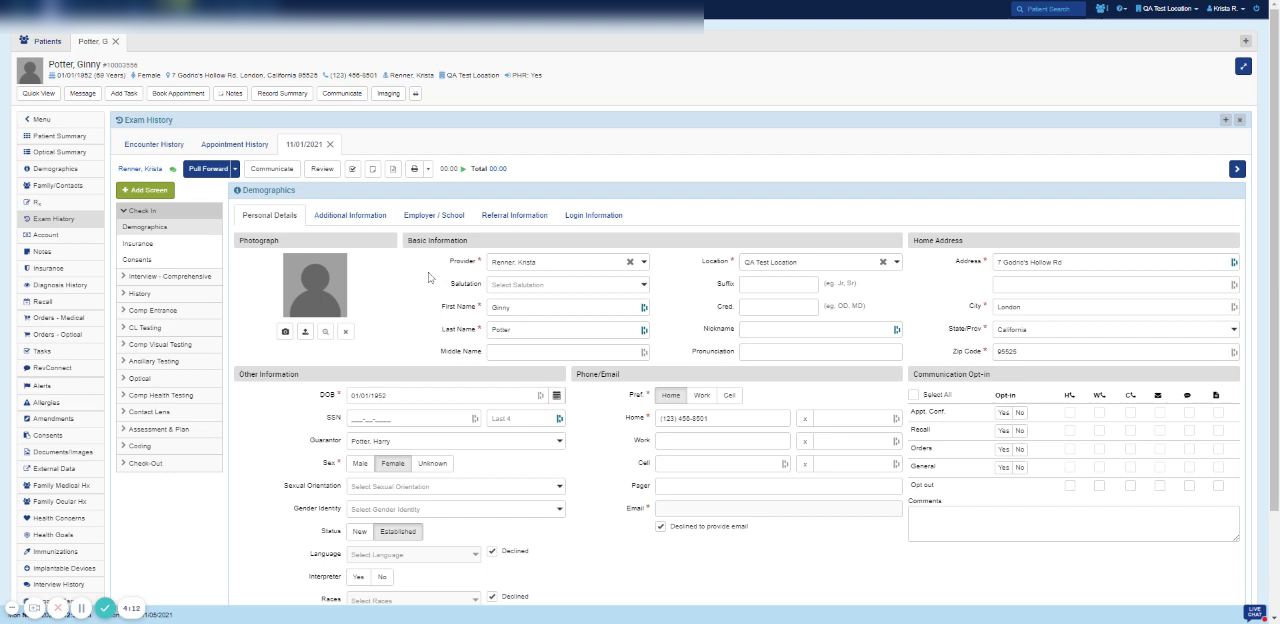
Digital intake that writes straight to the patient record
RevIntake collects demographics, contact details, insurance, and consent from the patient before the visit, and the answers post into the patient record instead of being retyped at the front desk. Staff review and approve each section from the same tabs they use every day.
- Online intake for demographics, contacts, and insurance
- Submitted answers post into the patient record
- Front desk review and approval before filing
Screenshots sourced from RevolutionEHR's publicly available materials and shown for identification and review purposes. Interface shown may differ from the current release.
Optical orders
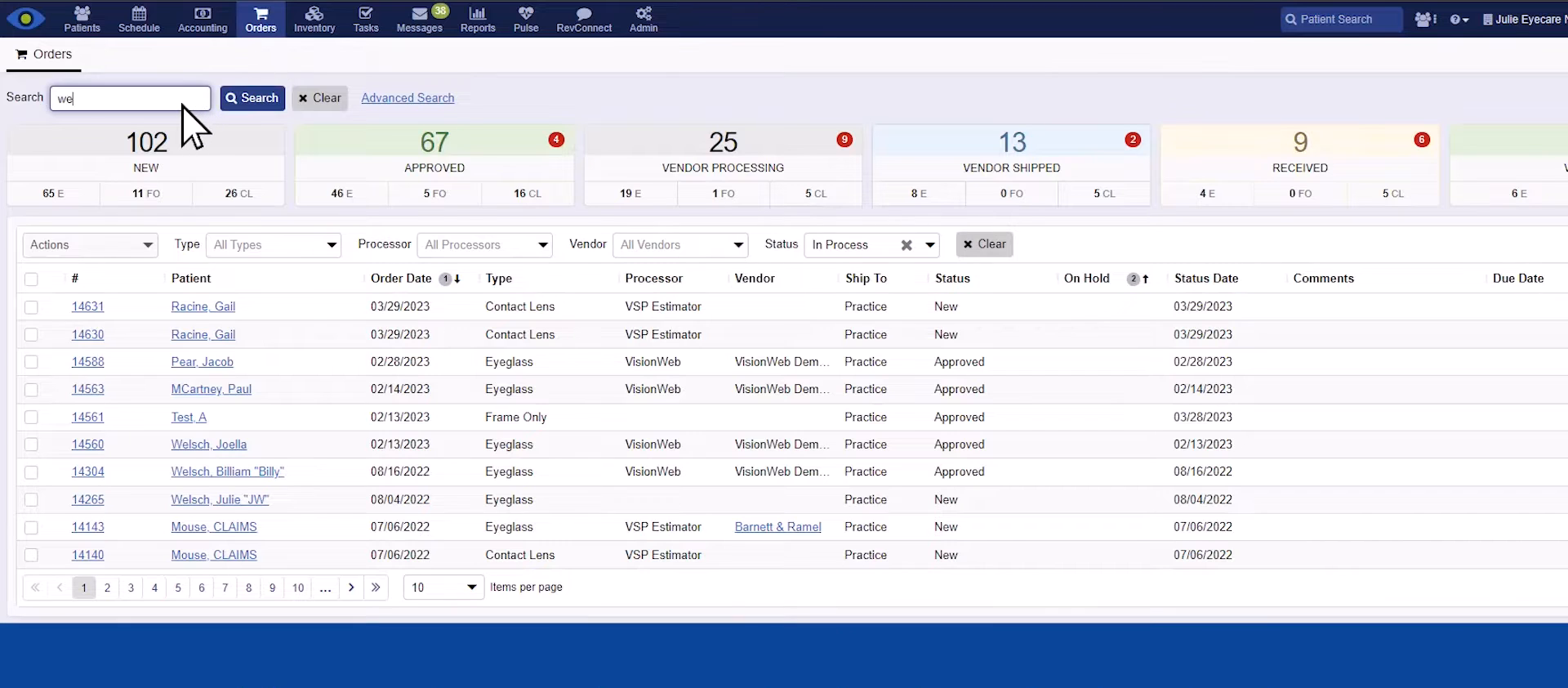
Track optical orders from new to received
The orders workspace counts every order by stage, new, approved, vendor processing, vendor shipped, and received, with a filterable list underneath showing patient, order type, processor, vendor, and status date. Staff can submit optical orders and chase late ones from the same screen.
- Order counts by stage from new to received
- Filters for type, processor, vendor, and status
- Submit optical orders and track vendor progress
Screenshots sourced from RevolutionEHR's publicly available materials and shown for identification and review purposes. Interface shown may differ from the current release.
Pricing
How much does RevolutionEHR cost?
RevolutionEHR is offered in modular plans that allow practices to start with core EHR and practice management and add modules such as AI Scribe, payment processing, patient engagement and quality reporting as needed. plan details is provided on request.
Get PricingCore EHR and practice management
Optometry exam documentation, scheduling, patient intake and basic billing workflows.
With advanced billing
Adds electronic claims via RevClear and integrated payment processing via RevPay.
Full suite
Adds AI Scribe, patient engagement tools (RevEngage), intake automation (RevIntake) and CMS quality reporting (RevAspire).
Across public reviews, RevolutionEHR is generally described positively by optometrists and practice managers, who note the optometry-specific workflows and the value of having scheduling, clinical and billing data in one system. Some reviewers mention a learning curve when transitioning and find the modular plan details adds up for practices that need the full feature set.
plan details references are based on publicly available third-party information and industry benchmarks. Actual costs may vary.
Who it's for
Who is RevolutionEHR for?
Use cases
Common ways teams use RevolutionEHR
Documenting optometry exams faster
Use optometry-specific templates and AI Scribe to complete exam documentation in the lane rather than after hours.
Running front-of-office operations
Manage online booking, patient intake, reminders and payment collection to keep the front desk efficient.
Billing and claim management
Submit electronic claims, track denials and post ERAs without leaving the same system used for scheduling and charting.
Multi-location practice oversight
View schedules, exam records and billing data across multiple locations from a single cloud-based platform.
What users say
Aggregated from public reviews, sentiment toward RevolutionEHR is largely positive among optometrists, ODs and practice managers. Users value the optometry-specific exam workflows, the ability to manage the full practice in one system and the convenience of cloud access across locations. Common criticisms include a learning curve when switching from another system and the modular add-on structure meaning some features come at additional cost.
Features
RevolutionEHR features
Capabilities listed on the official site, summarised in our own words. Exact availability varies by plan.
Optometry exam documentation
Specialty-specific templates, reporting equipment integrations and customizable exam workflows for optometry.
AI Scribe
Listens during the exam and structures visit notes for fast review, reducing documentation time.
Scheduling and patient intake
Online booking, customizable intake forms, automated reminders and patient surveys.
Billing and claims
Electronic claims via an integrated clearinghouse, ERA posting, denial management and revenue reporting.
Payment processing
Accept in-office and online payments via card, tap and digital wallet inside the same workflow.
Pros & cons
RevolutionEHR pros and cons
Pros
- Built exclusively for optometry practices
- AI Scribe included to reduce charting time
- Full-practice coverage from booking to billing
- Cloud-based with multi-location access
- Modular, add only the tools you need
Cons
- Learning curve when switching from another EHR
- Modular plan details means full feature set carries additional costs
- Not suitable for specialties outside optometry
FAQ
Common questions about RevolutionEHR
Request a demo
Share a few details and we'll help arrange a RevolutionEHR walkthrough for your workflow.
Software Finder is an independent software marketplace, not RevolutionEHR, and not affiliated with or endorsed by them.
By submitting, you agree to Software Finder's Terms of Service and Privacy Policy and consent to be contacted by Software Finder and one or more matchedsoftware vendors (which may include RevolutionEHR) about your request. You can opt out at any time.
Next step
Still comparing options? See RevolutionEHR in action.
Software Finder helps you gather the information that actually drives a software decision, a real walkthrough of RevolutionEHR and a clear view of how it compares to similar platforms.
- See RevolutionEHR in a live walkthrough
- Connect with the right team
- Compare against similar platforms
- Independent guidance