

Logo shown is the property of Practice Q, used for identification purposes only.
Get Practice Q Pricing & Demo
Compare plans, book a live demo, and see how Practice Q fits your practice.
Practice Q is a cloud based practice management and EHR platform with online booking, intake forms, notes, telehealth, and billing. Tell us about your practice and we'll return current pricing matched to your provider count.
Key takeaways
Practice Q is a cloud based practice management and EHR platform from the makers of IntakeQ, covering scheduling, intake forms, notes, telehealth, a client portal, and billing. Public feedback commonly highlights its ease of use and intake workflow, while some reviewers mention limits in advanced reporting and customization.
See the plan that fits your practice
Share a few details and we'll send Practice Q pricing matched to your practice needs.
Independent guidance
Software Finder is an independent software marketplace, not Practice Q, and not affiliated with or endorsed by them.
By submitting, you agree to Software Finder's Terms of Service and Privacy Policy and consent to be contacted by Software Finder and one or more matchedsoftware vendors (which may include Practice Q) about your request. You can opt out at any time.
Overview
What is Practice Q?
Practice Q is a cloud based practice management system with EHR features, built by the team behind IntakeQ. It brings online booking, digital intake, clinical notes, telehealth, messaging, and billing into one browser based platform. Client forms and payments connect to the same record, so front office and clinical work stay in sync. It is designed for small and mid sized practices that want a simple, all in one setup.
Best for
Practice Q suits independent and small group practices that want scheduling, intake, notes, telehealth, and billing in one easy to learn cloud system, with the digital intake workflow as its standout feature.
Payment platform
Track invoices and payments by practitioner
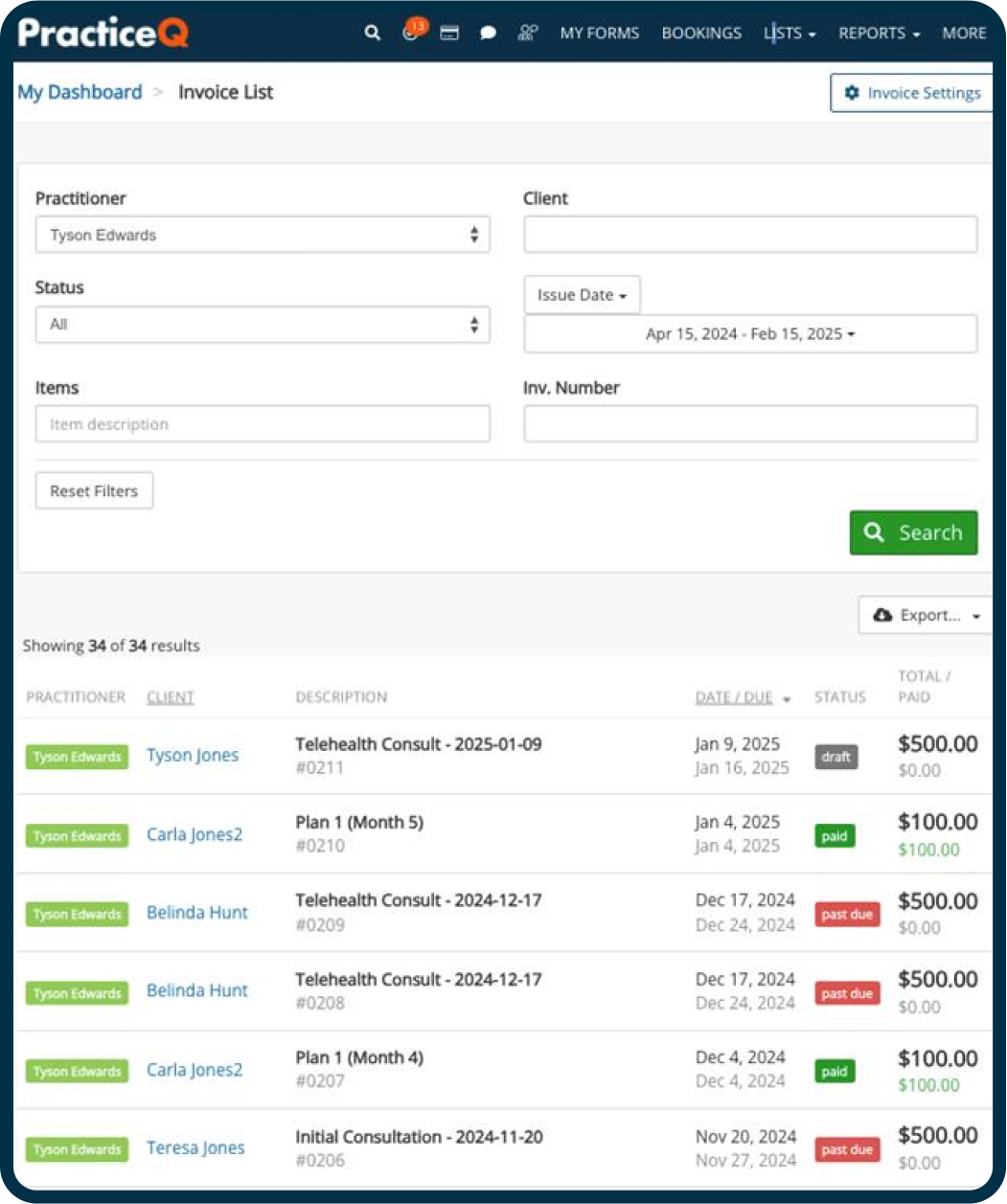
The Practice Q invoice list shows every invoice with its practitioner, client, description, due date, and status. Staff can filter by practitioner, status, date range, or invoice number and quickly spot drafts, paid items, and past due balances.
- Filters by practitioner, status, and issue date
- Draft, paid, and past due statuses at a glance
- Totals and amounts paid shown per invoice
Screenshots sourced from Practice Q's publicly available materials and shown for identification and review purposes. Interface shown may differ from the current release.
Patient portal
Secure messaging through the patient portal
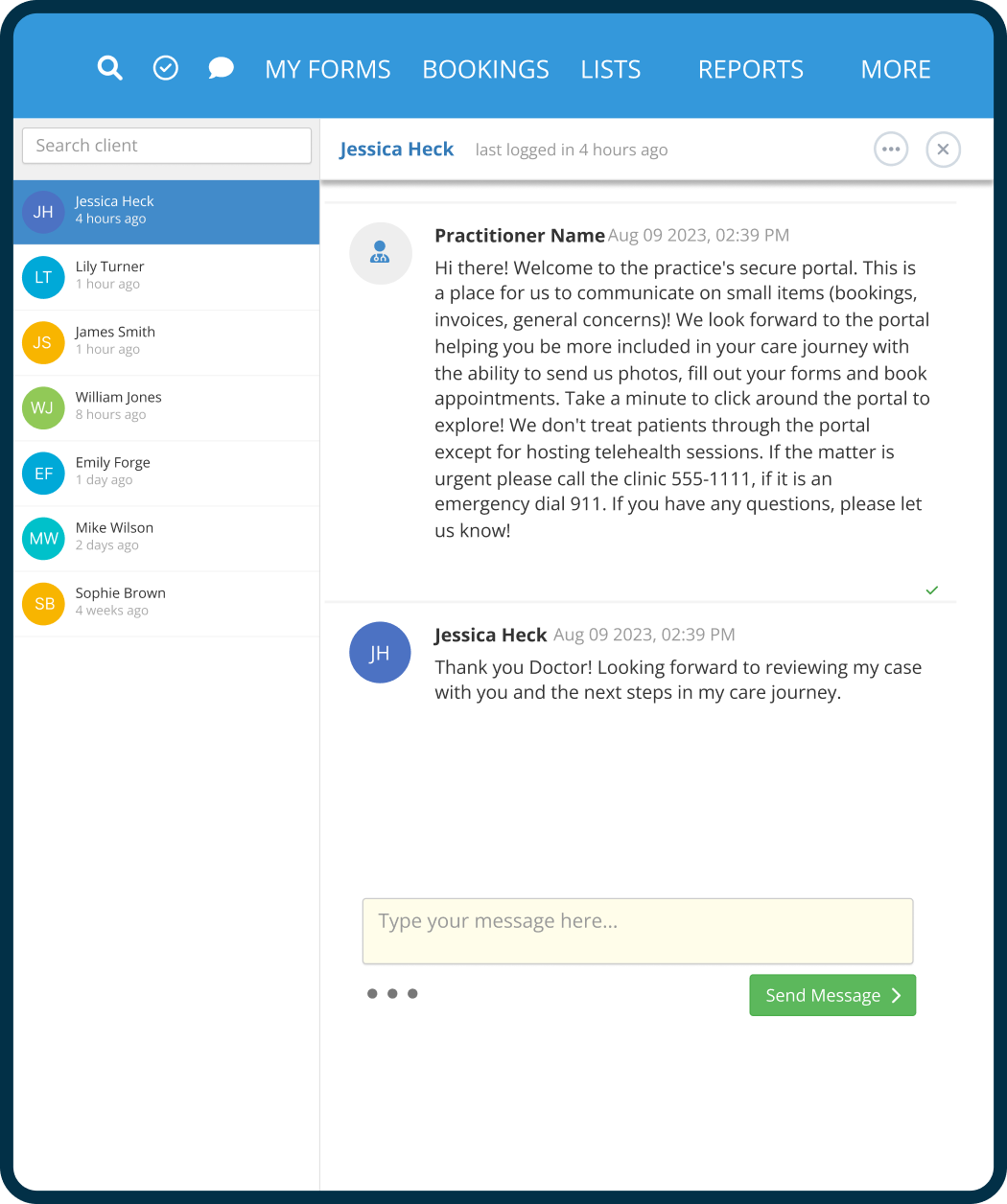
Practice Q includes a secure portal where patients and practitioners exchange messages about bookings, invoices, and general questions. Patients can also send photos, fill out forms, book appointments, and join telehealth sessions from the portal.
- Secure two way messaging with patients
- Client list with last login activity
- Forms, bookings, and telehealth in one portal
Screenshots sourced from Practice Q's publicly available materials and shown for identification and review purposes. Interface shown may differ from the current release.
Appointment booking
Let patients book appointments online
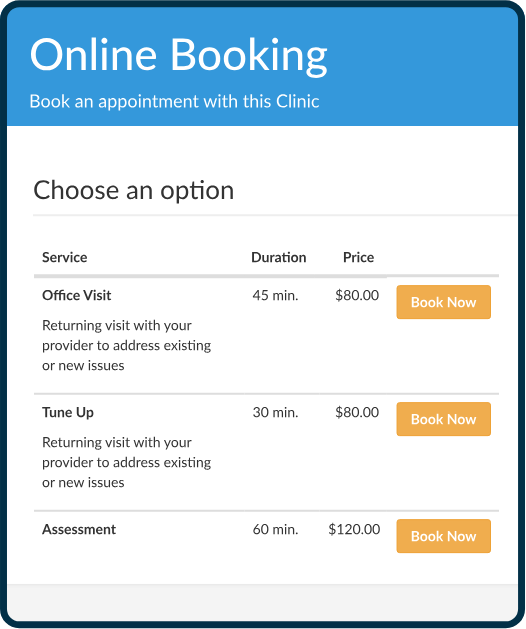
Patients choose a service from the practice's online booking page, see its duration and price, and book directly. This reduces scheduling calls and keeps the calendar up to date.
- Service list with duration and price
- One click Book Now for each service
- Fewer scheduling phone calls for staff
Screenshots sourced from Practice Q's publicly available materials and shown for identification and review purposes. Interface shown may differ from the current release.
Pricing
How much does Practice Q cost?
Practice Q is offered on a subscription basis, generally quoted per practitioner, with add ons such as telehealth and claims depending on your needs.
Get PricingCore
Scheduling, intake forms, notes, and client records.
Core + telehealth
Adds built in video sessions and client messaging.
Full suite
Adds billing, payments, and insurance claims support.
Across public reviews, Practice Q is noted for its clean interface and intake forms. Some reviewers mention that reporting and advanced customization are more limited than larger systems.
Plan details are based on publicly available third party information and industry benchmarks. Actual costs may vary.
Who it's for
Who is Practice Q for?
Who it's not for
Use cases
Common ways teams use Practice Q
Filling the calendar
Let clients book online and get automated reminders to reduce no shows.
Paperless intake
Send intake forms and consents before the visit so charts are ready on arrival.
Virtual visits
Run telehealth sessions without a separate video tool.
Getting paid
Send invoices, take card payments, and submit claims from one place.
What users say
Aggregated from public reviews, sentiment toward Practice Q centers on its ease of use, intake forms, and all in one setup. Recurring criticisms mention limited reporting depth and fewer customization options than enterprise platforms.
Features
Practice Q features
Capabilities listed on the official site, summarised in our own words. Exact availability varies by plan.
Online scheduling
Client self booking, reminders, and calendar sync.
Intake forms
Customizable forms and e-signed consents linked to the record.
Clinical notes
Template based notes stored with the client chart.
Telehealth
Built in video sessions for virtual visits.
Client portal
Secure messaging, forms, and appointment access.
Billing and claims
Invoices, card payments, and insurance claims.
Pros & cons
Practice Q pros and cons
Pros
- Easy to learn interface
- Strong digital intake forms
- Built in telehealth
- Scheduling and billing in one system
- Secure client portal
Cons
- Reporting is fairly basic
- Limited advanced customization
- Fewer enterprise features
FAQ
Common questions about Practice Q
Request a demo
Share a few details and we'll help arrange a Practice Q walkthrough for your workflow.
Software Finder is an independent software marketplace, not Practice Q, and not affiliated with or endorsed by them.
By submitting, you agree to Software Finder's Terms of Service and Privacy Policy and consent to be contacted by Software Finder and one or more matchedsoftware vendors (which may include Practice Q) about your request. You can opt out at any time.
Next step
Still comparing options? See Practice Q in action.
Software Finder helps you gather the information that actually drives a software decision, a real walkthrough of Practice Q and a clear view of how it compares to similar platforms.
- See Practice Q in a live walkthrough
- Connect with the right team
- Compare against similar platforms
- Independent guidance