

Logo is the property of Office EMR and is shown for identification only.
Get Office EMR Pricing & Demo
Compare plans, book a live demo, and see how Office EMR fits your outpatient practice.
Software Finder is an independent software marketplace, not Office EMR, and not affiliated with or endorsed by them.
Get Office EMR pricing
Share a few details and we'll send Office EMR pricing matched to your practice needs.
Independent guidance
Software Finder is an independent software marketplace, not Office EMR, and not affiliated with or endorsed by them.
By submitting, you agree to Software Finder's Terms of Service and Privacy Policy and consent to be contacted by Software Finder and one or more matchedsoftware vendors (which may include Office EMR) about your request. You can opt out at any time.
Office EMR by iSalus Healthcare is an integrated EHR, practice management, and billing system built for outpatient medical practices. It combines scheduling, charting, claims management, and revenue cycle tools in one platform. Tell us about your practice and we'll return current pricing matched to your setup. Software Finder compares Office EMR pricing for orthopedics, ENT / Otolaryngology, nephrology, urology, and pain management practices.
Key takeaways
Office EMR by iSalus Healthcare is an integrated EHR, practice management, and billing system for outpatient medical practices. It covers scheduling, charting, claims management, revenue cycle tracking, and patient engagement.Office EMR is commonly evaluated by orthopedics, ENT / Otolaryngology, nephrology, urology, and pain management practices. Practices should confirm specialty fit, implementation support, and integrations during a demo. Software Finder compares Office EMR pricing for orthopedics, ENT / Otolaryngology, nephrology, urology, and pain management practices.
Overview
What is Office EMR?
Office EMR by iSalus Healthcare is a cloud-based EHR and practice management platform designed for outpatient medical practices. It combines clinical documentation, scheduling, billing, claims management, revenue cycle tools, and patient engagement features in one system. Practices can manage appointments, document visits, submit claims, and communicate with patients through a unified workflow.
Good fit for
Office EMR is commonly evaluated by orthopedics, ENT / Otolaryngology, nephrology, urology, and pain management practices.
Scheduling
Schedule appointments across providers, locations, and exam rooms
The scheduling module displays provider columns, exam rooms, and location resources in one calendar view. Staff can book, move, and recall appointments while seeing availability and resource conflicts at a glance.
- Multi-provider, multi-location calendar
- Exam room and resource tracking
- Search recall and intake scheduling
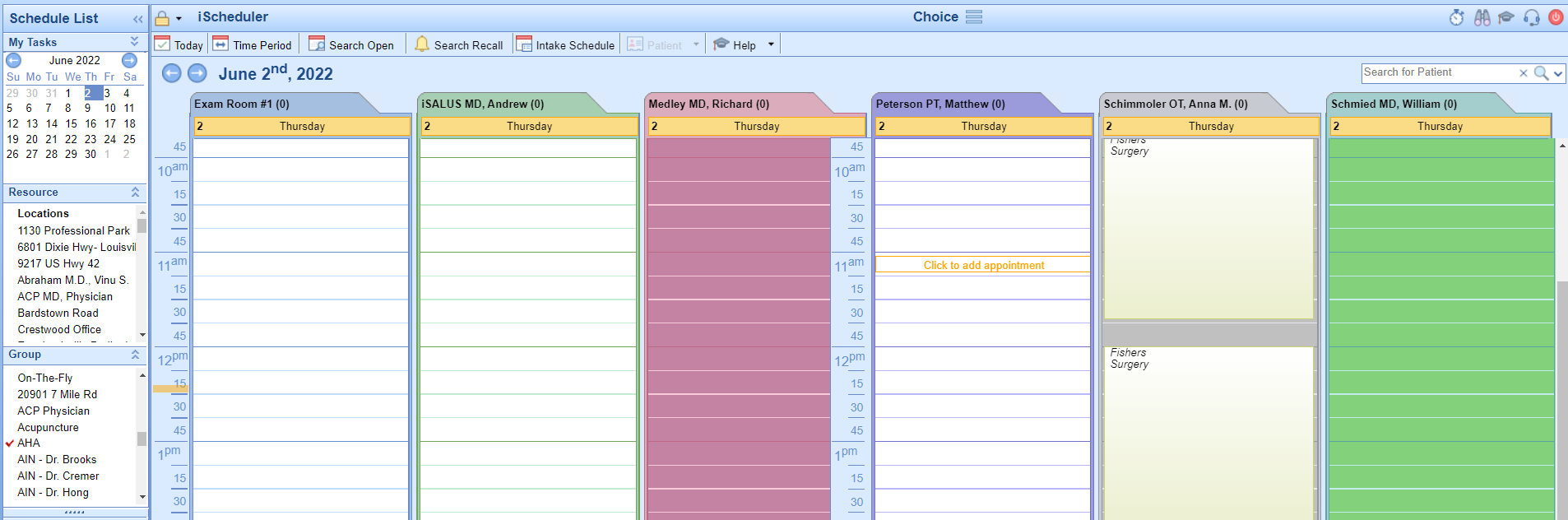
Screenshots sourced from Office EMR's publicly available materials and shown for identification and review purposes. Interface shown may differ from the current release.
Revenue Cycle
Track claims from preparation through submission
The revenue cycle tools organize claims by status, flag missing data, and batch submissions for electronic processing. Teams can view counts, drill into issues, and export worklists to keep accounts moving.
- Claims grouped by prepare, submit, post, and collect stages
- Missing data and issue flags
- Exportable worklists and batch views
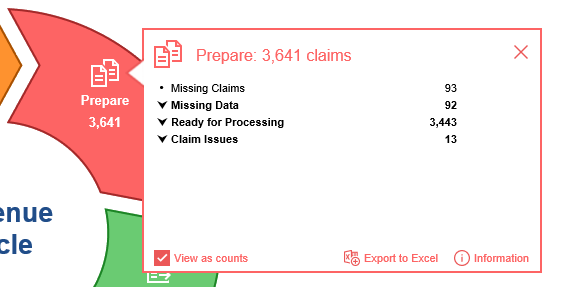
Screenshots sourced from Office EMR's publicly available materials and shown for identification and review purposes. Interface shown may differ from the current release.
Claims Management
Submit and monitor claim batches in one place
The claims submission view lists pending, response, and error submissions so billing staff can quickly find and resolve issues. Filters and counts help teams prioritize daily work without switching screens.
- Pending, response, and error submission groups
- Batch-level status counts
- Built-in search and export options
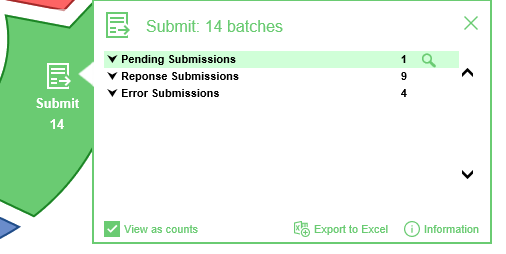
Screenshots sourced from Office EMR's publicly available materials and shown for identification and review purposes. Interface shown may differ from the current release.
Pricing
How much does Office EMR cost?
Office EMR pricing is typically customized based on practice size, specialty, and the modules selected. iSalus Healthcare offers bundled options that include EHR, practice management, billing, and revenue cycle services.
Get PricingOffice EMR Core
EHR, scheduling, and charting for outpatient practices.
Office EMR Plus Billing
Adds integrated billing, claims management, and revenue cycle tools.
Managed Billing Option
Revenue cycle management services handled by the iSalus team.
Across public listings, Office EMR is noted for its integrated billing and revenue cycle tools, scheduling flexibility, and focus on outpatient practices. Reviewers advise confirming implementation timelines and specialty templates during a demo.
Plan details are based on publicly available third party information and industry benchmarks. Actual costs may vary.
Primary specialties served
Primary specialties Office EMR serves
Software Finder compares Office EMR pricing for practices in these specialties.
Use cases
Common ways teams use Office EMR
Scheduling patient appointments
Book visits across multiple providers, locations, and exam rooms with color-coded resource views.
Documenting outpatient visits
Capture encounter notes, orders, and templates within the EHR during or after the visit.
Managing claims and submissions
Track claims through preparation, submission, and posting stages with issue flags and batch tools.
Running revenue cycle reports
Monitor collections, pending claims, and accounts receivable from a centralized dashboard.
Features
Office EMR features
Capabilities listed on the official site, summarised in our own words. Exact availability varies by plan.
Integrated EHR and practice management
Clinical documentation, scheduling, and billing share one patient record and workflow.
Multi-resource scheduling
Schedule by provider, location, and exam room with availability rules and recall tools.
Claims management
Prepare, submit, and track claims with status flags, batch views, and error handling.
Revenue cycle dashboard
Monitor prepare, submit, post, and collect stages with counts and actionable worklists.
Patient portal
Let patients view records, send messages, request appointments, and complete intake forms online.
Telehealth
Run virtual visits from within the platform without a separate video tool.
Customizable templates
Build note and form templates tailored to the practice's specialty and workflow.
Reporting and analytics
Generate operational, financial, and clinical reports to track practice performance.
Pros & cons
Office EMR pros and cons
Pros
- Integrated EHR, scheduling, billing, and claims in one system
- Strong revenue cycle and claims management tools
- Multi-provider, multi-location scheduling
- Patient portal and telehealth included
- Customizable templates for outpatient specialties
- Cloud-based access from multiple devices
Cons
- Specialty depth should be confirmed in a demo
- Implementation timeline may vary by practice size
- Third-party integrations should be verified
FAQ
Common questions about Office EMR
Ready to see Office EMR pricing?
Get an Office EMR demo
Request a live walkthrough and we'll connect you with the right team to answer questions specific to your practice.
Software Finder is an independent software marketplace, not Office EMR, and not affiliated with or endorsed by them.
By submitting, you agree to Software Finder's Terms of Service and Privacy Policy and consent to be contacted by Software Finder and one or more matchedsoftware vendors (which may include Office EMR) about your request. You can opt out at any time.