

Logo shown is the property of Office Ally, used for identification purposes only.
Get Office Ally Pricing & Demo
Compare plans, book a live demo, and see how Office Ally fits your practice.
Office Ally combines Practice Mate for practice management and billing with EHR 24/7 for charting, giving independent practices an affordable way to run scheduling, claims, and documentation. Tell us about your practice and we'll return current pricing matched to your setup.
Key takeaways
Office Ally serves independent practices with two connected products, Practice Mate for scheduling, billing, and practice management, and EHR 24/7 for web based charting and documentation. Public information highlights its low entry cost, and practices should still confirm charting depth and workflow fit before deciding.
See the plan that fits your practice
Share a few details and we'll send Office Ally pricing matched to your practice needs.
Independent guidance
Software Finder is an independent software marketplace, not Office Ally, and not affiliated with or endorsed by them.
By submitting, you agree to Software Finder's Terms of Service and Privacy Policy and consent to be contacted by Software Finder and one or more matchedsoftware vendors (which may include Office Ally) about your request. You can opt out at any time.
Overview
What is Office Ally?
Office Ally provides two connected products for independent medical practices. Practice Mate is a practice management system covering appointment scheduling, insurance confirmation, claims, and revenue tracking. EHR 24/7 is a certified web based electronic health record for charting, progress notes, and document management, with no software to install. The two work together so front desk and clinical teams share the same patient records and appointments.
Best for
Office Ally suits small and mid size independent practices that want affordable scheduling, billing, and charting tools that work together without a large upfront investment.
Scheduling
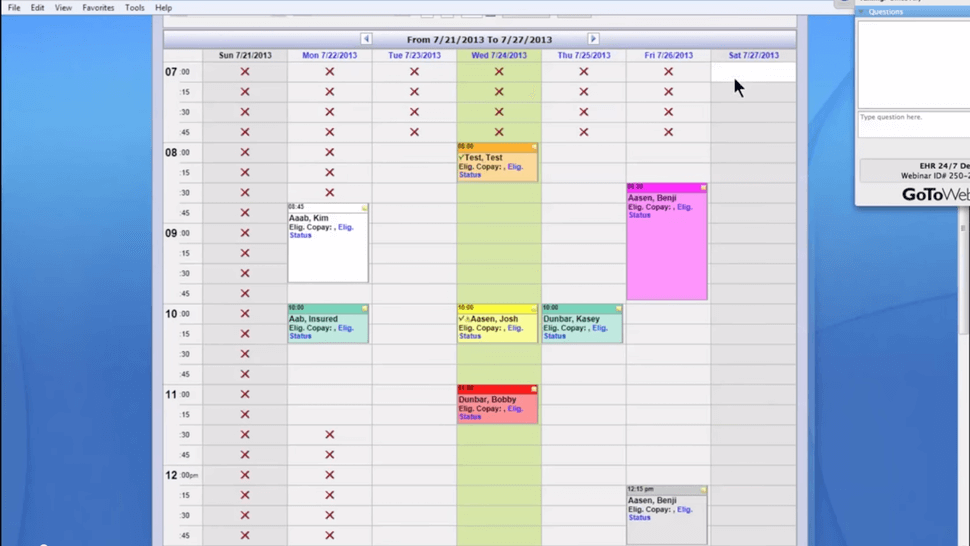
See the whole week at a glance
The appointment book shows the full week with color coded visits and availability markers. Staff can scan the schedule quickly, spot open slots, and review visit status without clicking into each appointment.
- Weekly appointment book view
- Color coded visits and availability markers
- Quick view of visit and reminder status
Screenshots sourced from Office Ally's publicly available materials and shown for identification and review purposes. Interface shown may differ from the current release.
Patient Records
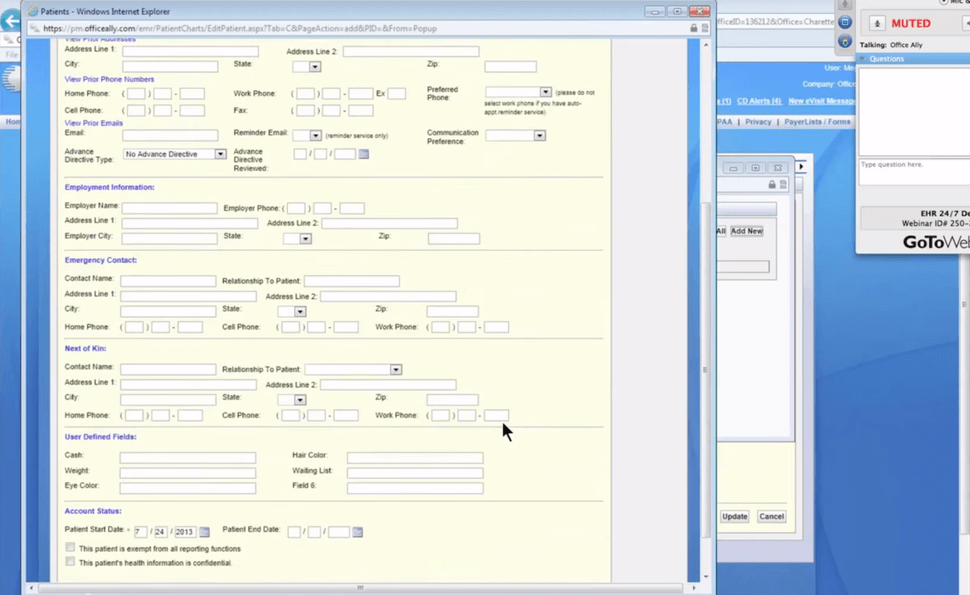
Register patients with complete details
The patient information screen captures demographics, contact details, employment information, and account status in one form. Fields are organized in clear sections so front desk staff can register a patient without switching screens.
- Demographics, contact, and employment sections in one form
- Account status and start date tracking
- Organized layout for fast front desk entry
Screenshots sourced from Office Ally's publicly available materials and shown for identification and review purposes. Interface shown may differ from the current release.
Practice Management
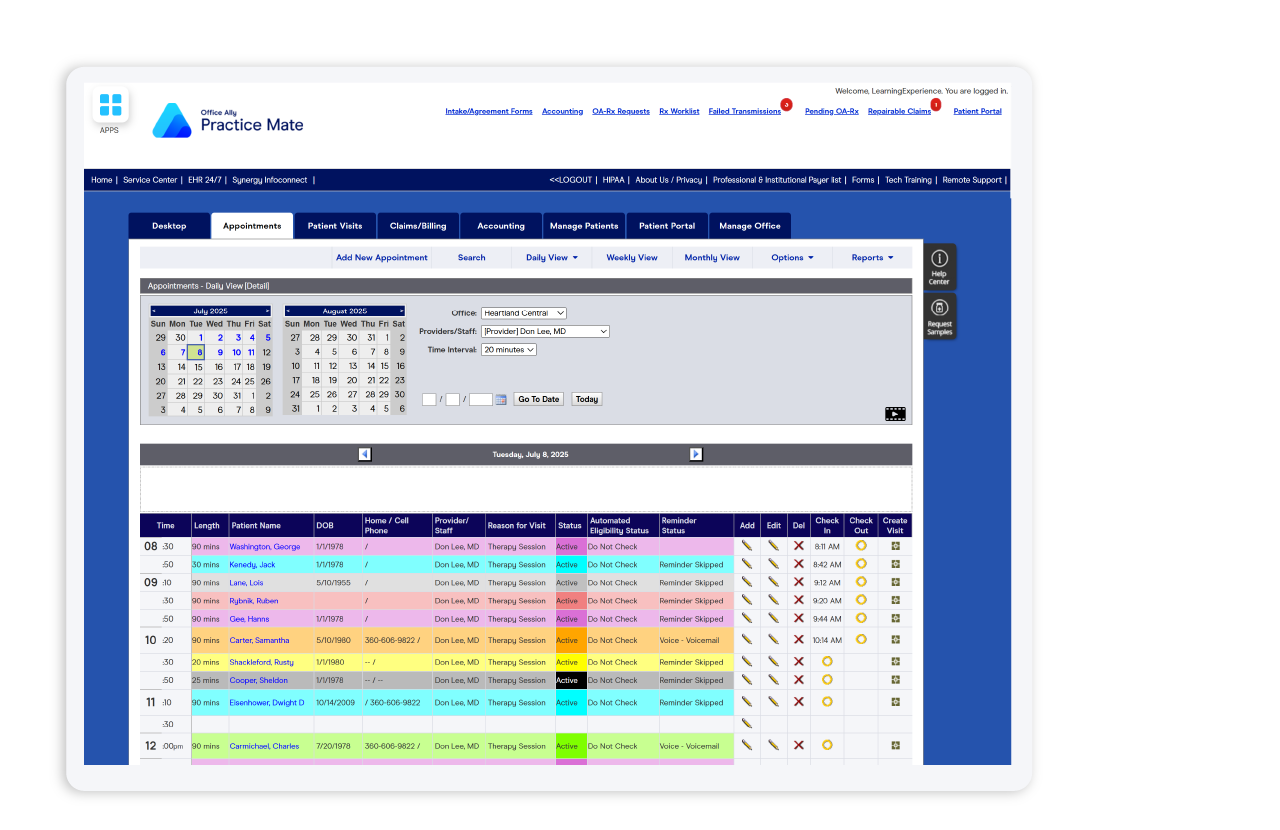
Run the front desk from Practice Mate
Practice Mate's daily appointment view lists every visit with time, provider, reason, and check in and check out status. Eligibility and reminder columns sit beside each row so the front desk can manage the day from a single screen.
- Daily view with check in and check out status
- Eligibility and reminder columns per visit
- Create visit and edit actions on each row
Screenshots sourced from Office Ally's publicly available materials and shown for identification and review purposes. Interface shown may differ from the current release.
Pricing
How much does Office Ally cost?
Office Ally is known for a low cost entry point, with Practice Mate commonly listed at no monthly charge and EHR 24/7 offered as a paid per provider plan. Clearinghouse and add on services are priced separately depending on volume and features.
Get PricingPractice Mate
Scheduling, claims, and practice management basics.
EHR 24/7
Web based charting, progress notes, and document center.
Add ons
Clearinghouse, reminders, and patient portal services priced separately.
Across public listings, Office Ally is noted for affordability and straightforward billing tools. Reviewers advise confirming charting workflow depth and add on costs during a demo.
Plan details are based on publicly available third party information and industry benchmarks. Actual costs may vary.
Who it's for
Who is Office Ally for?
Who it's not for
Use cases
Common ways teams use Office Ally
Running an affordable front desk
Schedule patients, confirm insurance, and manage the day from Practice Mate without a large software bill.
Charting visits in a web based EHR
Document progress notes and manage patient charts in EHR 24/7 with nothing to install.
Managing claims and revenue
Submit claims, track the revenue cycle, and review failed transmissions from one system.
Registering patients quickly
Capture demographics, contacts, and account status in a single organized patient form.
What users say
Aggregated from public listings, interest in Office Ally centers on its low cost, claims tools, and the convenience of having scheduling, billing, and charting connected. Practices are advised to verify charting workflows and add on pricing during the evaluation process.
Features
Office Ally features
Capabilities listed on the official site, summarised in our own words. Exact availability varies by plan.
Appointment scheduling
Daily, weekly, and monthly appointment views with reminders and check in tracking.
Practice management
Practice Mate handles scheduling, accounts, and day to day front desk operations.
Claims and billing
Claim submission, failed transmission tracking, and revenue cycle tools.
Web based charting
EHR 24/7 progress notes and patient charts accessible from any browser.
Patient registration
Organized patient information forms covering demographics and account status.
Document center
Centralized access to clinical and administrative documents across patient charts.
Patient portal
Portal options for patients to connect with the practice online.
Desktop tab and messaging
Inter office communication and task management inside both products.
Pros & cons
Office Ally pros and cons
Pros
- Low cost entry point for independent practices
- Scheduling, billing, and charting work together
- Web based EHR with nothing to install
- Clear claims and failed transmission tracking
- Organized patient registration forms
- Clearinghouse services available in one place
Cons
- Interface feels dated compared to newer platforms
- Add on services can add to the total cost
- Charting depth should be confirmed in a demo
FAQ
Common questions about Office Ally
Request a demo
Share a few details and we'll help arrange a Office Ally walkthrough for your workflow.
Software Finder is an independent software marketplace, not Office Ally, and not affiliated with or endorsed by them.
By submitting, you agree to Software Finder's Terms of Service and Privacy Policy and consent to be contacted by Software Finder and one or more matchedsoftware vendors (which may include Office Ally) about your request. You can opt out at any time.
Next step
Still comparing options? See Office Ally in action.
Software Finder helps you gather the information that actually drives a software decision, a real walkthrough of Office Ally and a clear view of how it compares to similar platforms.
- See Office Ally in a live walkthrough
- Connect with the right team
- Compare against similar platforms
- Independent guidance