

Logo shown is the property of Novoclinical, used for identification purposes only.
Get Novoclinical Pricing & Demo
Evaluate Novoclinical for your specialty practice.
Novoclinical is a cloud based EHR that brings scheduling, clinical documentation, care plans, and reporting into one system. Tell us about your practice and we'll help you review current plan details matched to your needs.
Key takeaways
For the specialty practices listed above, Novoclinical evaluation should start with the workflows that matter to your clinicians: visit scheduling, structured notes, patient history, and follow up care. Its public materials show connected charting and an AI assistant. Specialty-specific templates, procedure workflows, and device or imaging integrations must be confirmed with the vendor.
Review options for your specialty
Tell us your specialty and provider count to discuss Novoclinical options for your practice.
Independent guidance
Software Finder is an independent software marketplace, not Novoclinical, and not affiliated with or endorsed by them.
By submitting, you agree to Software Finder's Terms of Service and Privacy Policy and consent to be contacted by Software Finder and one or more matchedsoftware vendors (which may include Novoclinical) about your request. You can opt out at any time.
Overview
What is Novoclinical?
Novoclinical connects appointment lists, check in and document tracking, structured provider notes, AI assistance, care plans, and reporting through the patient record. This page focuses on evaluating those tools for the eleven specialties listed above. Shared EHR functions are not a guarantee of specialty-specific support, so review your actual clinical scenarios with the vendor.
Best for
This evaluation is intended for Allergy & Immunology, Dermatology, ENT/Otolaryngology, Gastroenterology, OB/GYN, Orthopedics, Opthamology, Pain Management / Pain Medicine, Podiatry, Surgery (Plastic Surgery), and Urology practices assessing connected scheduling, charting, and records.
Scheduling
Review scheduling for specialty visits and follow ups
The appointment list brings visits together with check in status, documents to complete, room assignments, and visit type. Allergy & Immunology, ENT/Otolaryngology, Gastroenterology, and Urology practices can use a walkthrough to assess how provider and location filters fit their consultation and follow up schedules. Confirm any procedure-specific scheduling requirements with the vendor.
- Check in and document status on every appointment
- Location, provider, and room level filtering
- Holds for portal and walk in requests
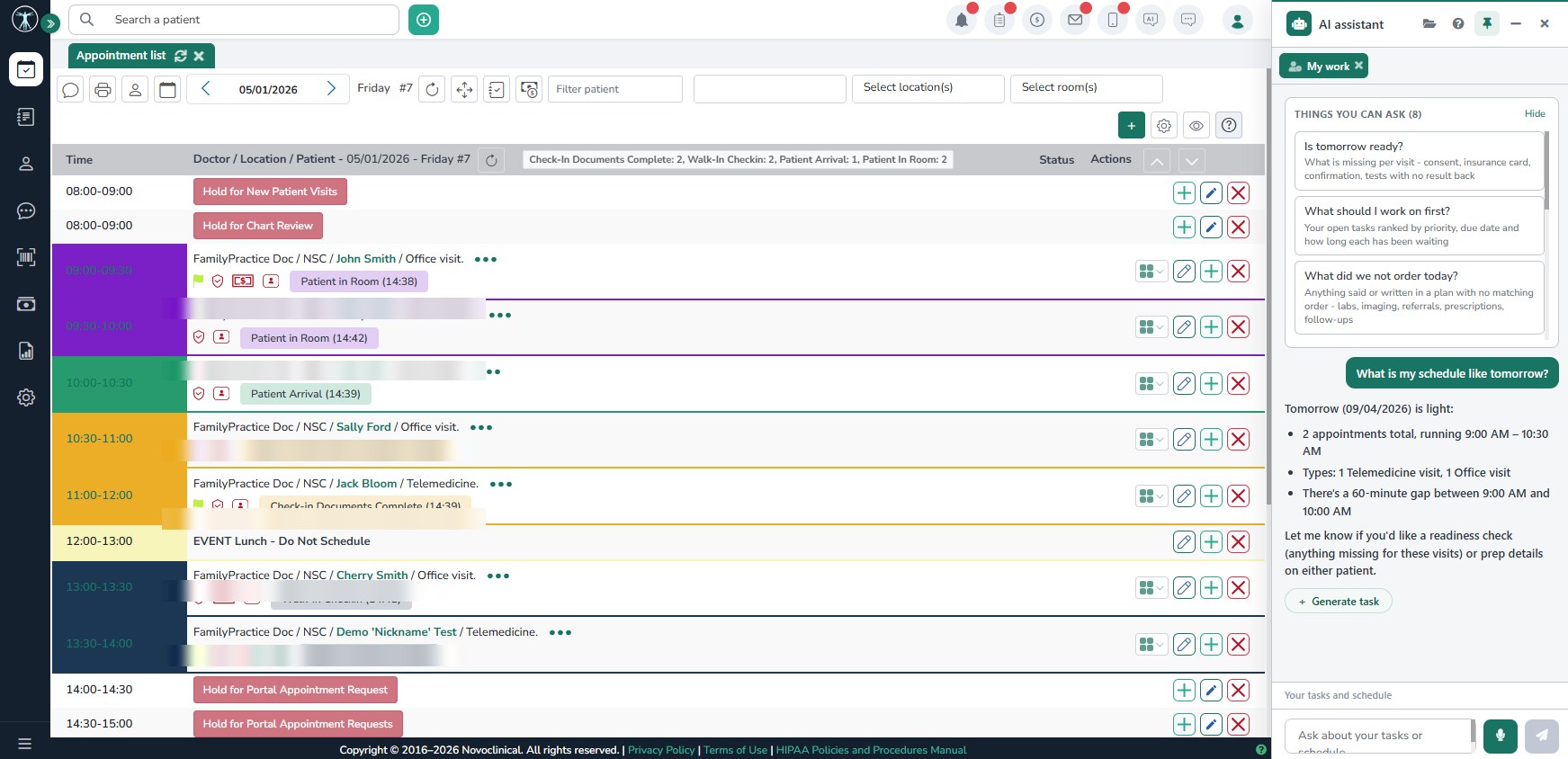
Screenshots sourced from Novoclinical's publicly available materials and shown for identification and review purposes. Interface shown may differ from the current release.
Clinical documentation
Assess documentation for your specialty
The provider note workspace organizes chief complaint, history, conditions, medications, and assessment into a structured report, with an AI assistant for chart related questions. Dermatology, OB/GYN, Orthopedics, and Pain Management / Pain Medicine practices should review their own documentation scenarios during a demo and confirm the available specialty templates before choosing a setup.
- Structured progress notes with E and M coding
- AI assistant for patient chart questions
- Problem list and medication review in context
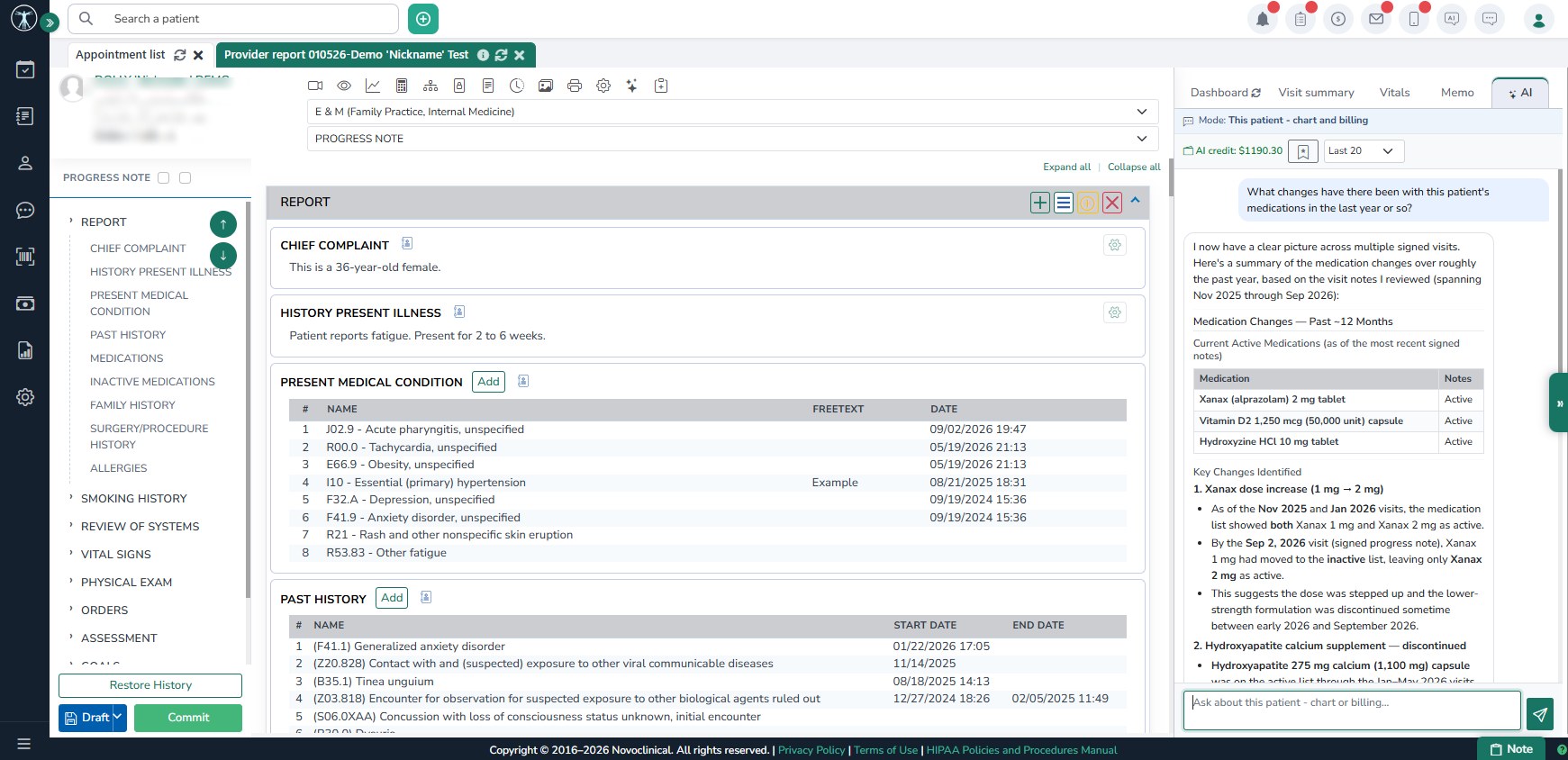
Screenshots sourced from Novoclinical's publicly available materials and shown for identification and review purposes. Interface shown may differ from the current release.
Patient records
Review records across a specialty care journey
The patient chart combines demographics, coverage, appointment history, care plans, and documents in one view. Opthamology, Podiatry, and Surgery (Plastic Surgery) practices can evaluate how these records fit their consultation and follow up needs. Confirm imaging connections, procedure documentation, and any specialty-specific record requirements rather than assuming they are included.
- Demographics, coverage, and pharmacy details
- Visit history with telemedicine and office visits
- Care plans, records, and lab work one click away
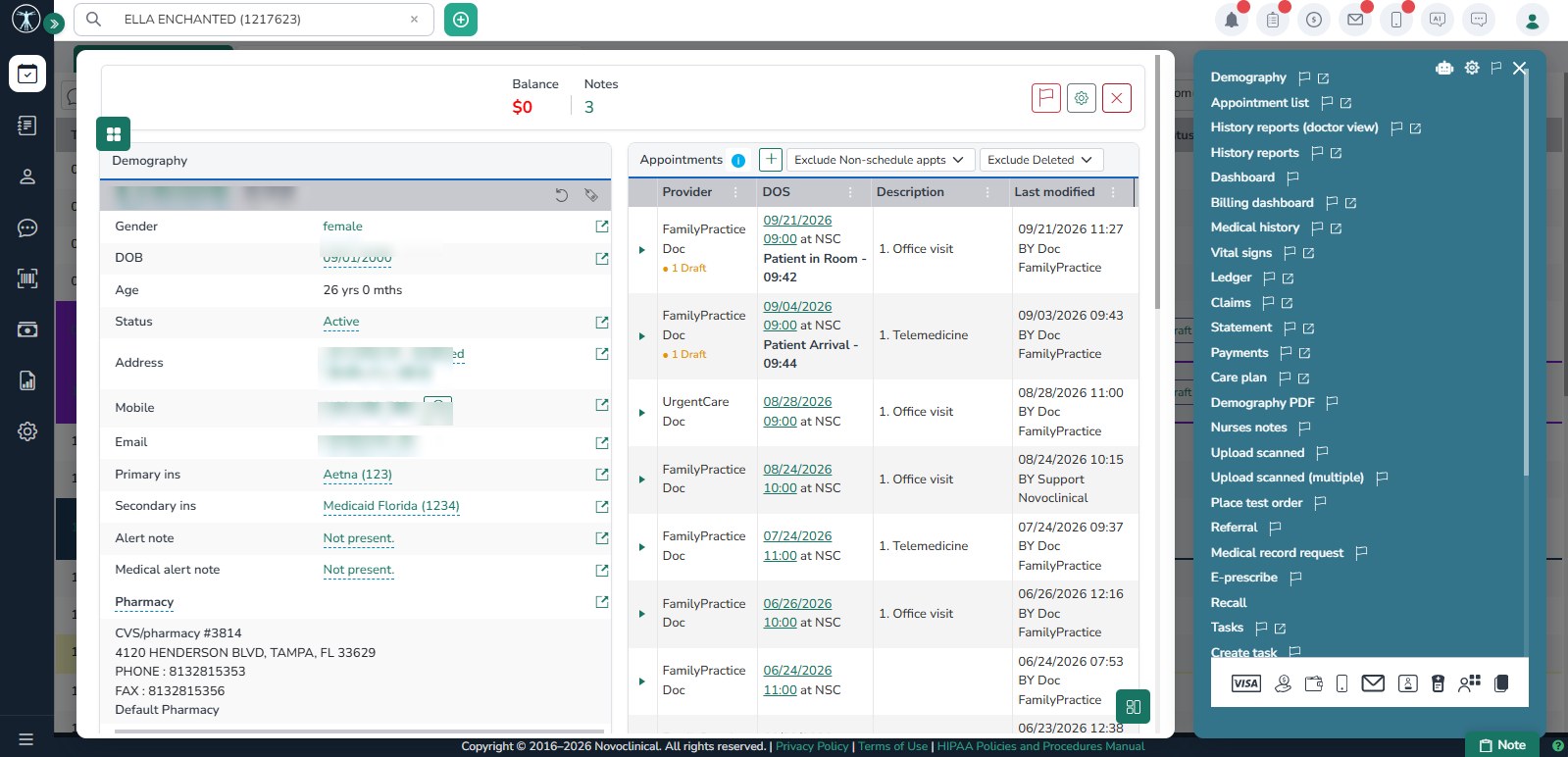
Screenshots sourced from Novoclinical's publicly available materials and shown for identification and review purposes. Interface shown may differ from the current release.
Pricing
How much does Novoclinical cost?
Ask for a quote based on your specialty, provider count, locations, and required workflows. Confirm whether the proposed setup includes the templates, integrations, migration, and training your specialty team needs, and request a clear breakdown of any additional costs.
Get PricingCore EHR
Charting, structured notes, care plans, and patient records.
EHR + scheduling
Adds the appointment list, check in tracking, and portal requests.
Full practice setup
Adds reporting dashboards and multi location configuration.
A connected schedule and chart are only part of the decision. Ask clinicians in your specialty to review the proposed documentation workflow and confirm template fit before committing.
Plan details are based on publicly available information and may change. Actual costs vary by agreement.
Who it's for
Who is Novoclinical for?
Who it's not for
Use cases
Common ways teams use Novoclinical
Specialty consultations and follow ups
Assess appointment lists for Allergy & Immunology, ENT/Otolaryngology, Gastroenterology, and Urology visit schedules.
Specialty documentation review
Test representative Dermatology and OB/GYN notes, and confirm the templates and documentation fields your clinicians require.
Ongoing care documentation
Review patient history and care plans for Orthopedics and Pain Management / Pain Medicine, including your follow up requirements.
Procedure and record requirements
Confirm record, imaging, and procedure documentation needs for Opthamology, Podiatry, and Surgery (Plastic Surgery).
What users say
When seeking feedback on Novoclinical, prioritize references from your own specialty. Ask about template fit, follow up documentation, migration, and integration support rather than relying on general EHR impressions.
Features
Novoclinical features
Capabilities listed on the official site, summarised in our own words. Exact availability varies by plan.
Appointment scheduling
Appointment list with check in status, holds, and location filtering.
Clinical documentation
Structured progress notes with E and M coding and AI assistance.
Care plans
Care plan management tied to the patient chart and enrollments.
Patient records
Demographics, coverage, visit history, and documents in one chart.
AI assistant
Chart level AI help for patient questions and task drafting.
Practice dashboards
Clinical and billing dashboards with collections and aging views.
Telehealth
Telemedicine visit types that tie back to the appointment and record.
Pros & cons
Novoclinical pros and cons
Pros
- Scheduling, charting, and reporting in one system
- AI assistant available in chart and schedule views
- Structured notes with care plan tracking
- Clinical and billing dashboards included
- Telemedicine visits tied to the appointment record
Cons
- Specialty template depth should be confirmed before purchase
- Implementation and migration timelines vary by practice
- Fewer third party integrations than larger platforms
FAQ
Common questions about Novoclinical
Request a demo
Share a few details and we'll help arrange a Novoclinical walkthrough for your workflow.
Software Finder is an independent software marketplace, not Novoclinical, and not affiliated with or endorsed by them.
By submitting, you agree to Software Finder's Terms of Service and Privacy Policy and consent to be contacted by Software Finder and one or more matchedsoftware vendors (which may include Novoclinical) about your request. You can opt out at any time.
Next step
Review Novoclinical against your specialty workflow.
Bring your specialty's consultation, documentation, and follow up requirements to a guided walkthrough. Confirm template fit and required integrations before choosing a setup.
- Review your specialty's appointment workflow
- Test representative clinical notes
- Confirm templates and integrations
- Get independent guidance