
Logo is the property of Nexus Clinical and is shown for identification only.
Get Nexus Clinical Pricing & Demo
Compare plans, book a live demo, and see how Nexus Clinical fits your practice.
Software Finder is an independent software marketplace, not Nexus Clinical, and not affiliated with or endorsed by them.
See the plan that fits your practice
Share a few details and we'll send Nexus Clinical pricing matched to your practice needs.
Independent guidance
Software Finder is an independent software marketplace, not Nexus Clinical, and not affiliated with or endorsed by them.
By submitting, you agree to Software Finder's Terms of Service and Privacy Policy and consent to be contacted by Software Finder and one or more matchedsoftware vendors (which may include Nexus Clinical) about your request. You can opt out at any time.
Nexus Clinical is a cloud based EHR paired with practice management, scheduling, billing, telehealth, and a patient engagement suite, with an AI scribe built in. Tell us about your practice and we'll return current pricing matched to your provider count. Software Finder compares Nexus Clinical pricing for orthopedics, neurology and neurosurgery practices, plus small and mid-sized independent practices.
Key takeaways
Nexus Clinical is a cloud based, ONC certified EHR built for small and mid size practices, offered together with practice management, medical billing support, telehealth, and a patient engagement suite. A native AI scribe is included for documentation. Public feedback commonly highlights the breadth of the integrated platform at its price point, while recurring criticisms mention a dated interface in places and a learning period during setup. Software Finder compares Nexus Clinical pricing for orthopedics, neurology and neurosurgery practices, plus small and mid-sized independent practices.
Overview
What is Nexus Clinical?
Nexus Clinical is a cloud based electronic health record aimed at independent practices. The EHR covers charting, orders, and results review, and it connects to a practice management side that handles scheduling, eligibility checks, visit tracking, and billing handoffs, so the front office and clinical side work from the same record. The platform also includes telehealth visits, a patient engagement suite, digital intake forms, document management, and a native AI scribe that drafts visit documentation for provider review.
Good fit for
Nexus Clinical suits small and mid size independent practices that want an EHR, practice management, telehealth, and billing support from one vendor at an accessible price point.
Front desk
Run the whole day from one dashboard
The dashboard puts today's schedule, encounters waiting to be signed, and current tasks in a single view. Front desk staff check patients in, see visit type and provider at a glance, and work the follow up queue without switching screens.
- Today's schedule with check in status and visit type
- Encounters pending sign off in one worklist
- Task queue assigned to staff with dates and flags
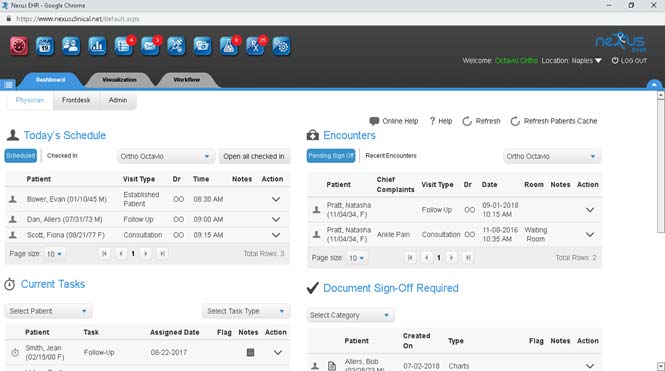
Screenshots sourced from Nexus Clinical's publicly available materials and shown for identification and review purposes. Interface shown may differ from the current release.
Document management
File, scan, and sign off documents in one place
The documents viewer groups charts, labs, order results, patient education, referral letters, and reports with filters by category and type. Staff scan or import files, create new documents from templates, and track sign off status from the same list.
- Charts, labs, referrals, and reports in one filterable list
- Scan, import, or create documents from templates
- Sign off and sharing status tracked per document
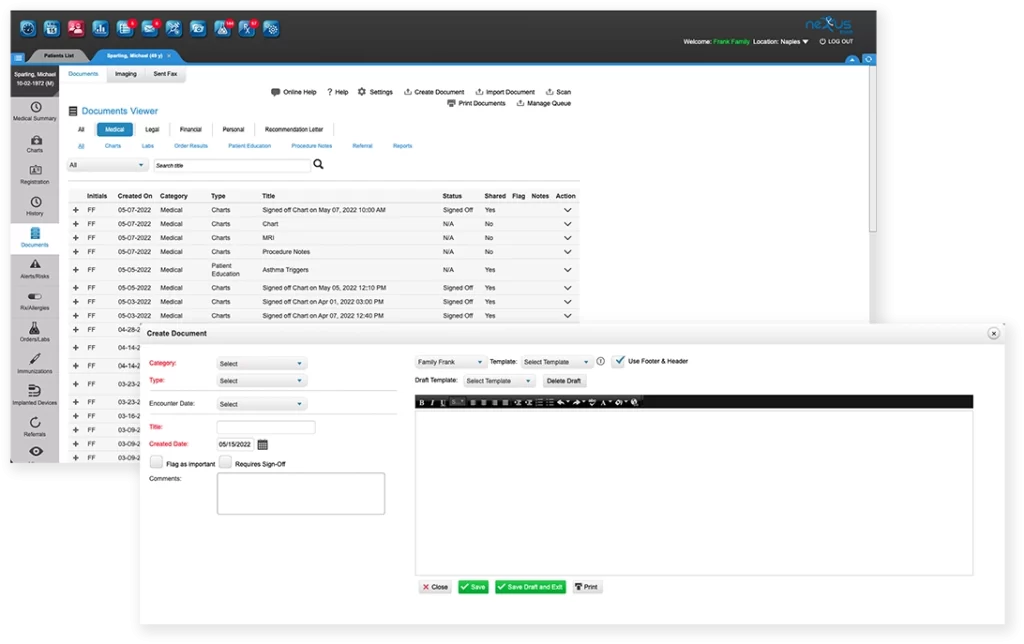
Screenshots sourced from Nexus Clinical's publicly available materials and shown for identification and review purposes. Interface shown may differ from the current release.
Patient intake
Collect consent and intake forms digitally
Office forms such as privacy notices and consent documents are presented to patients digitally, signed on the spot, and saved straight to the chart. Intake paperwork no longer needs printing, scanning, or manual filing.
- Privacy notices and consent forms delivered digitally
- Patient details filled into the form automatically
- Signed forms saved directly to the patient chart
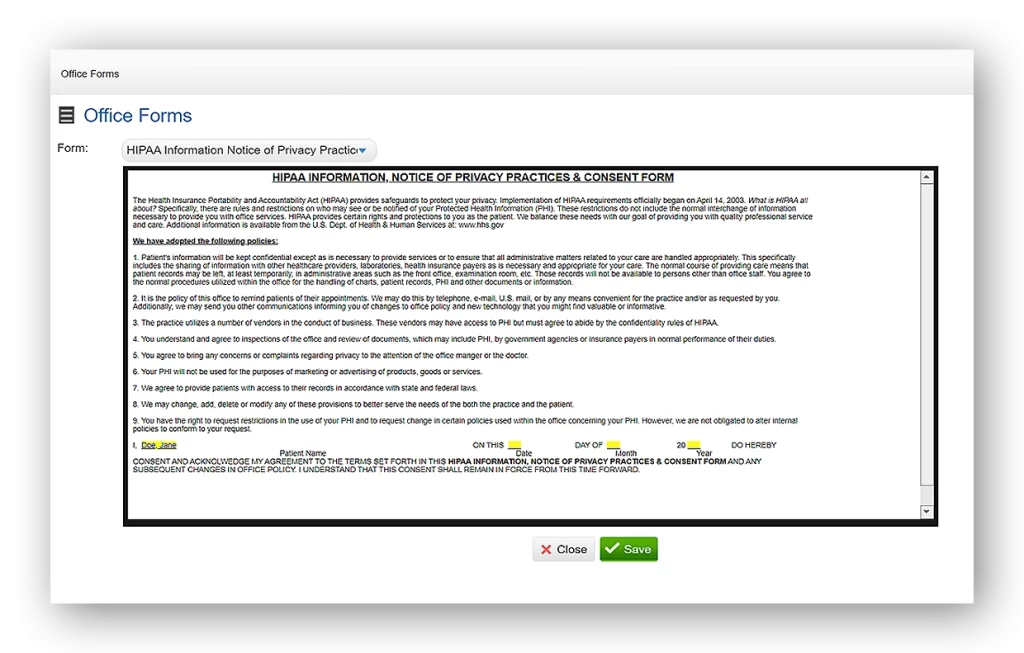
Screenshots sourced from Nexus Clinical's publicly available materials and shown for identification and review purposes. Interface shown may differ from the current release.
Pricing
How much does Nexus Clinical cost?
Nexus Clinical is generally quoted per provider and depends on the modules you include, such as the EHR, practice management, patient engagement, telehealth, and billing services. Implementation, training, and data migration are typically part of the arrangement.
Get PricingEHR
Charting, orders, results, and the AI scribe.
EHR + practice management
Adds scheduling, eligibility checks, and billing handoffs.
Full suite
Adds telehealth, patient engagement, and billing service support.
Across public reviews, Nexus Clinical is noted for covering a lot of ground, EHR, scheduling, telehealth, and billing, at a price that works for independent practices. Some reviewers mention an interface that feels dated in places and an adjustment period during onboarding.
Plan details are based on publicly available third party information and industry benchmarks. Actual costs may vary.
Primary specialties served
Primary specialties Nexus Clinical serves
Software Finder compares Nexus Clinical pricing for practices in these specialties.
Use cases
Common ways teams use Nexus Clinical
Keeping the day on track
See the schedule, check patients in, and work encounters and tasks from a single dashboard.
Cutting documentation time
Let the AI scribe draft visit notes so providers review and sign instead of typing from scratch.
Going paperless at intake
Present consent and intake forms digitally and file the signed copies straight to the chart.
Managing documents centrally
Scan, import, and organize charts, labs, and referrals with sign off tracking in one viewer.
Features
Nexus Clinical features
Capabilities listed on the official site, summarised in our own words. Exact availability varies by plan.
Cloud based EHR
Charting, orders, and results review accessible from any device, ONC certified.
AI scribe
Native AI documentation that drafts visit notes for provider review and sign off.
Practice management
Scheduling, eligibility checks, visit tracking, and billing handoffs in one system.
Document management
Scan, import, and organize charts, labs, and referrals with sign off tracking.
Digital intake forms
Consent and privacy forms delivered and signed digitally, saved to the chart.
Telehealth
Virtual visits that tie back to the same appointment and patient record.
Patient engagement
Portal access, appointment reminders, and patient communication tools.
Billing support
Claim workflows and optional billing service support for the practice.
Pros & cons
Nexus Clinical pros and cons
Pros
- EHR, practice management, telehealth, and billing from one vendor
- Native AI scribe included
- ONC certified and MIPS ready
- Digital intake and consent forms
- Accessible price point for independent practices
- Central document management with sign off tracking
Cons
- Interface feels dated in places
- Learning period during onboarding
- Fewer third party integrations than larger platforms
FAQ
Common questions about Nexus Clinical
Ready to see Nexus Clinical pricing?
See Nexus Clinical in action
Request a walkthrough and we'll connect you with the right team to answer questions specific to your practice.
Software Finder is an independent software marketplace, not Nexus Clinical, and not affiliated with or endorsed by them.
By submitting, you agree to Software Finder's Terms of Service and Privacy Policy and consent to be contacted by Software Finder and one or more matchedsoftware vendors (which may include Nexus Clinical) about your request. You can opt out at any time.