

Logo shown is the property of LiquidEHR, used for identification purposes only.
Get LiquidEHR Pricing & Demo
Compare plans, book a live demo, and see how LiquidEHR fits your team.
LiquidEHR is a cloud-based EHR and practice management system built specifically for optometrists. It covers exam-lane charting, scheduling, billing, electronic claims, and patient communication without requiring an on-site server or long-term contract. Tell us your needs and we'll return current pricing.
Key takeaways
LiquidEHR is a cloud-based EHR and practice management platform built exclusively for optometrists. It covers the full practice workflow, front desk, exam lane, and back office, with simple per-provider plan details and no long-term contract requirement. Public reviews highlight ease of use, responsive customer support, and the optometry-specific charting tools. Occasional criticisms mention limitations in customisation compared to larger enterprise EHR systems.
See the plan that fits your team
Share a few details and we'll send LiquidEHR pricing matched to your clinical needs.
Independent guidance
Software Finder is an independent software marketplace, not LiquidEHR, and not affiliated with or endorsed by them.
By submitting, you agree to Software Finder's Terms of Service and Privacy Policy and consent to be contacted by Software Finder and one or more matchedsoftware vendors (which may include LiquidEHR) about your request. You can opt out at any time.
Overview
What is LiquidEHR?
LiquidEHR is a cloud-based electronic health record and practice management platform developed specifically for optometry practices. It provides optometry-specific exam charting, scheduling and recall management, integrated billing and electronic claims, pay-by-text and email payments, and automated patient communication. The system requires no on-site server and is accessible from front-desk, exam-lane, and remote locations. Integrations with reporting equipment manufacturers and clearinghouses extend the connected ecosystem.
Best for
LiquidEHR is best suited to independent and small-group optometry practices seeking a purpose-built, no-contract cloud EHR that covers the full workflow from scheduling to billing. Its most-cited feature is the optometry-specific charting, developed alongside practising eye care doctors, which allows clinicians to document exams without adapting a generic medical record.
Patient records
Patient records built around optometry practices
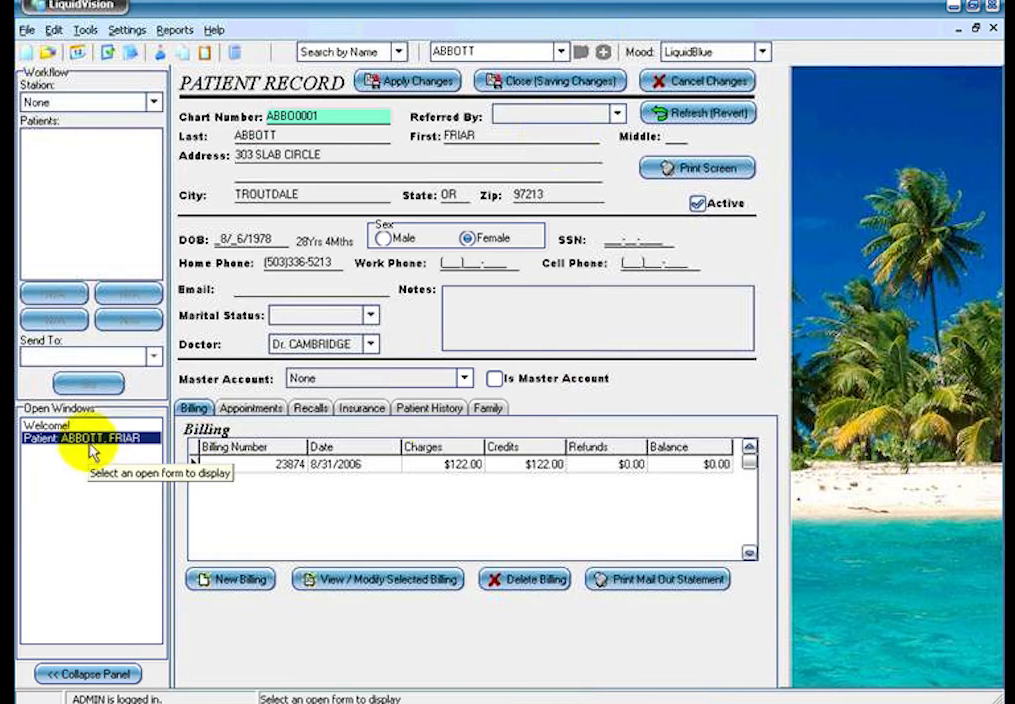
LiquidEHR keeps demographics, insurance, appointments, recalls, and account history on a single patient record, so front desk staff can look up a patient and see the full picture without switching screens. Records were designed with practising eye care doctors so the fields and workflows match how optometry offices work.
- Demographics, insurance, and referral details on one screen
- Tabs for billing, appointments, recalls, and patient history
- Optometry-specific templates and configurable records
Screenshots sourced from LiquidEHR's publicly available materials and shown for identification and review purposes. Interface shown may differ from the current release.
Scheduling
Multi-provider scheduling at the front desk
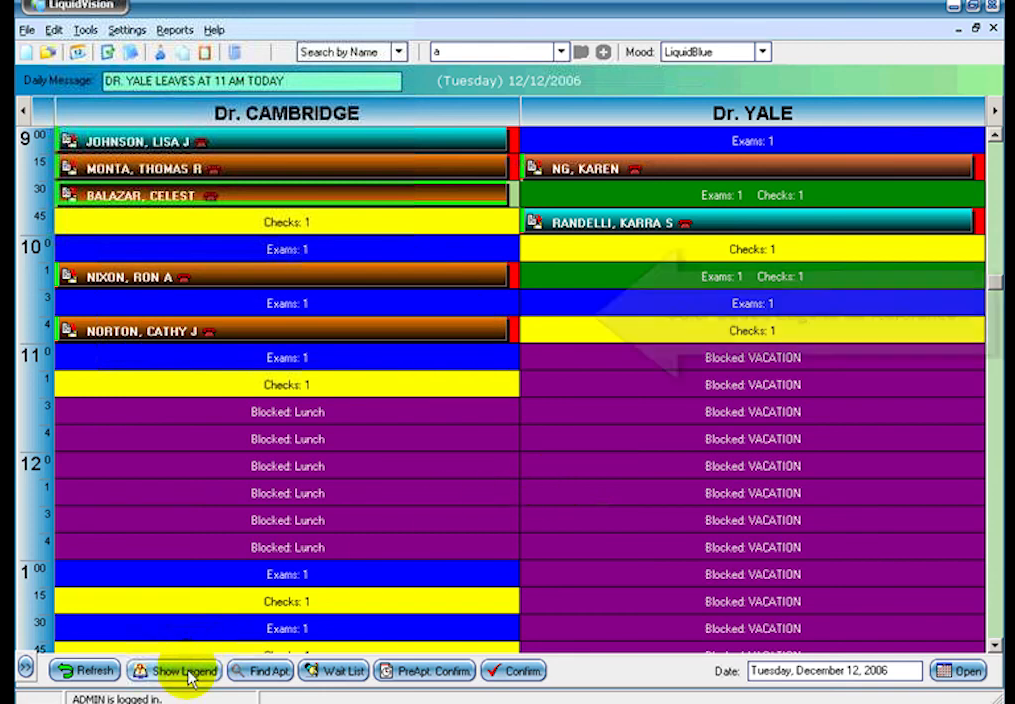
The LiquidEHR scheduler shows every provider side by side with colour coded appointment types, blocked time, and open slots, so the front desk can book, move, and fill the day quickly. Appointment search finds the next available time across doctors and locations.
- Side by side provider columns with colour coded status
- Appointment search for the next available slot
- Wait list, walk-ins, and drag free rescheduling
Screenshots sourced from LiquidEHR's publicly available materials and shown for identification and review purposes. Interface shown may differ from the current release.
Confirmations & recalls
Appointment confirmations and recall follow up
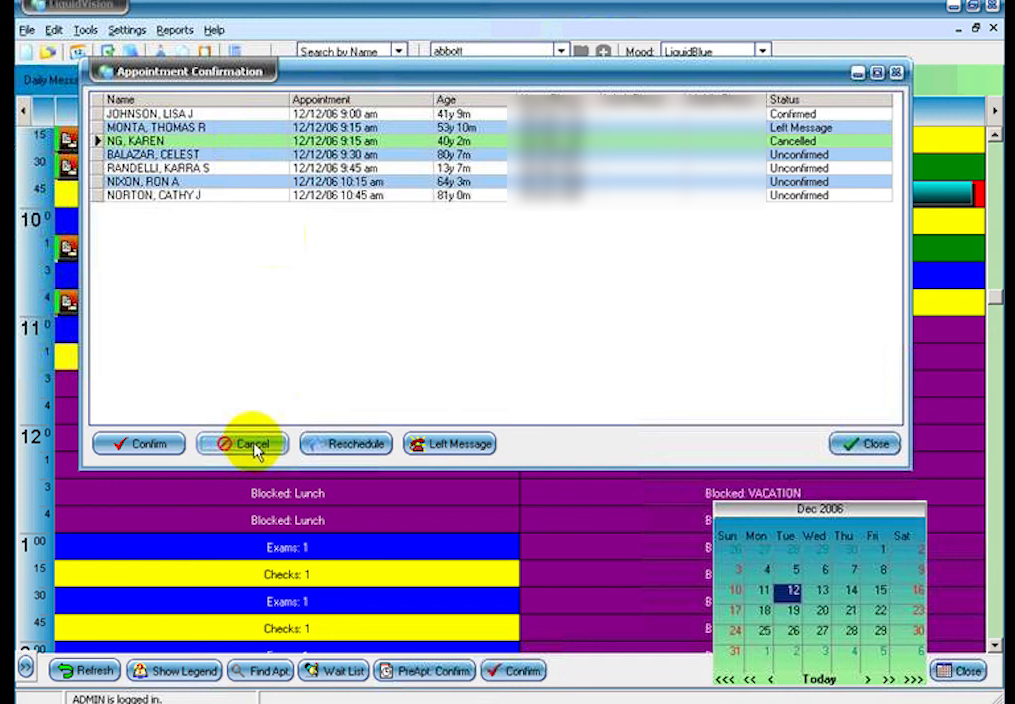
LiquidEHR tracks confirmation status for every upcoming appointment, so staff can work a single list to confirm, reschedule, or log a left message. Paired with the Liquid Communicator add-on, reminders and recall campaigns go out automatically to cut down no-shows.
- Confirmation list with status for each upcoming visit
- Confirm, reschedule, or record a left message in one click
- Automated reminders and recall campaigns with Liquid Communicator
Screenshots sourced from LiquidEHR's publicly available materials and shown for identification and review purposes. Interface shown may differ from the current release.
Pricing
How much does LiquidEHR cost?
LiquidEHR is offered on a per-provider subscription basis with straightforward plan details and no long-term contract requirement. The vendor positions plan details as simple and transparent. Exact rates are provided on request.
Get PricingSolo provider
Cloud EHR, scheduling, and exam charting for a single optometrist.
Multi-provider
Extends access to additional providers with shared scheduling and records.
Full practice management
Adds billing, electronic claims, payments, and patient communication.
Public reviews of LiquidEHR are generally favourable, with users noting the straightforward plan details, the quality of customer support, and the time savings from optometry-specific charting tools. Some reviewers mention a desire for deeper reporting features.
plan details references are based on publicly available third-party information and industry benchmarks. Actual costs may vary.
Who it's for
Who is LiquidEHR for?
Use cases
Common ways teams use LiquidEHR
Charting the optometric exam
Document exams using optometry-specific templates with IOP tracking, drawings, and reporting image attachment.
Scheduling and managing recalls
Keep the schedule full with front-desk booking tools and automated patient recall campaigns.
Billing and electronic claims
Submit insurance claims electronically and collect patient payments by text or email from within the EHR.
Connecting front desk, exam lane, and home
Give every team member access to the same up-to-date record from any location, with no server required.
What users say
Aggregated from public reviews, LiquidEHR receives positive ratings from optometry practices for ease of use, the optometry-specific charting features, and customer support responsiveness. Some reviewers note a learning period when transitioning from paper charts, and a few mention wanting more advanced reporting and analytics capabilities.
Features
LiquidEHR features
Capabilities listed on the official site, summarised in our own words. Exact availability varies by plan.
Optometry-specific EHR
Exam templates, IOP charting, drawing tools, and image management built around the optometric workflow.
Scheduling and recall
Front-desk scheduling with automated recall campaigns to keep the appointment book full.
Electronic billing and claims
Submit insurance claims and track payments within the same system used for clinical documentation.
Integrated payments
Send invoices and collect balances by text or email, with multiple payment method support.
Patient communication (Liquid Communicator)
Automated reminders, two-way messaging, and recall campaigns to reduce no-shows.
Reporting equipment integration
Connect instruments from ZEISS, Topcon, Optos, Reichert, Marco, and others directly to the chart.
Pros & cons
LiquidEHR pros and cons
Pros
- Purpose-built for optometry, no generic medical EHR adaptation needed
- No long-term contract required
- Cloud-based with no on-site server
- Responsive customer support
- Reporting equipment and clearinghouse integrations
- Pay-by-text and email payment collection
Cons
- Focused exclusively on optometry, not suitable for other specialties
- Reporting and analytics depth is limited for larger practices
- Exact plan details requires a quote
FAQ
Common questions about LiquidEHR
Request a demo
Share a few details and we'll help arrange a LiquidEHR walkthrough for your workflow.
Software Finder is an independent software marketplace, not LiquidEHR, and not affiliated with or endorsed by them.
By submitting, you agree to Software Finder's Terms of Service and Privacy Policy and consent to be contacted by Software Finder and one or more matchedsoftware vendors (which may include LiquidEHR) about your request. You can opt out at any time.
Next step
Still comparing options? See LiquidEHR in action.
Software Finder helps you gather the information that actually drives a software decision, a real walkthrough of LiquidEHR and a clear view of how it compares to similar platforms.
- See LiquidEHR in a live walkthrough
- Connect with the right team
- Compare against similar platforms
- Independent guidance