

Logo shown is the property of Kajabi, used for identification purposes only.
Get Kajabi Pricing & Demo
Share your team size and needs, we'll return current Kajabi pricing and set up a demo.
Kajabi helps creators run courses, coaching, communities and memberships on one platform instead of stitching separate tools together. Its all-in-one scope means some teams find individual modules less deep than dedicated apps. Tell us your needs and we'll return current pricing.
Get in touch
Share a few details and we'll send Kajabi pricing matched to your team size and needs.
Software Finder is an independent software marketplace, not Kajabi, and not affiliated with or endorsed by them.
By submitting, you agree to Software Finder's Terms of Service and Privacy Policy and consent to be contacted by Software Finder and one or more matchedsoftware vendors (which may include Kajabi) about your request. You can opt out at any time.
- Pricing matched to your stage
- Independent guidance
- Compare with similar platforms
Key takeaways
Kajabi is an all-in-one platform for building and selling courses, coaching, memberships and digital products, used mainly by independent creators and small knowledge businesses. Across public reviews the majority of feedback is positive, with creators highlighting the convenience of running courses, email and payments in one place and finding it straightforward to use. Recurring criticisms centre on higher plan details and the depth of some tools, such as automations and customisation.
Overview
What is Kajabi?
Kajabi is a software platform for creators who sell knowledge products. It combines course hosting, coaching delivery, community spaces, email marketing, landing pages and checkout in a single system. The aim is to let a creator build, market and sell offers without connecting several separate services. Content, contacts and payments live together, and the platform supports custom domains and branded apps so creators keep ownership of their audience.
Best for
Kajabi is best for established creators and small teams who want to consolidate several tools into one platform and are willing to invest in an all-in-one system. Its standout element, frequently highlighted by reviewers, is the built-in marketing and funnel toolkit, email, landing pages and checkout working alongside the course and community features rather than through third-party add-ons.
Course builder
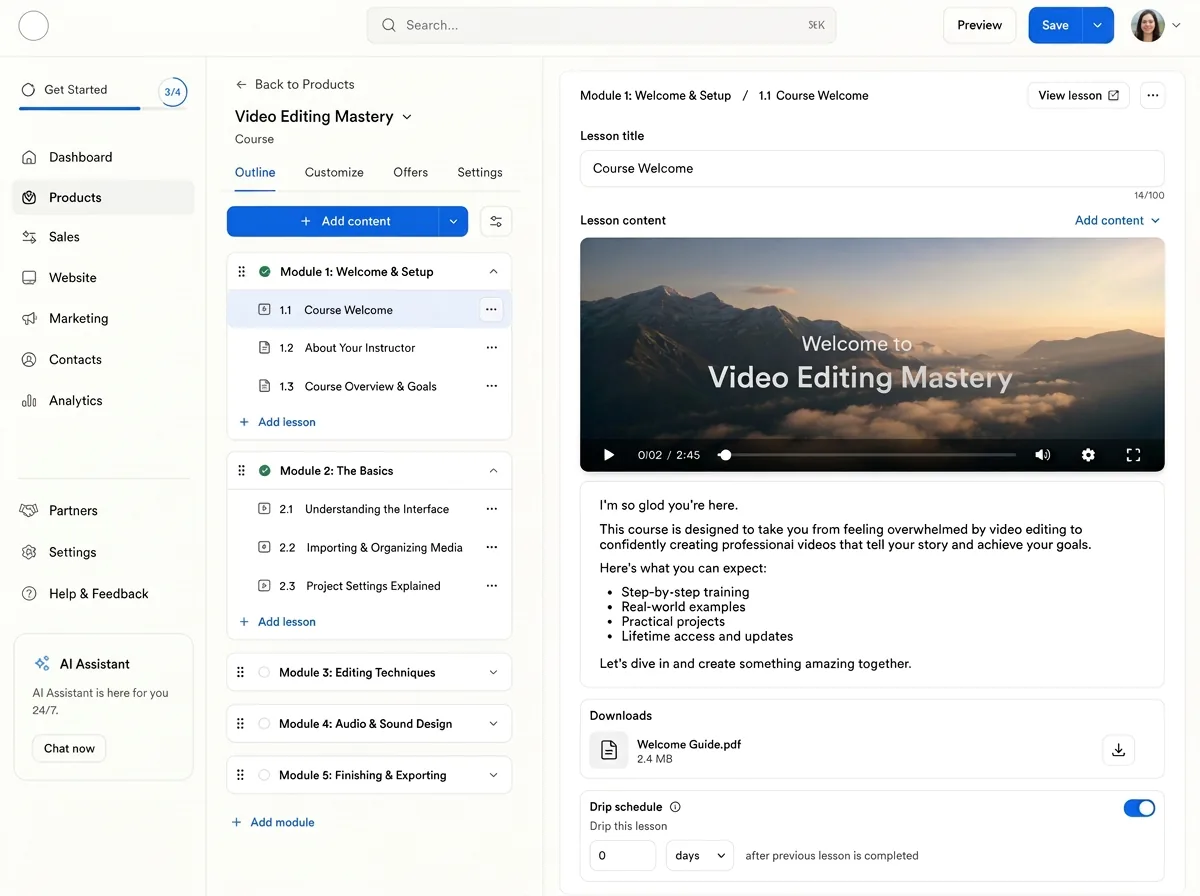
Build and structure courses in one editor
Kajabi centralises course creation so you can arrange modules, add lessons and drip content on a schedule without separate hosting. Media, quizzes and downloads live alongside the lesson structure.
- Drag-and-drop lesson and module ordering
- Scheduled drip release of content
- Video, downloads and assessments in-line
Screenshots sourced from Kajabi's publicly available materials and shown for identification and review purposes. Interface shown may differ from the current release.
Checkout & payments
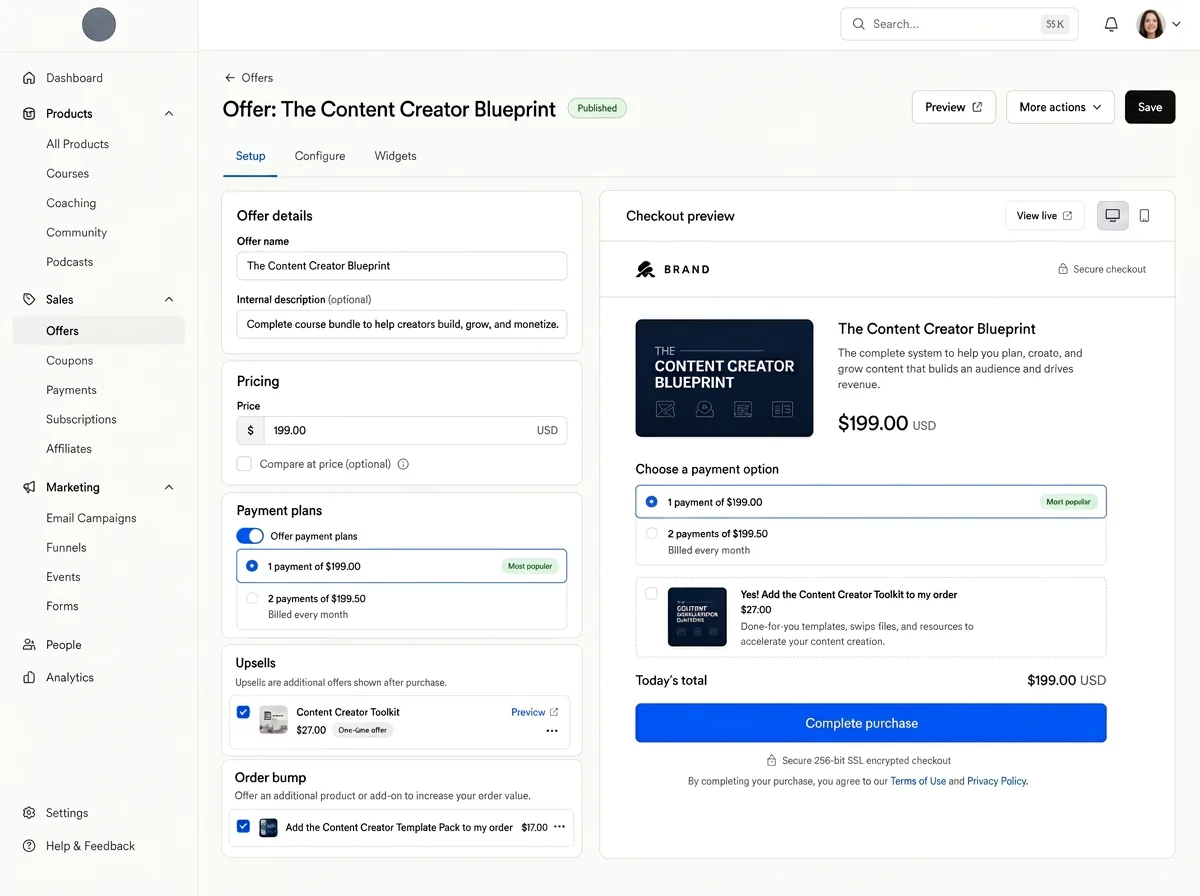
Sell offers through a built-in checkout
Payments are handled inside the platform, so you can publish an offer and take payment without wiring up a separate store. Order bumps, upsells and payment plans are configured per offer.
- Order bumps and one-click upsells
- Subscription and payment-plan billing
- Branded, hosted checkout pages
Screenshots sourced from Kajabi's publicly available materials and shown for identification and review purposes. Interface shown may differ from the current release.
Marketing & funnels
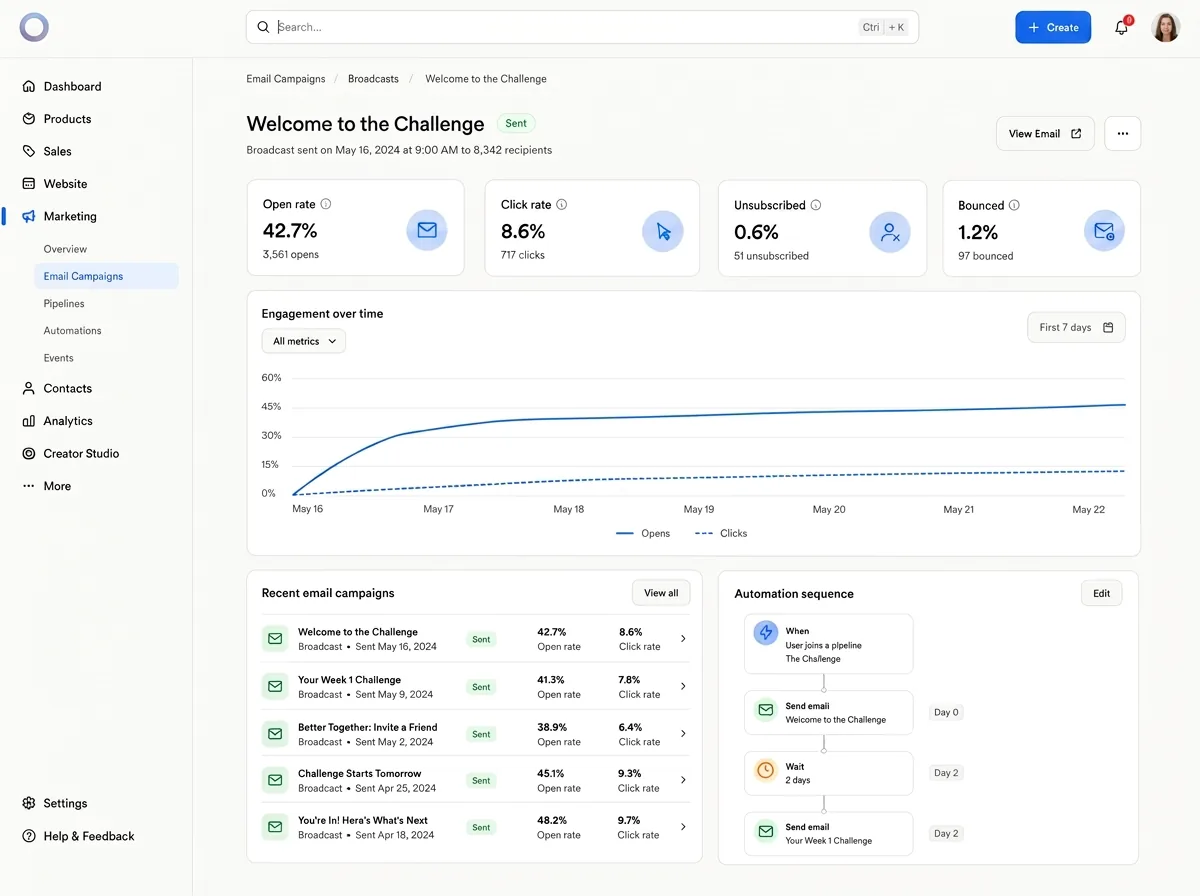
Run marketing and funnels alongside your content
Landing pages, email broadcasts and automated sequences sit in the same platform as your products, so campaigns can reference offers and contacts directly rather than through third-party add-ons.
- Landing-page and email builders
- Automated sequences and triggers
- Funnels mapped to specific offers
Screenshots sourced from Kajabi's publicly available materials and shown for identification and review purposes. Interface shown may differ from the current release.
Analytics & reporting
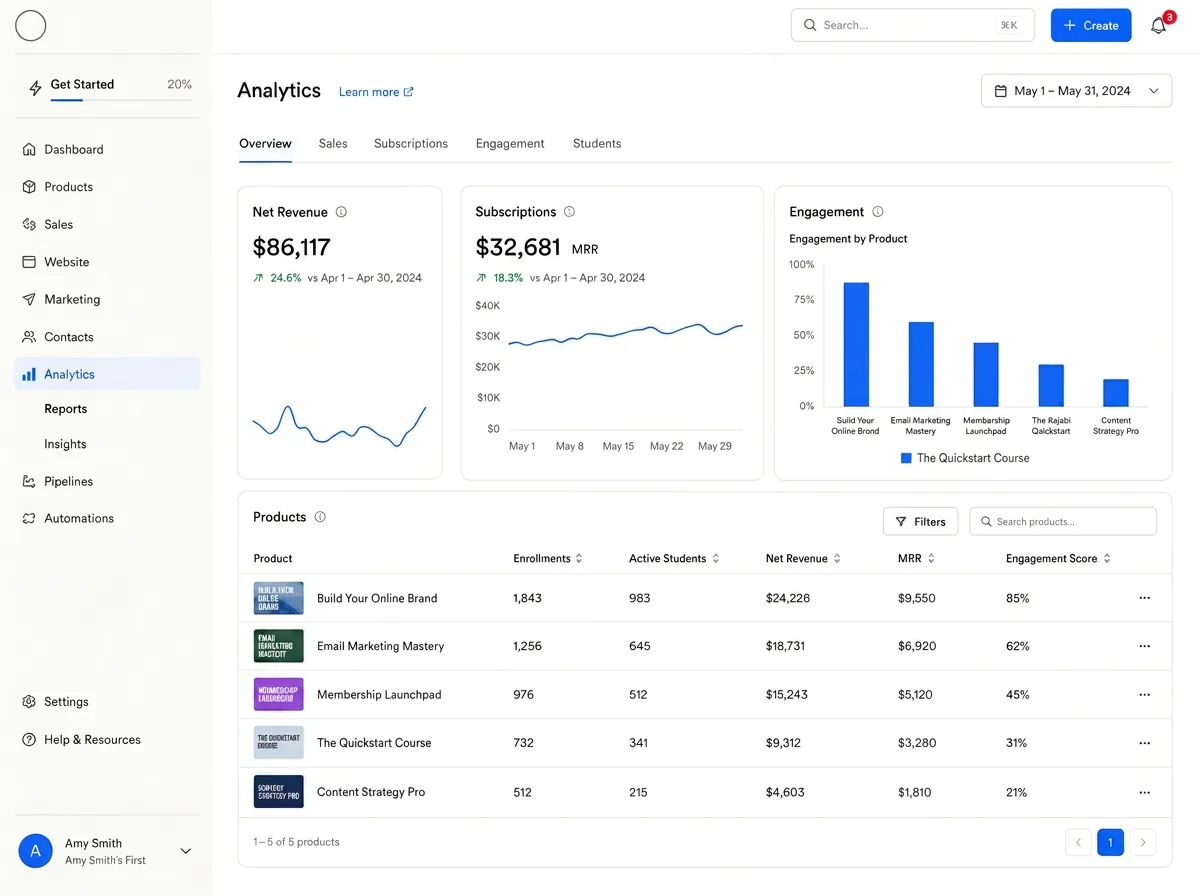
Track performance across products and revenue
Reporting brings sales, subscription and engagement data into one place so you can see how offers perform over time without exporting to another tool. Views can be filtered by product and period.
- Revenue and subscription trends
- Product-level engagement metrics
- Filterable reporting views
Screenshots sourced from Kajabi's publicly available materials and shown for identification and review purposes. Interface shown may differ from the current release.
Pricing
How much does Kajabi cost?
Kajabi is offered in tiered plans that scale with the number of products, contacts and admin users you need. A free trial is typically available so you can test the platform before committing.
Get PricingEntry tier
Core course, marketing and checkout tools for a single creator getting started.
Growth tier
More products, contacts and admin users, plus advanced automation options.
Higher tiers
Larger product and contact limits with additional admin seats for scaling teams.
Across public reviews, cost is the most frequently raised drawback: many creators describe Kajabi as a premium option whose value depends on actively using several modules together, and some early-stage users feel the plan is high before revenue is established.
Plan details references are based on publicly available third-party information and industry benchmarks. Actual costs may vary.
Who it's for
Who is Kajabi for?
Use cases
Common ways teams use Kajabi
Launching a paid online course
Structure lessons, drip content over time and sell access through a built-in checkout without separate hosting or payment tools.
Running a coaching program
Deliver 1:1 or group coaching with scheduling, structured payments and a space to share resources between sessions.
Building a paid membership
Combine gated content, recurring billing and community discussion so members have a single place to log in.
Consolidating a creator tech stack
Replace a mix of course, email, landing-page and checkout tools with one platform to reduce integrations and overhead.
What users say
Aggregated from public reviews, sentiment toward Kajabi is largely favourable: creators value having courses, email marketing and payments in one platform and generally describe it as easy to use once set up, with helpful templates and integrations. The most common criticisms are that plan details feels high for smaller businesses, that some customer-support experiences were mixed, and that certain areas, automations, funnels, tagging and design customisation, feel less deep than dedicated tools. Reviewers are most often small-business owners in coaching, marketing and wellness.
Features
Kajabi features
Capabilities listed on the official site, summarised in our own words. Exact availability varies by plan.
Courses and digital products
Build structured lessons, drip content and sell downloads and digital products from within the platform.
Coaching
Deliver 1:1 and group coaching programs with scheduling and structured payment options.
Communities and memberships
Host discussion spaces, gated content and recurring member access in one place.
Email marketing and funnels
Create landing pages, send broadcasts and automate sequences aimed at creator marketing.
Checkout and payments
Sell offers with order bumps, upsells and payment plans through a built-in checkout.
Pros & cons
Kajabi pros and cons
Pros
- Everything in one platform
- Strong built-in marketing tools
- Easy to use overall
- Handles several product types
- Helpful email templates
- Good range of integrations
Cons
- Design customisation feels limited
- Automations and funnels feel basic
- Contact tagging limits on lower tiers
FAQ
Common questions about Kajabi
Request a demo
Share a few details and we'll help arrange a Kajabi walkthrough for your workflow.
Software Finder is an independent software marketplace, not Kajabi, and not affiliated with or endorsed by them.
By submitting, you agree to Software Finder's Terms of Service and Privacy Policy and consent to be contacted by Software Finder and one or more matchedsoftware vendors (which may include Kajabi) about your request. You can opt out at any time.
Next step
Want to see Kajabi in action? Book a live walkthrough.
Software Finder helps you gather the information that actually drives a software decision, a real walkthrough of Kajabi and a clear view of how it compares to similar platforms.
- See Kajabi in a live walkthrough
- Explore feature and capability details
- Compare against similar platforms
- Independent guidance