

Logo shown is the property of Bridge LMS, used for identification purposes only.
Get Bridge LMS Pricing & Demo
Compare plans, book a live demo, and see how Bridge LMS fits your team.
Bridge LMS is a learning and performance platform built for companies that want to connect employee training with ongoing development and manager check-ins. It combines course authoring, role-based learning paths and performance conversations in one system. Teams looking for a simple content-only library may find it broader than they need. Tell us your requirements and we'll return current plan details.
See the plan that fits your team
Share a few details and we'll send Bridge LMS pricing matched to your learning needs.
Independent guidance
Software Finder is an independent software marketplace, not Bridge LMS, and not affiliated with or endorsed by them.
By submitting, you agree to Software Finder's Terms of Service and Privacy Policy and consent to be contacted by Software Finder and one or more matchedsoftware vendors (which may include Bridge LMS) about your request. You can opt out at any time.
- Pricing matched to your team size
- Independent guidance
- Compare with similar platforms
Key takeaways
Bridge LMS is a learning and performance management platform aimed at mid-sized and larger organisations that want to tie training to employee development. Across public reviews, users highlight the clean interface, the connection between learning and one-on-one conversations, and the ease of building structured learning paths. Recurring criticisms centre on reporting depth compared with dedicated analytics tools and on plan details for smaller teams that do not need the full performance suite.
Overview
What is Bridge LMS?
Bridge LMS is a cloud-based learning management and employee development platform. It helps organisations create and assign courses, manage learning paths by role, and connect training with performance conversations, goals and skill feedback. The platform is designed for companies that see learning as part of a broader employee development strategy rather than a standalone training tool. Bridge also offers mobile access so employees can complete learning on the go.
Best for
Bridge LMS is best for mid-sized and larger organisations that want to combine training with performance management and employee development. Its standout element is the integration of learning paths with one-on-one conversations and goals, so managers can link course completion directly to development plans.
Course library
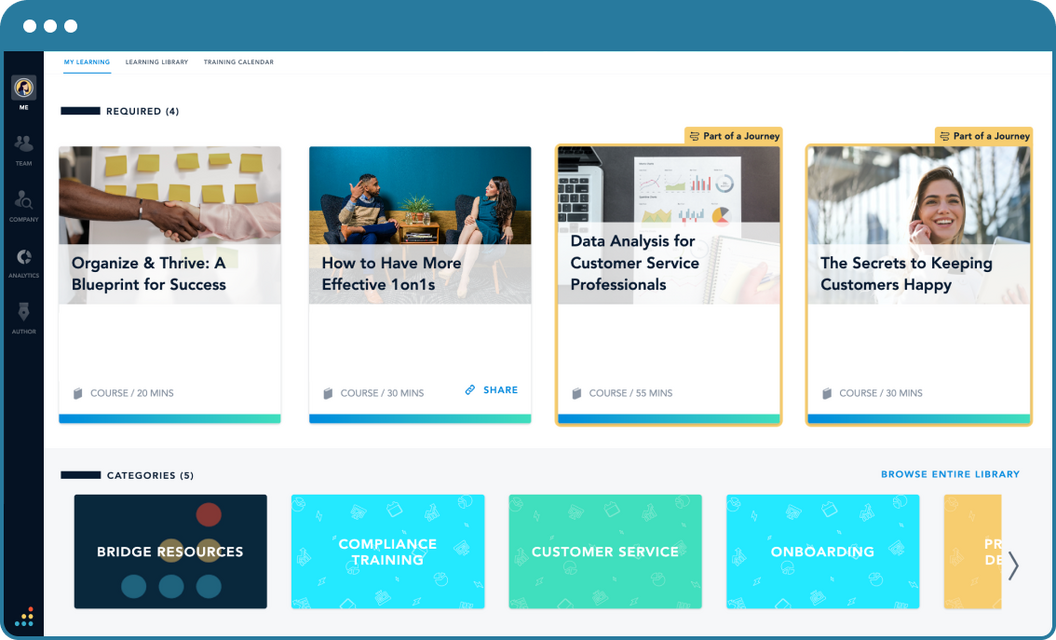
Create, store and assign courses from one library
Bridge LMS gives administrators a central library where they can build courses, import SCORM content and organize materials by topic, role or team. Authors can combine videos, documents and quizzes into structured learning experiences and update them as processes change.
- Build courses with video, documents and quizzes
- Import SCORM and third-party content
- Organize materials by topic, role or team
Screenshots sourced from Bridge LMS's publicly available materials and shown for identification and review purposes. Interface shown may differ from the current release.
Learning paths
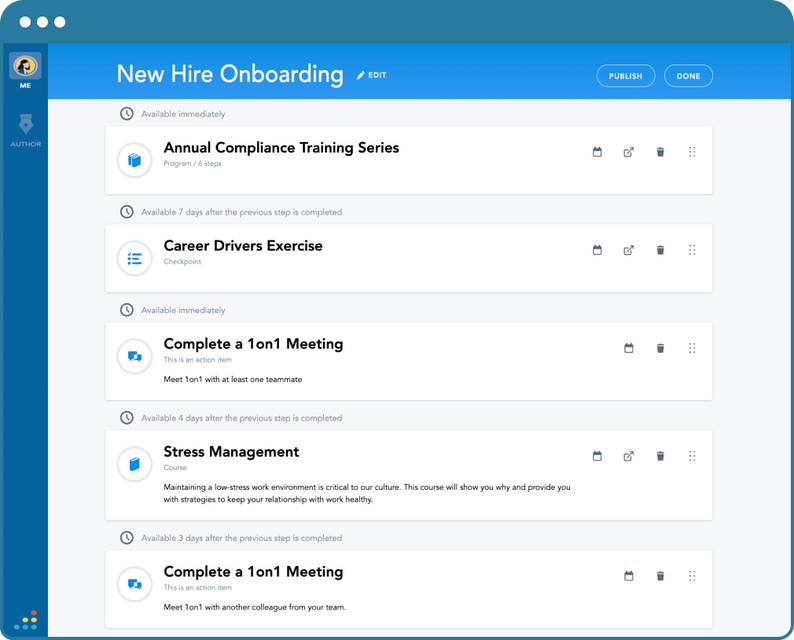
Build structured learning paths by role
Learning paths let administrators sequence courses and assign them automatically based on role, location or team. New hires and promoted employees can receive the right curriculum on day one without manual enrolment.
- Sequence courses into structured paths
- Auto-assign by role, team or location
- Set due dates and completion milestones
Screenshots sourced from Bridge LMS's publicly available materials and shown for identification and review purposes. Interface shown may differ from the current release.
Performance connection
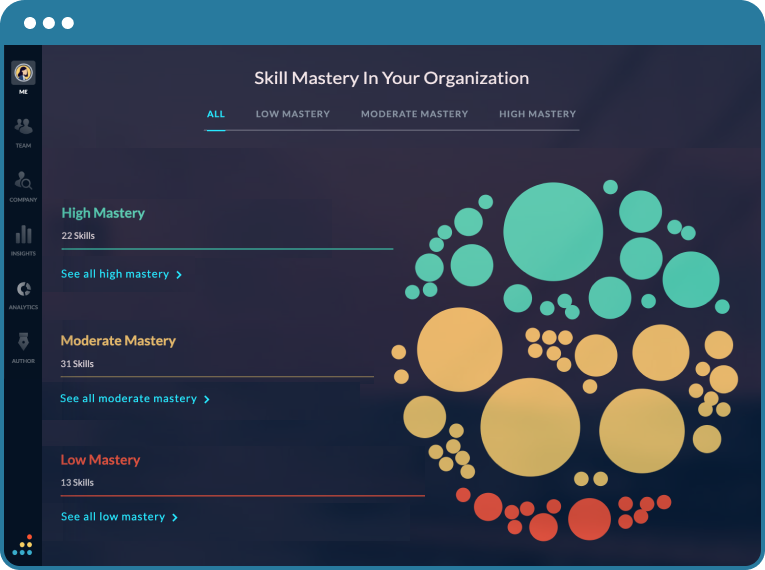
Connect learning with performance conversations
Bridge combines training with performance tools such as one-on-one agendas, goal tracking and skill feedback. Managers can link learning assignments to development goals and review progress during regular check-ins.
- One-on-one meeting agendas and notes
- Goal and skill tracking
- Link courses to development plans
Screenshots sourced from Bridge LMS's publicly available materials and shown for identification and review purposes. Interface shown may differ from the current release.
Reporting
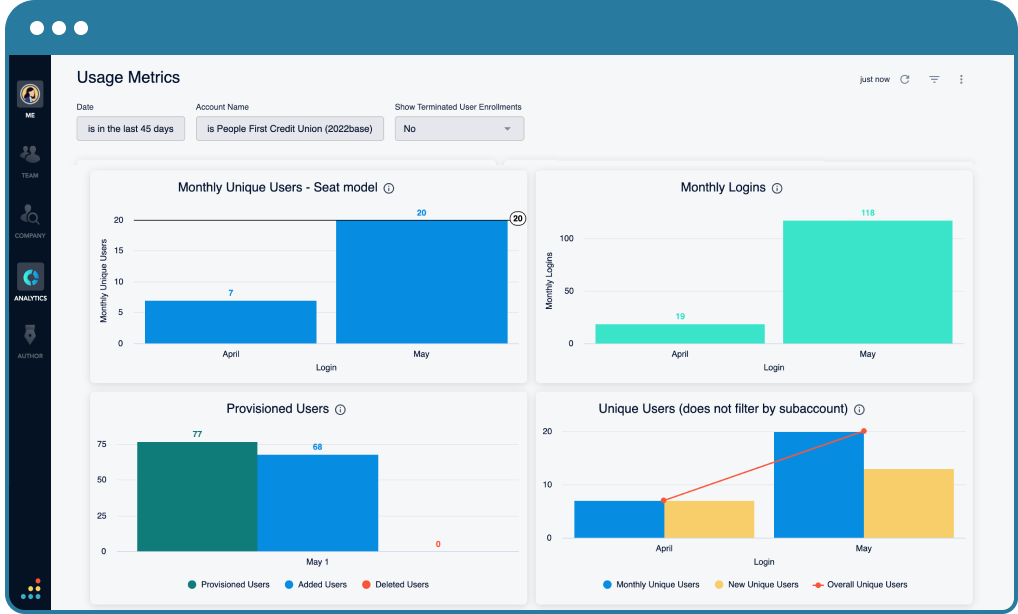
Track enrollments, logins and completions in one dashboard
Administrators get usage metrics covering monthly unique users, logins, provisioned accounts and completion trends. Filters by date range, account and enrollment status make it easy to share progress with stakeholders.
- Usage and enrollment metrics
- Filter by date, account or status
- Shareable dashboards for stakeholders
Screenshots sourced from Bridge LMS's publicly available materials and shown for identification and review purposes. Interface shown may differ from the current release.
Pricing
How much does Bridge LMS cost?
Bridge LMS plan details are typically tailored to organisation size, the modules selected and the level of support required. Plan details are provided on request based on your requirements.
Get PricingCore LMS
Course authoring, library and learner management for teams focused on training delivery.
LMS + Performance
Adds goal tracking, one-on-ones and skill feedback tied to learning assignments.
Enterprise
Larger organisations with advanced integrations, reporting and dedicated support.
Across public reviews, organisations that use both the learning and performance modules generally view Bridge LMS as good value for an integrated platform, while some smaller teams note they pay for features they do not fully use.
Plan details are subject to change.
Who it's for
Who is Bridge LMS for?
Use cases
Common ways teams use Bridge LMS
Structured new-hire onboarding
Assign role-based learning paths to new hires so they complete required training and introductions before their first review cycle.
Compliance and policy training
Deliver mandatory courses, track completion and produce records for audits or certification renewals.
Sales and product enablement
Keep revenue teams current on product knowledge, messaging and competitive positioning through sequenced courses and assessments.
Leadership and career development
Link leadership curricula to individual development goals and manager one-on-ones for ongoing growth conversations.
What users say
Aggregated from public reviews, sentiment toward Bridge LMS is generally positive among HR and L&D leaders who value the connection between learning and performance management. Users praise the intuitive course builder, the structured learning paths and the way one-on-one agendas tie back to training goals. The most common criticisms are that advanced reporting is less flexible than in dedicated analytics platforms, that smaller teams may not need the full performance suite, and that some integrations require higher-tier plans. Reviewers are most often HR managers, L&D administrators and people operations leaders.
Features
Bridge LMS features
Capabilities listed on the official site, summarised in our own words. Exact availability varies by plan.
Course authoring and library
Build courses with video, documents and quizzes, import SCORM packages and organize content in a searchable library.
Role-based learning paths
Sequence courses and auto-assign them by role, team or location with due dates and completion milestones.
Live training scheduling
Schedule instructor-led sessions and blend them with self-paced online content in one program.
Mobile learning access
Let employees complete assigned training from smartphones and tablets, including offline progress sync.
Reporting and dashboards
Track completion, compliance and skill progress with dashboards for administrators and managers.
Performance conversations
Connect learning to one-on-one agendas, goals and skill feedback so development stays visible.
Pros & cons
Bridge LMS pros and cons
Pros
- Combines learning and performance in one platform
- Clean, modern course builder
- Role-based learning paths with auto-assignment
- Mobile access for deskless employees
- One-on-one and goal integration
- Useful for onboarding and compliance
Cons
- Advanced reporting less flexible than analytics-first tools
- Full value requires using performance features
- Plan details can be high for small teams
- Some integrations need higher-tier plans
FAQ
Common questions about Bridge LMS
Request a demo
Share a few details and we'll help arrange a Bridge LMS walkthrough for your workflow.
Software Finder is an independent software marketplace, not Bridge LMS, and not affiliated with or endorsed by them.
By submitting, you agree to Software Finder's Terms of Service and Privacy Policy and consent to be contacted by Software Finder and one or more matchedsoftware vendors (which may include Bridge LMS) about your request. You can opt out at any time.
Next step
Still comparing options? See Bridge LMS in action.
Software Finder helps you gather the information that actually drives a software decision, a real walkthrough of Bridge LMS and a clear view of how it compares to similar platforms.
- See Bridge LMS in a live walkthrough
- Connect with the right team
- Compare against similar platforms
- Independent guidance