

Logo shown is the property of Actionstep, used for identification purposes only.
Get Actionstep Pricing & Demo
Compare plans, book a live demo, and see how Actionstep fits your team.
Actionstep brings matter management, legal accounting, document handling and workflow automation together for law firms. Because it is a broad platform, smaller teams may not need every module. Tell us about your firm and we'll return current plan details.
See the plan that fits your team
Share a few details and we'll send Actionstep pricing matched to your legal needs.
Independent guidance
Software Finder is an independent software marketplace, not Actionstep, and not affiliated with or endorsed by them.
By submitting, you agree to Software Finder's Terms of Service and Privacy Policy and consent to be contacted by Software Finder and one or more matchedsoftware vendors (which may include Actionstep) about your request. You can opt out at any time.
- Pricing matched to your team size
- Independent guidance
- Compare with similar platforms
Key takeaways
Actionstep is a cloud legal practice management platform used by small and mid-sized law firms to run matters, billing, accounting and workflows in one place. Reviewers most often highlight its configurable workflows and depth of features, while a recurring limitation is a learning curve during setup. It continues to expand integrations and document automation.
Overview
What is Actionstep?
Actionstep is a cloud-based legal practice management platform for law firms. It combines matter management, client and contact records, document management and automation, time recording, billing and legal accounting in a single system. Firms configure workflows to match how they handle each matter type, from intake through to closing. The platform is designed to support the day-to-day operations and financial management of a practice from one place.
Best for
Actionstep is best for small and mid-sized law firms that want practice management and legal accounting combined rather than run as separate tools. Its most frequently noted strength is configurable, step-based workflow automation, which lets firms map matter processes, trigger tasks and standardise how work moves through each stage across different practice areas.
Matter management
Run every matter from a single workspace
Actionstep brings matters, contacts, calendars, tasks and documents together so the whole firm works from one record. Each matter shows its stage, parties, fees and upcoming appointments, keeping work moving without switching tools.
- Matter stages and workflows
- Contacts, calendars and tasks together
- Fee and file-note tracking
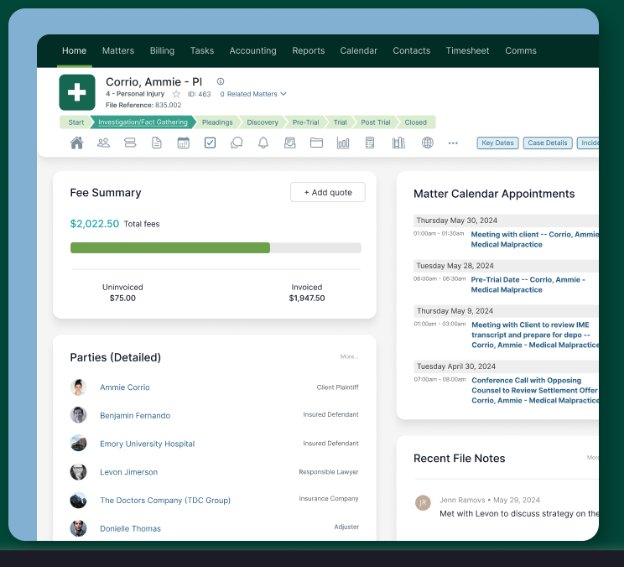
Screenshots sourced from Actionstep's publicly available materials and shown for identification and review purposes. Interface shown may differ from the current release.
Billing & accounting
Handle time, billing and trust accounting
Actionstep combines time recording, invoicing and legal accounting, including trust and business accounts, so firms can track balances, reconcile transactions and manage client funds within the same system used to run matters.
- Time recording and invoicing
- Trust and business accounting
- Balance and transaction views
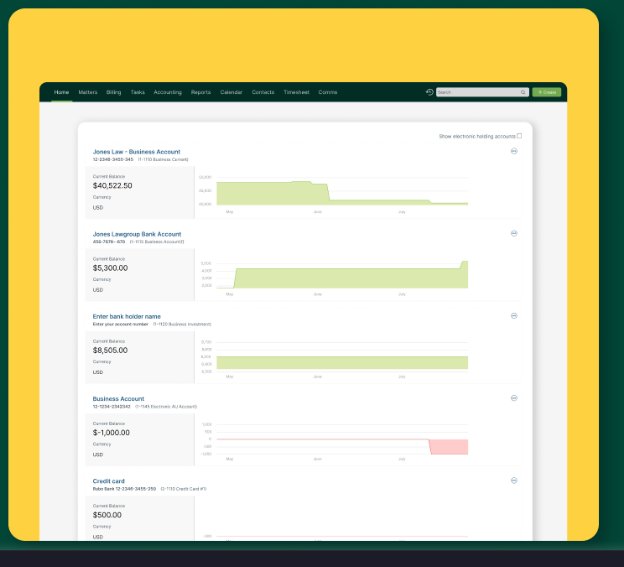
Screenshots sourced from Actionstep's publicly available materials and shown for identification and review purposes. Interface shown may differ from the current release.
Workflow automation
Automate intake, steps and communications
Configurable workflows move matters through defined steps, trigger tasks and capture intake from web forms and email. Alerts and automated actions reduce manual admin as work progresses through each stage.
- Web intake forms and email capture
- Step-based matter workflows
- Automated tasks and alerts
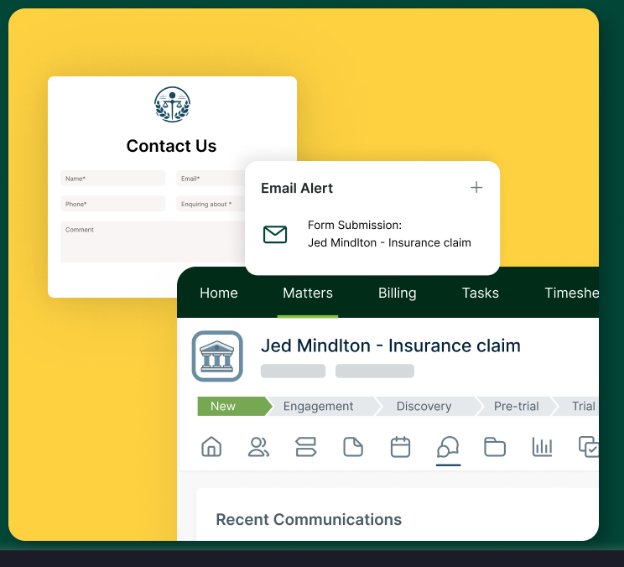
Screenshots sourced from Actionstep's publicly available materials and shown for identification and review purposes. Interface shown may differ from the current release.
Pricing
How much does Actionstep cost?
Actionstep does not publish standard plan details on its website; plans are quoted based on firm size, edition and modules. A consultation is available on request.
Get PricingQuote-based plans
Plan details scales with users, edition and modules selected.
Editions
Tiers add advanced accounting, automation and reporting.
Consultation
Book a walkthrough to receive a tailored quote.
Across public reviews, Actionstep is generally seen as a capable investment for firms that use its breadth, though some note that cost and value depend on how many modules a firm adopts.
Plan details references are based on publicly available third-party information and industry benchmarks. Actual costs may vary.
Who it's for
Who is Actionstep for?
Use cases
Common ways teams use Actionstep
Managing matters end to end
Track each matter's stage, parties, tasks and documents in one record.
Running legal accounting
Manage trust and business accounts alongside billing and reconciliation.
Automating firm workflows
Move matters through defined steps with automated tasks and alerts.
Capturing new intake
Feed enquiries from web forms and email straight into matters.
What users say
Aggregated from public reviews, sentiment toward Actionstep is broadly positive: users value the configurable workflows, the combined practice management and accounting, and the flexibility across practice areas. The most common criticism is that the platform takes time to set up and learn. Reviewers are frequently firm administrators and managers at small and mid-sized practices.
Features
Actionstep features
Capabilities listed on the official site, summarised in our own words. Exact availability varies by plan.
Matter management
Central records for matters, contacts, tasks and documents.
Legal accounting
Trust and business accounting with billing and reconciliation.
Workflow automation
Configurable step-based workflows and automated actions.
Document management
Store, generate and automate documents tied to matters.
Time and billing
Record time and produce invoices from matter activity.
Pros & cons
Actionstep pros and cons
Pros
- Highly configurable workflows
- Practice management and accounting combined
- Flexible across practice areas
- Strong document automation
- Central view of each matter
Cons
- Takes time to set up
- Learning curve for new users
- Best value when fully adopted
FAQ
Common questions about Actionstep
Request a demo
Share a few details and we'll help arrange a Actionstep walkthrough for your workflow.
Software Finder is an independent software marketplace, not Actionstep, and not affiliated with or endorsed by them.
By submitting, you agree to Software Finder's Terms of Service and Privacy Policy and consent to be contacted by Software Finder and one or more matchedsoftware vendors (which may include Actionstep) about your request. You can opt out at any time.
Next step
Still comparing options? See Actionstep in action.
Software Finder helps you gather the information that actually drives a software decision, a real walkthrough of Actionstep and a clear view of how it compares to similar platforms.
- See Actionstep in a live walkthrough
- Connect with the right team
- Compare against similar platforms
- Independent guidance