

Logo shown is the property of Sling, used for identification purposes only.
Get Sling Pricing & Demo
Compare plans, book a live demo, and see how Sling fits your team.
Sling is an employee scheduling, time clock and team communication app built for shift-based businesses like restaurants, retail and healthcare. Managers build schedules, track labor cost against sales, and keep team messages in one place. Deep HR and payroll features sit outside the product. Tell us your team size and we'll return current pricing.
Key takeaways
Sling is an employee scheduling and shift-management platform used mainly by restaurants, retail, hospitality and healthcare employers with hourly teams. Across public reviews, sentiment is broadly positive, with users citing an easy-to-learn scheduler, mobile shift swaps and built-in messaging. Recurring criticisms centre on reporting depth and occasional mobile app quirks. Sling continues to expand its time-clock, labor-cost and team-communication capabilities under the Toast umbrella.
See the plan that fits your team
Share a few details and we'll send Sling pricing matched to your HR needs.
Independent guidance
Software Finder is an independent software marketplace, not Sling, and not affiliated with or endorsed by them.
By submitting, you agree to Software Finder's Terms of Service and Privacy Policy and consent to be contacted by Software Finder and one or more matchedsoftware vendors (which may include Sling) about your request. You can opt out at any time.
Overview
What is Sling?
Sling is a workforce management app focused on employee scheduling, time tracking and team communication for hourly, shift-based teams. Managers build weekly or monthly schedules by role, position and location, track clock-ins from a mobile app or shared terminal, and monitor labor cost against sales. Employees see their upcoming shifts, request swaps and receive announcements from a single mobile app. The product is used mainly by restaurants, retail, healthcare and other multi-location shift employers.
Best for
Sling is best suited to small and mid-sized shift-based employers that want scheduling, a time clock and team messaging in one mobile-first tool instead of stitching together separate apps. Its standout element, consistently noted in reviews, is the combined scheduler and newsfeed, team announcements, shift swaps and handover notes live next to the schedule employees already open every day.
Scheduling
Drag and drop shifts across staff and locations
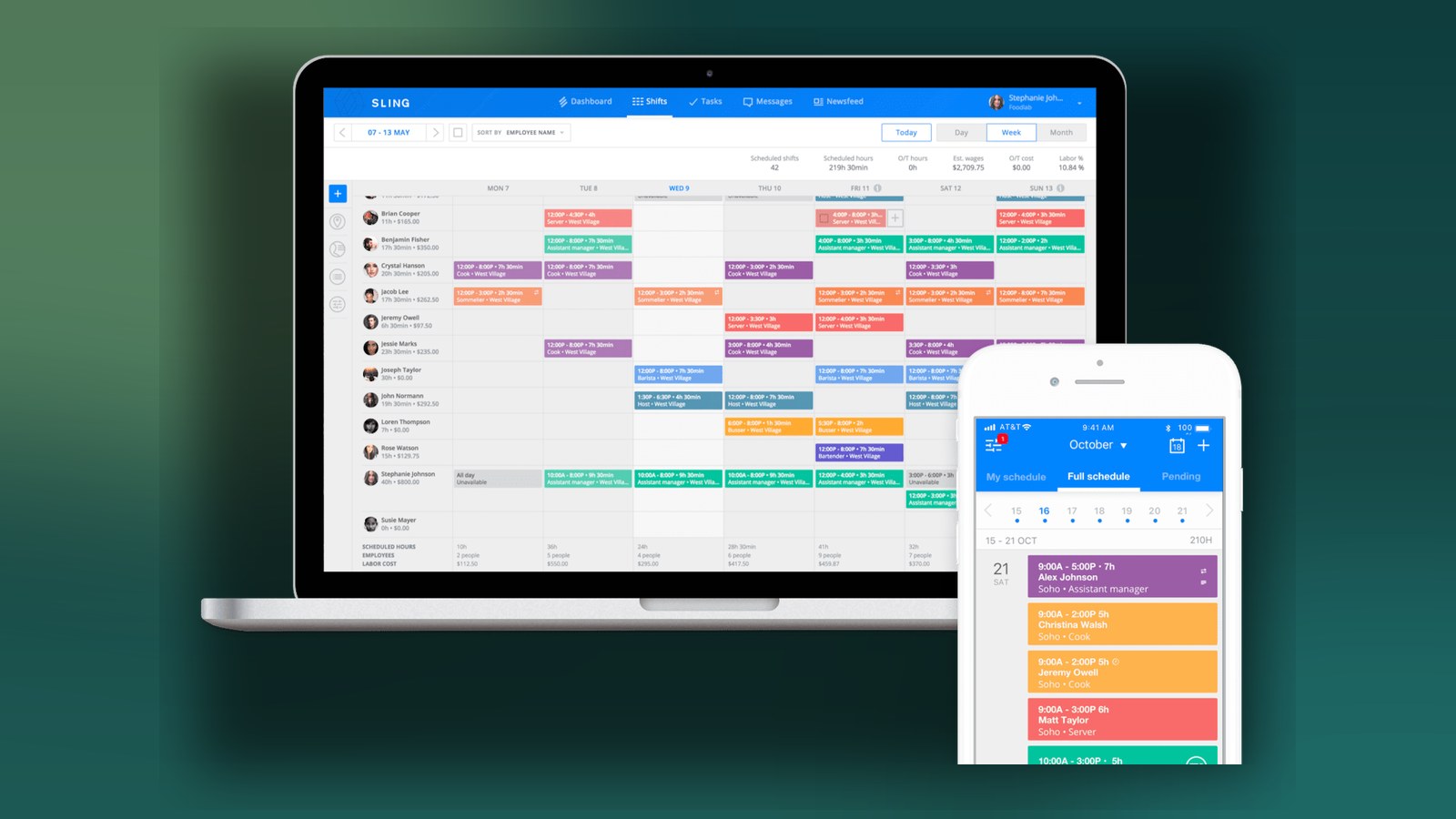
Sling's scheduler lets managers drag and drop shifts across employees, positions and locations, with visibility into scheduled hours, overtime and labor cost as they build the week. Employees see their upcoming shifts on mobile, swap or offer shifts, and get push notifications when the schedule changes.
- Drag-and-drop weekly and monthly schedules
- Shift swaps, offers and availability requests
- Overtime and double-booking warnings
Screenshots sourced from Sling's publicly available materials and shown for identification and review purposes. Interface shown may differ from the current release.
Time & labor
Track hours and see labor cost against sales
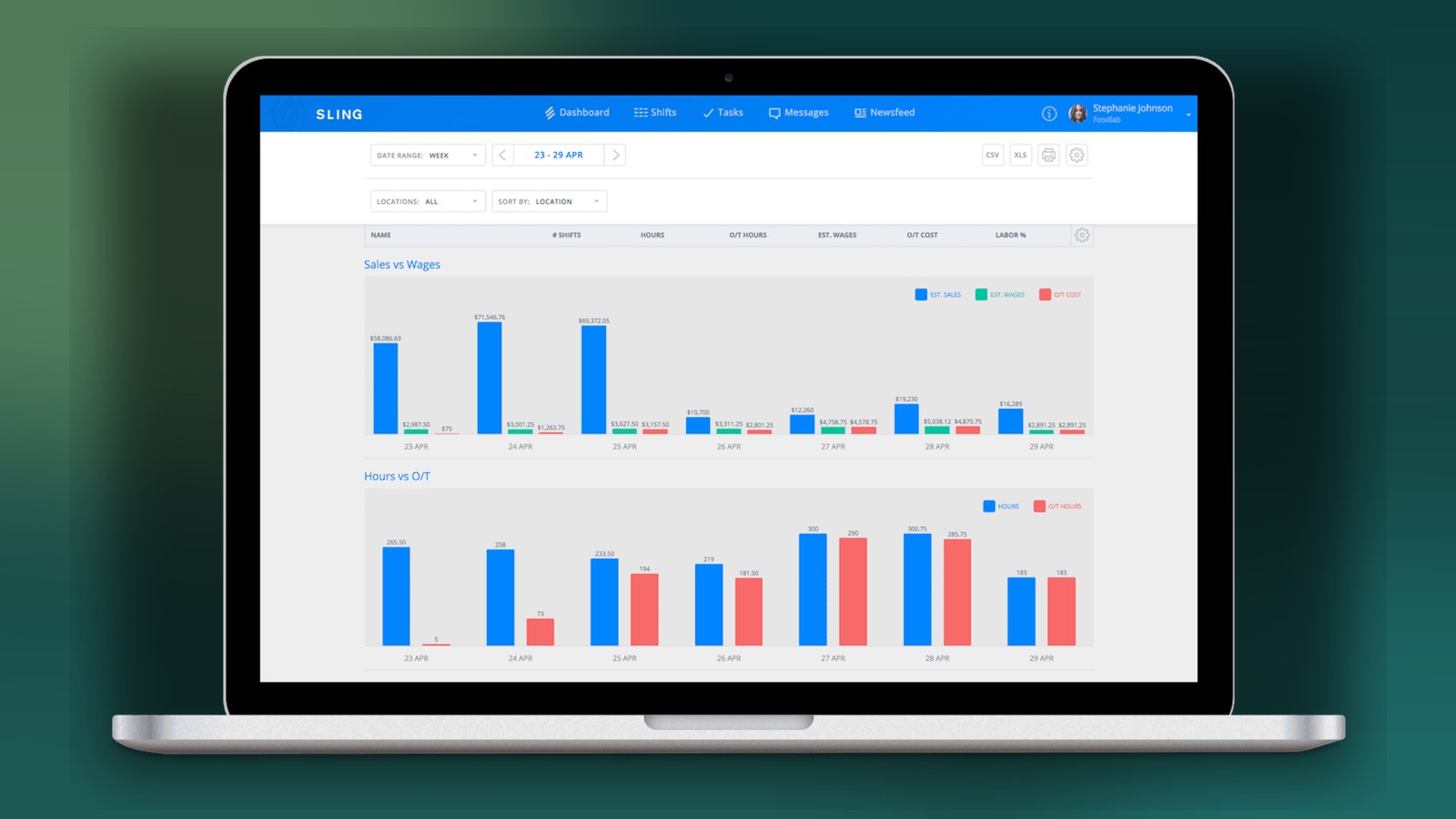
The built-in time clock lets employees clock in and out from a shared terminal, browser or mobile app, with geofencing and photo verification available. Managers get labor reports that stack scheduled hours, actual hours, overtime and estimated wages against sales for the week.
- Mobile, web and shared-device time clock
- Labor cost vs. sales and overtime reporting
- Timesheet exports for payroll
Screenshots sourced from Sling's publicly available materials and shown for identification and review purposes. Interface shown may differ from the current release.
Team communication
Keep team messages and updates in one place
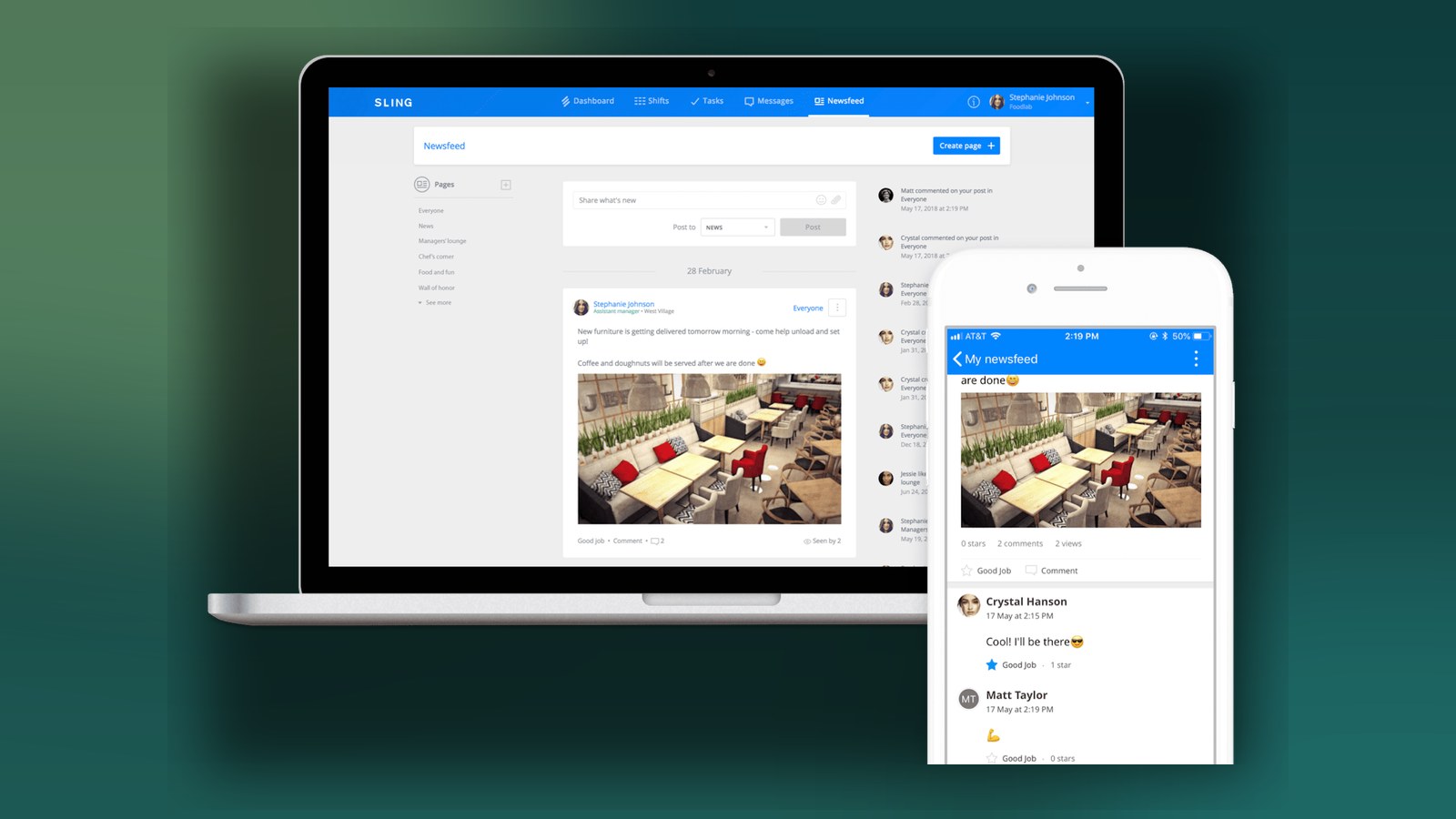
Sling includes group and 1:1 messaging, a company newsfeed and task assignments so shift chatter, announcements and shift-handover notes live alongside the schedule instead of scattered across texts and personal apps. Managers can target posts to specific locations, roles or groups.
- Group, direct and newsfeed messaging
- Targeted posts by location, role or group
- Tasks and shift-handover notes on mobile
Screenshots sourced from Sling's publicly available materials and shown for identification and review purposes. Interface shown may differ from the current release.
Pricing
How much does Sling cost?
Sling offers a free tier for basic scheduling and messaging, with paid plans that add time tracking, labor-cost reporting and advanced scheduling features. Paid plans are typically priced per user per month, with a free trial available on premium tiers.
Get PricingFree
Core scheduling, messaging and newsfeed for smaller teams.
Premium
Adds time clock, timesheets and labor-cost reporting.
Business
Adds labor-cost vs. sales, advanced reports and integrations.
Across public reviews, Sling is generally seen as fair value for shift-based teams, particularly for its free tier. Some reviewers note that time tracking, labor-cost reporting and advanced integrations sit on the paid plans, and that per-user plan details adds up as headcount grows.
Plan details references are based on publicly available third-party information and industry benchmarks. Actual costs may vary.
Who it's for
Who is Sling for?
Use cases
Common ways teams use Sling
Building weekly shift schedules faster
Drag and drop shifts across roles, positions and locations, then publish to the whole team on mobile.
Controlling labor cost against sales
Track scheduled vs. actual hours, overtime and estimated wages against sales for the week.
Handling shift swaps without group chats
Let employees offer, swap or pick up open shifts inside the app with manager approval built in.
Keeping team communication in one place
Post announcements, tasks and shift-handover notes on a newsfeed tied to the schedule.
What users say
Aggregated from public reviews, sentiment toward Sling is broadly positive among restaurant, retail, hospitality and healthcare operators. Users regularly cite the intuitive scheduler, shift swaps, mobile app for staff, and built-in messaging that replaces group texts. Common criticisms include reporting depth and flexibility on advanced labor metrics, occasional mobile app glitches, and that time tracking and labor-cost features sit on the paid tiers. Reviews are most often written by managers, owners and shift supervisors at multi-location operators.
Features
Sling features
Capabilities listed on the official site, summarised in our own words. Exact availability varies by plan.
Employee scheduling
Drag-and-drop scheduling across roles, positions and multiple locations, with mobile publishing.
Time clock and timesheets
Mobile, web and shared-terminal clock-in with geofencing, plus timesheet exports for payroll.
Labor cost and overtime reporting
Compare scheduled vs. actual hours, overtime and estimated wages against sales for the week.
Shift swaps and availability
Employees offer, trade or pick up open shifts inside the app with manager approval built in.
Team messaging and newsfeed
Group, direct and newsfeed messaging so announcements and shift notes live next to the schedule.
Pros & cons
Sling pros and cons
Pros
- Intuitive drag-and-drop scheduler
- Mobile app that staff actually adopt
- Shift swaps and offers reduce manager back-and-forth
- Free tier covers core scheduling and messaging
- Built-in newsfeed replaces group text threads
Cons
- Advanced reporting depth can feel limited
- Time tracking and labor cost sit on paid plans
- Occasional mobile app glitches noted in reviews
FAQ
Common questions about Sling
Request a demo
Share a few details and we'll help arrange a Sling walkthrough for your workflow.
Software Finder is an independent software marketplace, not Sling, and not affiliated with or endorsed by them.
By submitting, you agree to Software Finder's Terms of Service and Privacy Policy and consent to be contacted by Software Finder and one or more matchedsoftware vendors (which may include Sling) about your request. You can opt out at any time.
Next step
Still comparing options? See Sling in action.
Software Finder helps you gather the information that actually drives a software decision, a real walkthrough of Sling and a clear view of how it compares to similar platforms.
- See Sling in a live walkthrough
- Connect with the right team
- Compare against similar platforms
- Independent guidance