

Logo shown is the property of Sage Payroll, used for identification purposes only.
Get Sage Payroll Pricing & Demo
Compare plans, book a live demo, and see how Sage Payroll fits your team.
Sage Payroll automates wage and tax calculations, guides you through each pay cycle, and helps keep your business compliant with payroll regulations. Feature depth varies across Sage's payroll products, so the right fit depends on your business size. Tell us your needs and we'll return current pricing.
Key takeaways
Sage Payroll is cloud payroll software that automates wage, tax and deduction calculations and guides users through a structured pay-cycle process, used mainly by small and mid-sized businesses as well as larger organisations. Across public reviews the majority of feedback is positive, with users highlighting time savings and compliance support. Recurring criticisms centre on a learning curve and variation across Sage's different payroll products.
See the plan that fits your team
Share a few details and we'll send Sage Payroll pricing matched to your HR needs.
Independent guidance
Software Finder is an independent software marketplace, not Sage Payroll, and not affiliated with or endorsed by them.
By submitting, you agree to Software Finder's Terms of Service and Privacy Policy and consent to be contacted by Software Finder and one or more matchedsoftware vendors (which may include Sage Payroll) about your request. You can opt out at any time.
Overview
What is Sage Payroll?
Sage Payroll is cloud-based payroll software from Sage, built to help businesses pay their teams accurately and on time. It automates wage, overtime and deduction calculations, tracks hours, and guides administrators through a pay-cycle flow that covers company setup, employees, leave, payroll and finalisation. It is designed to reduce manual errors and support compliance with payroll and tax regulations, and it scales from growing small businesses to larger organisations across Sage's payroll product range.
Best for
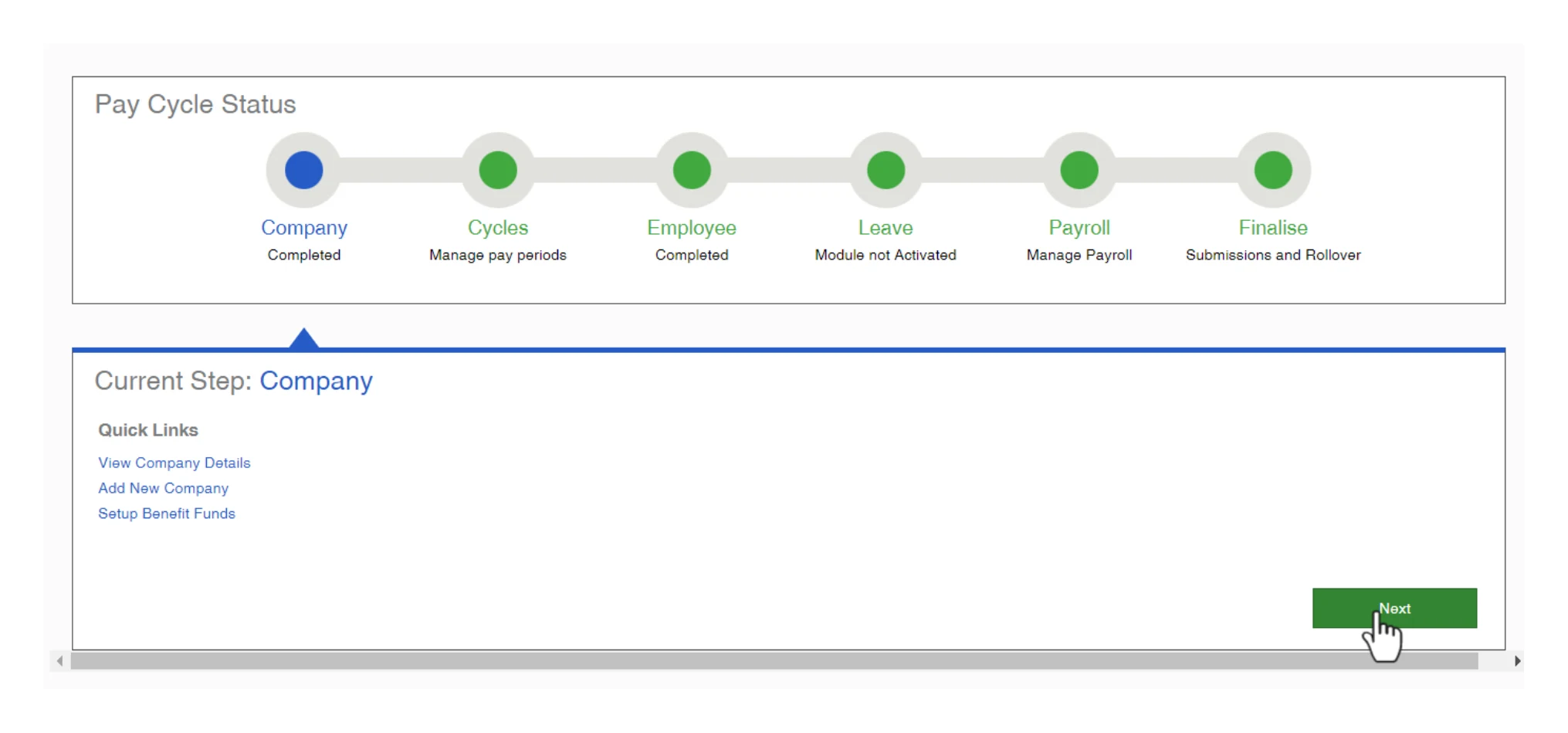
Sage Payroll is best for small and mid-sized businesses that want to automate payroll calculations and stay compliant without processing pay manually. Its standout element, frequently highlighted by reviewers, is the guided pay-cycle workflow, a step-by-step status view that walks administrators from company setup through employees, payroll and finalisation, which helps teams new to payroll follow a consistent process each cycle.
Payroll processing
Move through the pay cycle step by step
Sage Payroll works through a guided pay-cycle flow that moves from company setup and pay periods to employees, leave, payroll and finalisation. It calculates wages, deductions and overtime automatically, so pay runs can be processed on schedule with fewer manual calculations.
- Guided pay-cycle status stepper
- Automatic wage, tax and deduction calculations
- Scheduled pay runs with submissions and rollover
Screenshots sourced from Sage Payroll's publicly available materials and shown for identification and review purposes. Interface shown may differ from the current release.
Employee management
Track employees and pay periods
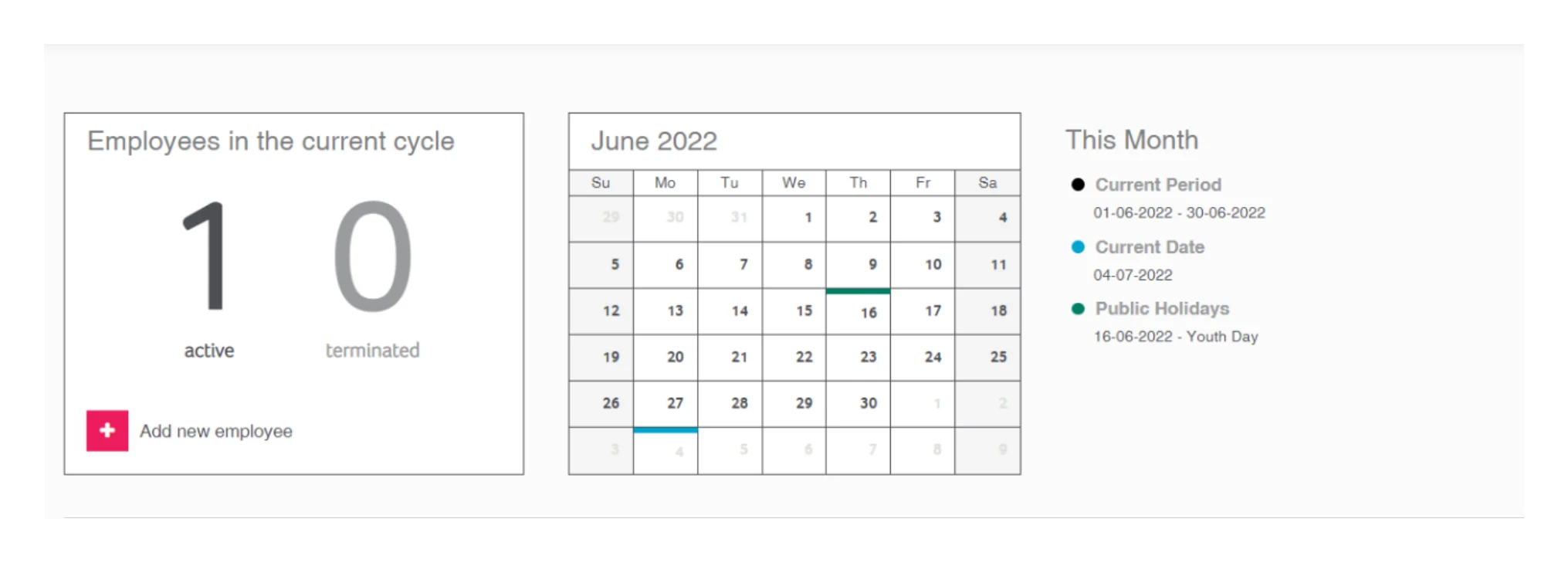
A dashboard summarises active and terminated employees in the current cycle alongside a pay calendar with the current period, pay date and public holidays. New employees can be added directly, keeping payroll records aligned with each pay period.
- Active and terminated employee counts
- Pay calendar with periods and holidays
- Add and manage employees in the cycle
Screenshots sourced from Sage Payroll's publicly available materials and shown for identification and review purposes. Interface shown may differ from the current release.
Pay cycle management
Manage pay cycles and periods
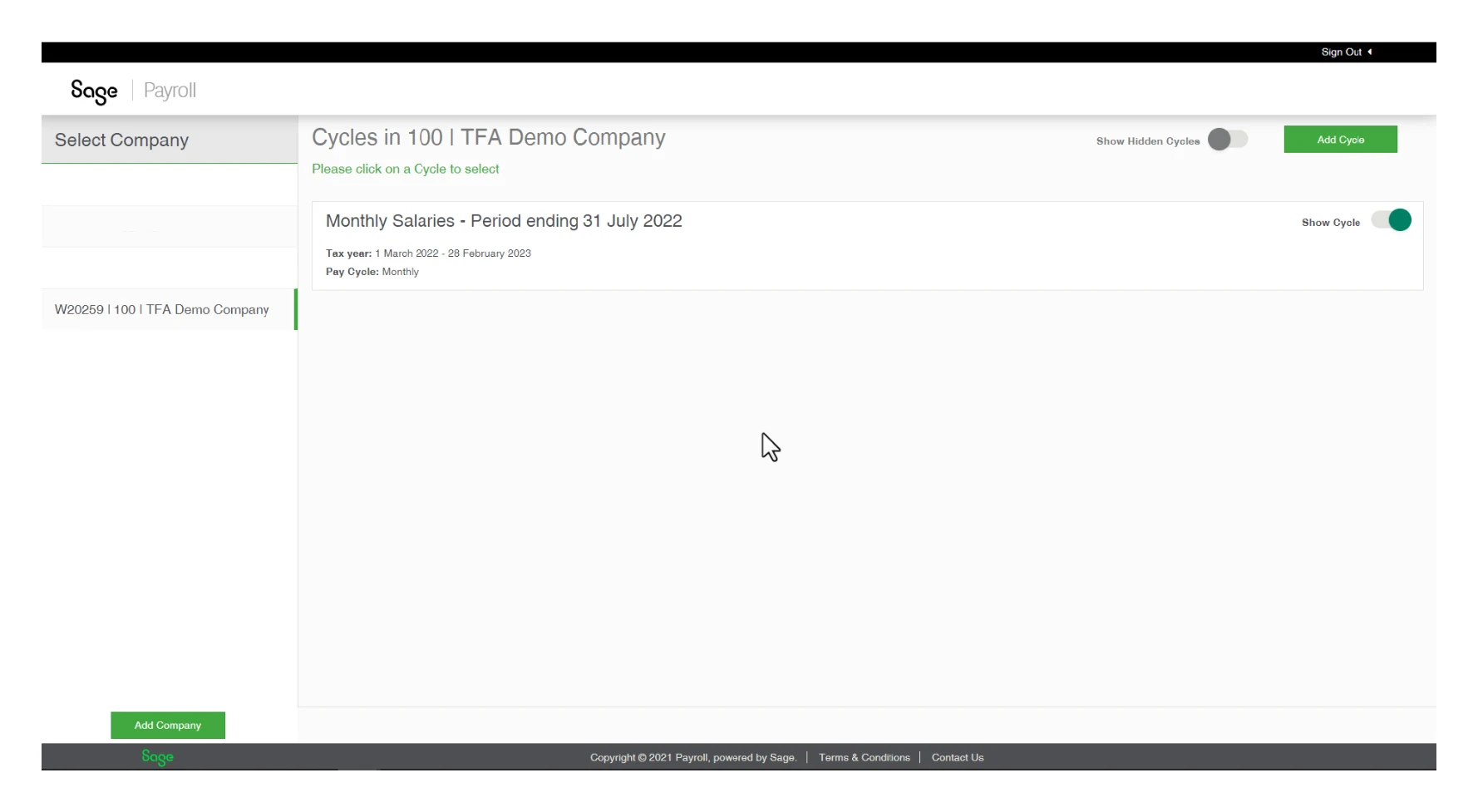
Sage Payroll lets teams set up and manage multiple pay cycles per company, for example monthly salary runs, with tax year and pay-frequency details recorded per cycle, and hidden cycles kept out of view until needed.
- Multiple pay cycles per company
- Tax year and pay frequency per cycle
- Show or hide cycles as needed
Screenshots sourced from Sage Payroll's publicly available materials and shown for identification and review purposes. Interface shown may differ from the current release.
Pricing
How much does Sage Payroll cost?
Sage offers a range of payroll products and typically publishes plan tiers with plan details that scales by business size and features, often with a free trial. Exact rates vary by product and region, so confirm current figures before budgeting.
Get PricingFree trial
Try Sage Payroll before committing to a paid plan.
Entry tiers
Core payroll processing and tax calculations for smaller teams.
Higher tiers
Adds advanced payroll, HR and compliance features for larger organisations.
Across public reviews, Sage Payroll is generally described as fair value for the automation and compliance it provides, with several buyers noting it saves time on manual payroll, though some mention that costs and complexity rise with larger, more advanced plans.
Plan details references are based on publicly available third-party information and industry benchmarks. Actual costs may vary.
Who it's for
Who is Sage Payroll for?
Use cases
Common ways teams use Sage Payroll
Automating payroll calculations
Calculate wages, overtime, taxes and deductions automatically to reduce manual errors each pay run.
Staying compliant
Keep payroll aligned with tax and payroll regulations and record submissions as part of each cycle.
Managing pay cycles
Set up and run multiple pay cycles per company with clear tax year and pay-frequency details.
Onboarding payroll teams
Use the guided pay-cycle status flow to help staff new to payroll follow a consistent process.
What users say
Aggregated from public reviews, sentiment toward Sage Payroll is largely favourable: users value the automated calculations, the structured pay-cycle process, and the time it saves compared with manual payroll. The most common criticisms are an initial learning curve and that capabilities vary across Sage's different payroll products, so buyers need to match the product to their size. Reviewers are most often payroll, finance and bookkeeping staff at small and mid-sized businesses.
Features
Sage Payroll features
Capabilities listed on the official site, summarised in our own words. Exact availability varies by plan.
Automated payroll processing
Calculate wages, overtime and deductions automatically.
Guided pay-cycle workflow
Step through company, employees, payroll and finalisation.
Tax and compliance support
Help keep payroll aligned with regulations.
Employee and pay-period management
Track employees and pay cycles per company.
Submissions and rollover
Finalise pay runs and roll over to the next period.
Pros & cons
Sage Payroll pros and cons
Pros
- Automates payroll calculations
- Clear guided pay-cycle process
- Helps keep payroll compliant
- Saves time versus manual payroll
- Scales with business size
Cons
- Initial learning curve
- Features vary across products
- Advanced tiers add complexity
FAQ
Common questions about Sage Payroll
Request a demo
Share a few details and we'll help arrange a Sage Payroll walkthrough for your workflow.
Software Finder is an independent software marketplace, not Sage Payroll, and not affiliated with or endorsed by them.
By submitting, you agree to Software Finder's Terms of Service and Privacy Policy and consent to be contacted by Software Finder and one or more matchedsoftware vendors (which may include Sage Payroll) about your request. You can opt out at any time.
Next step
Still comparing options? See Sage Payroll in action.
Software Finder helps you gather the information that actually drives a software decision, a real walkthrough of Sage Payroll and a clear view of how it compares to similar platforms.
- See Sage Payroll in a live walkthrough
- Connect with the right team
- Compare against similar platforms
- Independent guidance