

Logo shown is the property of OnPay, used for identification purposes only.
Get OnPay Pricing & Demo
Compare plans, book a live demo, and see how OnPay fits your team.
OnPay is a US payroll platform that bundles payroll, HR tools and benefits administration into a single monthly plan aimed at small businesses. Tell us your headcount and needs and we'll return current pricing.
Key takeaways
OnPay is a payroll, HR and benefits platform for US small businesses, offered as a single plan rather than tiered feature packages. Public reviews are largely positive, frequently highlighting the straightforward interface, responsive support and the simplicity of one flat price. Recurring criticisms centre on limited advanced HR functionality and thin documentation for less common scenarios.
See the plan that fits your team
Share a few details and we'll send OnPay pricing matched to your HR needs.
Independent guidance
Software Finder is an independent software marketplace, not OnPay, and not affiliated with or endorsed by them.
By submitting, you agree to Software Finder's Terms of Service and Privacy Policy and consent to be contacted by Software Finder and one or more matchedsoftware vendors (which may include OnPay) about your request. You can opt out at any time.
Overview
What is OnPay?
OnPay is a cloud-based payroll service for US organisations that also includes core HR tools and benefits administration. It covers unlimited pay runs, payroll tax calculation and filings, contractor payments, employee self-onboarding, document storage, PTO tracking and customisable reporting. Everything sits in one plan, so small teams do not have to select modules or upgrade tiers to reach standard functionality. Employees get self-service access to their own pay and personal details.
Best for
OnPay is best for US small businesses and non-profits that want predictable payroll costs and enough built-in HR to avoid a second system. It suits teams with a mix of salaried staff and contractors, and organisations in sectors such as agriculture, restaurants and churches where specialised payroll handling matters.
Payroll
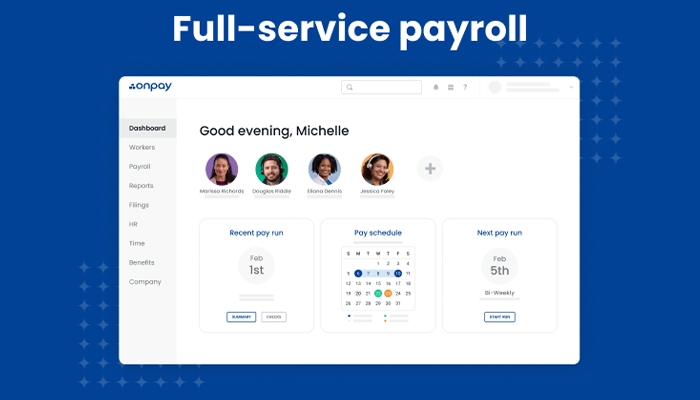
Run payroll for hourly and salaried staff
OnPay handles unlimited pay runs for US employers, covering hourly and salaried workers, contractors, multiple pay rates and schedules, with direct deposit and pay records kept in one place.
- Unlimited pay runs each month
- Hourly, salaried and contractor pay
- Direct deposit and pay records
Screenshots sourced from OnPay's publicly available materials and shown for identification and review purposes. Interface shown may differ from the current release.
HR tools
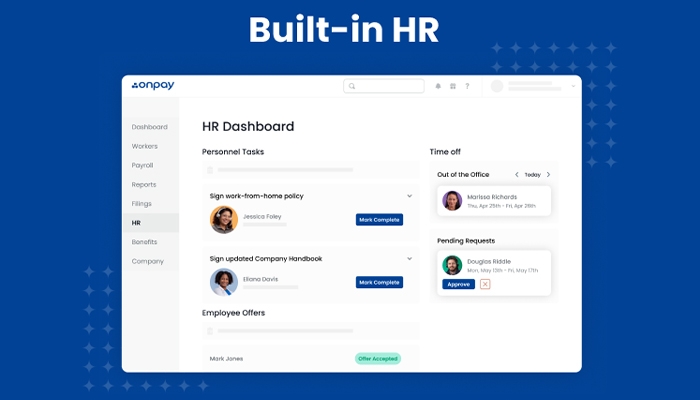
Keep HR records and onboarding in the same system
Built-in HR tools cover employee records, onboarding tasks, document storage, org charts and PTO tracking, so people data sits alongside payroll rather than in separate spreadsheets.
- Employee records and documents
- Self-onboarding for new hires
- PTO requests and approvals
Screenshots sourced from OnPay's publicly available materials and shown for identification and review purposes. Interface shown may differ from the current release.
Time off & reporting
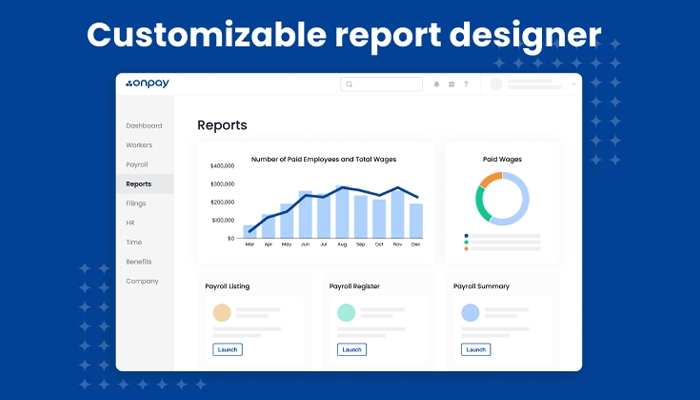
Approve time off and build the reports you need
Managers approve PTO requests in-app while customisable reports let finance and HR teams pull payroll registers, labour cost and employee data without exporting to another tool.
- PTO approvals and accruals
- Customisable payroll reports
- Labour cost and register views
Screenshots sourced from OnPay's publicly available materials and shown for identification and review purposes. Interface shown may differ from the current release.
Pricing
How much does OnPay cost?
OnPay is quoted as a monthly base fee plus a per-person charge, with all features included rather than split across tiers, so the total mainly depends on headcount.
Get PricingSingle plan
Payroll, HR tools and benefits administration in one package.
Base fee
A flat monthly platform charge for the account.
Per person
An additional monthly amount for each employee or contractor paid.
Across public reviews, OnPay is generally described as good value for small teams, with users pointing to the single all-inclusive plan and the absence of hidden add-on charges, though a few note the per-person fee adds up as headcount grows.
Plan details references are based on publicly available third-party information and industry benchmarks. Actual costs may vary.
Who it's for
Who is OnPay for?
Use cases
Common ways teams use OnPay
Running payroll
Process unlimited pay runs with taxes and direct deposit.
Onboarding new hires
Let staff complete their own paperwork online.
Managing time off
Track PTO requests, approvals and balances.
Administering benefits
Coordinate health and retirement benefit deductions.
What users say
Aggregated from public reviews, sentiment toward OnPay is largely favourable among small US employers: users value the clear interface, the all-inclusive single plan and responsive customer support. The most common criticisms concern the depth of advanced HR features and gaps in documentation for edge-case payroll scenarios.
Features
OnPay features
Capabilities listed on the official site, summarised in our own words. Exact availability varies by plan.
Unlimited pay runs
Process payroll as often as needed each month.
Payroll tax filings
Tax calculation, filing and year-end forms.
Contractor payments
Pay contractors alongside employees.
Employee self-onboarding
New hires enter their own details online.
PTO tracking
Requests, approvals and accrual balances.
Benefits administration
Manage health and retirement deductions.
Customisable reporting
Build payroll and workforce reports.
Employee self-service
Staff access their own pay and records.
Pros & cons
OnPay pros and cons
Pros
- One plan with all features included
- Simple, uncluttered interface
- Handles employees and contractors
- Responsive customer support
- Specialised payroll for niche sectors
Cons
- US-focused, not for global payroll
- Advanced HR features are limited
- Documentation can be thin
FAQ
Common questions about OnPay
Request a demo
Share a few details and we'll help arrange a OnPay walkthrough for your workflow.
Software Finder is an independent software marketplace, not OnPay, and not affiliated with or endorsed by them.
By submitting, you agree to Software Finder's Terms of Service and Privacy Policy and consent to be contacted by Software Finder and one or more matchedsoftware vendors (which may include OnPay) about your request. You can opt out at any time.
Next step
Still comparing options? See OnPay in action.
Software Finder helps you gather the information that actually drives a software decision, a real walkthrough of OnPay and a clear view of how it compares to similar platforms.
- See OnPay in a live walkthrough
- Connect with the right team
- Compare against similar platforms
- Independent guidance