

Logo shown is the property of APS Payroll, used for identification purposes only.
Get APS Payroll Pricing & Demo
Compare plans, book a live demo, and see how APS Payroll fits your team.
APS Payroll is a US-focused platform that brings payroll, HR, and time and attendance into one system, with self-service portals for employees and managers. Tell us your headcount and needs and we'll return current pricing.
Key takeaways
APS Payroll is a unified payroll, HR and attendance platform for US employers, typically used by small and mid-sized organisations that want one system rather than separate tools. Public reviews are largely positive, frequently highlighting the dedicated support model and the value of having payroll and time data in one place. Recurring criticisms centre on report customisation and the effort involved in initial setup.
See the plan that fits your team
Share a few details and we'll send APS Payroll pricing matched to your HR needs.
Independent guidance
Software Finder is an independent software marketplace, not APS Payroll, and not affiliated with or endorsed by them.
By submitting, you agree to Software Finder's Terms of Service and Privacy Policy and consent to be contacted by Software Finder and one or more matchedsoftware vendors (which may include APS Payroll) about your request. You can opt out at any time.
Overview
What is APS Payroll?
APS Payroll is a cloud-based workforce platform for US organisations that combines payroll processing, core HR, and time and attendance in a single system. It covers pay runs, payroll taxes and filings, employee records, benefits administration support, scheduling and time capture, with self-service portals for employees and managers. Because the modules share one database, approved hours and employee changes carry through to payroll without exports between separate applications.
Best for
APS Payroll is best for small and mid-sized US employers that want payroll, HR and attendance from one provider with a named support contact. It suits organisations with hourly staff, multiple locations or shift scheduling needs, where keeping time data and payroll in the same system removes manual reconciliation.
Payroll
Run payroll and manage taxes in one system
APS Payroll provides cloud-based payroll processing for US employers, covering pay calculations, deductions, direct deposit and payroll tax handling, with reporting available across pay periods.
- Cloud payroll processing
- Payroll tax handling and filings
- Direct deposit and pay records
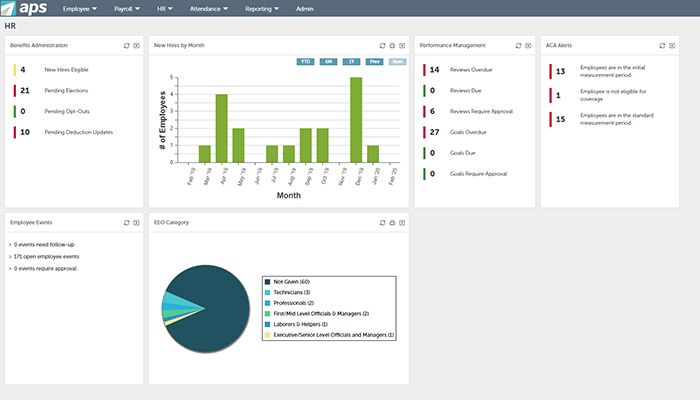
Screenshots sourced from APS Payroll's publicly available materials and shown for identification and review purposes. Interface shown may differ from the current release.
HR & employee self-service
Give employees and managers their own workspace
Employee and manager self-service portals let staff view pay information and personal details while managers handle approvals, so HR teams spend less time on routine requests.
- Employee self-service portal
- Manager approvals and calendars
- Central employee records
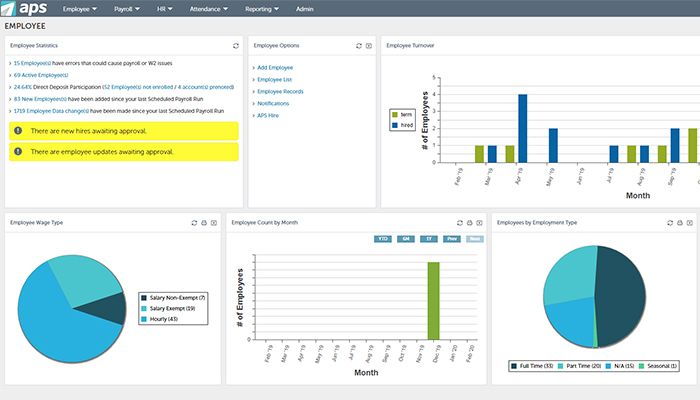
Screenshots sourced from APS Payroll's publicly available materials and shown for identification and review purposes. Interface shown may differ from the current release.
Time & attendance
Connect attendance data to payroll
Time tracking, scheduling and attendance sit in the same platform as payroll, so approved hours flow through to pay runs without exporting between separate systems.
- Time clock and attendance
- Scheduling tools
- Hours flow into payroll
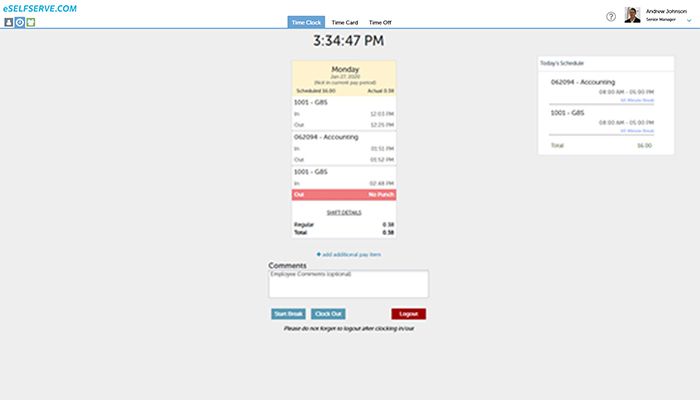
Screenshots sourced from APS Payroll's publicly available materials and shown for identification and review purposes. Interface shown may differ from the current release.
Pricing
How much does APS Payroll cost?
APS Payroll is generally quoted per employee per month with a base platform fee, and the total depends on headcount, pay frequency and which modules you take (payroll only, or payroll with HR and attendance).
Get PricingPayroll
Core payroll processing with tax handling and filings.
Payroll + HR
Adds core HR records, onboarding and self-service.
Full platform
Adds time and attendance, scheduling and additional modules.
Across public reviews, APS Payroll is generally described as competitively priced for a unified payroll and HR platform, with several noting the value of dedicated support, though some mention that costs rise as modules are added.
Plan details references are based on publicly available third-party information and industry benchmarks. Actual costs may vary.
Who it's for
Who is APS Payroll for?
Use cases
Common ways teams use APS Payroll
Processing payroll
Run pay cycles with taxes, deductions and direct deposit.
Managing attendance
Capture hours and route them straight into payroll.
Scheduling shift workers
Build schedules and track coverage across locations.
Employee self-service
Let staff and managers handle routine HR requests.
What users say
Aggregated from public reviews, sentiment toward APS Payroll is largely favourable among small and mid-sized US employers: users value the responsive, named support contacts and the convenience of payroll and attendance in one platform. The most common criticisms concern report customisation and the time required for initial implementation and configuration.
Features
APS Payroll features
Capabilities listed on the official site, summarised in our own words. Exact availability varies by plan.
Payroll processing
Pay runs with deductions and direct deposit.
Payroll tax filings
Tax calculation, filing and year-end forms.
Core HR records
Employee data, documents and onboarding.
Time and attendance
Time clock, approvals and attendance tracking.
Scheduling
Build and manage employee schedules.
Self-service portals
Employee and manager access to their own data.
Reporting dashboards
HR and payroll dashboards with standard reports.
Pros & cons
APS Payroll pros and cons
Pros
- Payroll, HR and attendance in one platform
- Dedicated support contacts
- Self-service for employees and managers
- Suited to hourly and multi-location teams
- Dashboards for HR and payroll data
Cons
- US-focused, not for global payroll
- Report customisation can feel limited
- Initial setup takes time
FAQ
Common questions about APS Payroll
Request a demo
Share a few details and we'll help arrange a APS Payroll walkthrough for your workflow.
Software Finder is an independent software marketplace, not APS Payroll, and not affiliated with or endorsed by them.
By submitting, you agree to Software Finder's Terms of Service and Privacy Policy and consent to be contacted by Software Finder and one or more matchedsoftware vendors (which may include APS Payroll) about your request. You can opt out at any time.
Next step
Still comparing options? See APS Payroll in action.
Software Finder helps you gather the information that actually drives a software decision, a real walkthrough of APS Payroll and a clear view of how it compares to similar platforms.
- See APS Payroll in a live walkthrough
- Connect with the right team
- Compare against similar platforms
- Independent guidance