

Logo shown is the property of Pipedrive, used for identification purposes only.
Get Pipedrive Pricing & Demo
Compare plans, book a live demo, and see how Pipedrive fits your team.
Pipedrive is a sales-focused CRM built around a visual deal pipeline, with activity tracking and automation designed to keep sales reps organized. Because it is oriented primarily around sales pipeline management, teams needing extensive marketing or service tools may need additional add-ons. Tell us your requirements and we'll return current pricing.
See the plan that fits your team
Share a few details and we'll send Pipedrive pricing matched to your CRM needs.
Independent guidance
Software Finder is an independent software marketplace, not Pipedrive, and not affiliated with or endorsed by them.
By submitting, you agree to Software Finder's Terms of Service and Privacy Policy and consent to be contacted by Software Finder and one or more matchedsoftware vendors (which may include Pipedrive) about your request. You can opt out at any time.
- Pricing matched to your team size
- Independent guidance
- Compare with similar platforms
Key takeaways
Pipedrive is a sales-focused CRM built around a visual deal pipeline, offering activity tracking, automation and reporting, used mainly by small and mid-sized sales teams. Across public reviews, most feedback is positive, with users highlighting ease of use and the clarity of the pipeline view. Recurring criticisms centre on the cost of add-ons and reporting depth at lower tiers.
Overview
What is Pipedrive?
Pipedrive is a customer relationship management platform centred on a visual sales pipeline. It helps sales teams track deals, contacts and activities from first contact through to close, with automation and reporting layered on top. Pipedrive is offered as a cloud-hosted product with tiered plans, and additional modules for marketing, web forms and other functions can be added on. It connects with a range of common business and productivity tools.
Best for
Pipedrive is best for small and mid-sized sales teams that want a straightforward, pipeline-first CRM rather than a broader all-in-one suite. Its standout element, frequently highlighted by reviewers, is the clarity of its visual pipeline, which gives reps and managers an immediate view of deal status and next steps without extensive setup.
Visual pipeline
Manage deals through a visual, drag-and-drop pipeline
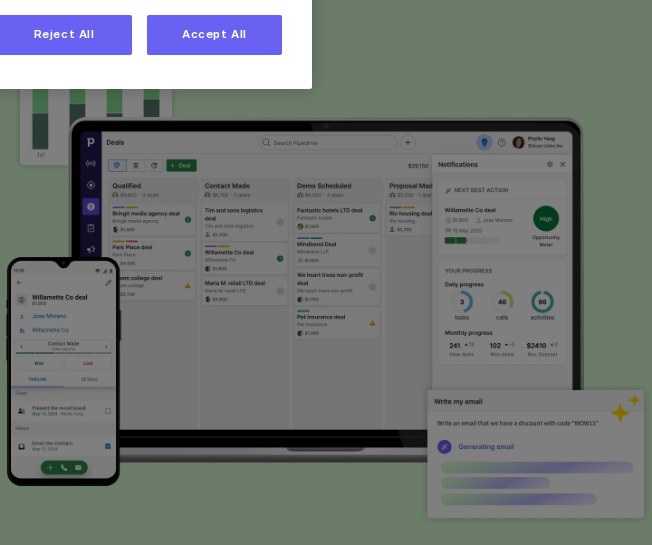
Pipedrive is built around a visual deal pipeline where reps can move deals between stages, keep track of value and see where each opportunity stands at a glance. Custom stages and fields allow the pipeline to be adjusted to a team's own sales process.
- Drag-and-drop deal pipeline
- Customizable stages and fields
- At-a-glance view of deal status and value
Screenshots sourced from Pipedrive's publicly available materials and shown for identification and review purposes. Interface shown may differ from the current release.
Activity & automation
Track activities and automate routine sales tasks
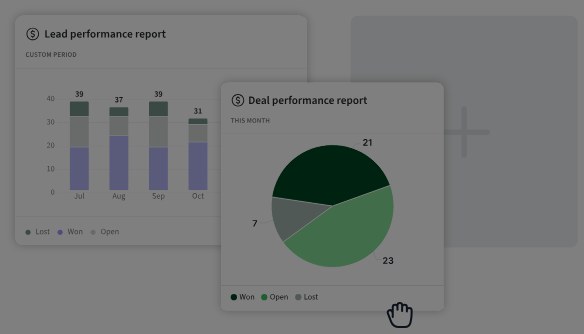
Pipedrive prompts reps with suggested next activities for each deal and offers automation for repetitive tasks such as follow-up emails and stage updates, aiming to keep the pipeline moving without manual tracking.
- Activity reminders tied to each deal
- Workflow automation for routine tasks
- Reporting on sales activity and performance
Screenshots sourced from Pipedrive's publicly available materials and shown for identification and review purposes. Interface shown may differ from the current release.
Pricing
How much does Pipedrive cost?
Pipedrive is offered in tiered plans structured per user per month, typically billed annually, with additional modules such as marketing or web forms available as add-ons.
Get PricingEssential
Core pipeline management and contact tracking.
Advanced
Adds email sync, automation and more customization.
Professional
Advanced reporting, forecasting and team management features.
Power / Enterprise
Expanded permissions, support and features for larger teams.
Across public reviews, Pipedrive is generally seen as fair value for small and mid-sized sales teams, though some buyers note that useful features and add-ons can raise costs at higher tiers.
Plan details is subject to change.
Who it's for
Who is Pipedrive for?
Use cases
Common ways teams use Pipedrive
Managing a visual sales pipeline
Move deals through stages and see value and status at a glance across the whole pipeline.
Staying on top of follow-ups
Use activity reminders tied to each deal so no follow-up is missed.
Automating repetitive sales tasks
Set up automation for routine emails and stage updates to reduce manual work.
Reporting on sales performance
Review reports on deal progress, activity and team performance over time.
What users say
Aggregated from public reviews, sentiment toward Pipedrive is largely favourable: users value the clear visual pipeline, ease of setup and straightforward day-to-day use. The most common criticisms are that some useful features require add-ons or higher-tier plans, and that reporting can feel limited on entry-level plans. Reviewers are most often sales managers, account executives and small business owners.
Features
Pipedrive features
Capabilities listed on the official site, summarised in our own words. Exact availability varies by plan.
Visual deal pipeline
Track deals through customizable stages with a drag-and-drop interface.
Activity tracking
Get reminders for suggested next activities tied to each deal.
Sales automation
Automate repetitive tasks such as follow-up emails and stage changes.
Reporting and forecasting
Review reports on pipeline progress, activity and sales forecasts.
Integrations
Connect with common email, calendar and business tools.
Pros & cons
Pipedrive pros and cons
Pros
- Clear, easy-to-use visual pipeline
- Simple to set up and adopt
- Helpful activity reminders
- Good automation for routine tasks
- Suitable for small and mid-sized teams
Cons
- Some features require add-ons
- Reporting is limited on lower tiers
- Costs can rise with add-ons and higher plans
- Less suited to complex enterprise needs
FAQ
Common questions about Pipedrive
Request a demo
Share a few details and we'll help arrange a Pipedrive walkthrough for your workflow.
Software Finder is an independent software marketplace, not Pipedrive, and not affiliated with or endorsed by them.
By submitting, you agree to Software Finder's Terms of Service and Privacy Policy and consent to be contacted by Software Finder and one or more matchedsoftware vendors (which may include Pipedrive) about your request. You can opt out at any time.
Next step
Still comparing options? See Pipedrive in action.
Software Finder helps you gather the information that actually drives a software decision, a real walkthrough of Pipedrive and a clear view of how it compares to similar platforms.
- See Pipedrive in a live walkthrough
- Connect with the right team
- Compare against similar CRM platforms
- Independent guidance